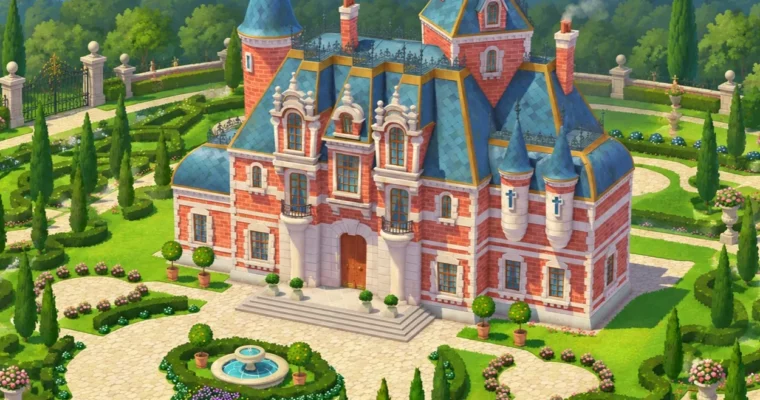
Game Stylized Building Design with Blender by Pedro De Elizalde

Actual Duration:2h 58m
Release date:2021
Publisher:Artstation
Skill level:Intermediate
Language:English
Exercise files:Yes
Software:Blender, Adobe Photoshop
Course URL:https://www.artstation.com/marketplace/p/POgxr/game-stylized-building-concept-art
If you want to design stylized buildings that actually hold up in a game, a book or an animation, the hard part is not the render — it is the shape language. This tutorial walks you through the whole pipeline: gathering references, studying real architecture, sketching from imagination, blocking the building in Blender, and then painting over the render in Photoshop until the 3D look disappears. Two versions are available: one with the full Blender tutorial for beginners, and one without it if you only want the design and painting half.
🎯 What you’ll learn
- Build a consistent stylized architecture style instead of copying random references
- Turn a realistic photo or building into a stylized design through a conversion exercise
- Model your own building in Blender from the sketch you drew yourself
- Export clean render passes from Blender so painting in Photoshop stays fast and flexible
- Paint dynamic textures, shadows and extra detail lines on top of the 3D base
- Hand-paint over the render to erase the fake CG look and unify the style
- Model and paint garden vegetation to finish the scene
✅ Requirements
- Skills: Basic drawing and observation skills, some comfort with shape language and color, no previous Blender experience required for the full version
- Tools: Blender (free download), Adobe Photoshop, a drawing tablet is strongly recommended for the painting pass
- Hardware: A machine that comfortably runs Blender and Photoshop; a dedicated GPU and 16GB of RAM will make the modeling and painting steps smoother
📝 Description
Let’s be honest about AI first, because it comes up in every conversation. AI can spit out a shiny image in seconds, but the moment you need the window to connect to the wall correctly, or the door to be the right size next to your character, or the edges to be hard in one place and soft in another, it stalls. Those decisions are the shape language of your project. If your building in the game, book or animation does not follow the same rules as everything else around it, it looks off, and it will keep looking off no matter how many prompts you throw at it. This tutorial is about owning those decisions.
The workflow is deliberately linear, because that’s how concept art for production actually gets made. You start by organizing references and running a realistic to stylized conversion exercise, so you understand what you are pulling out and what you are throwing away. Then you study the type of architecture you want, sketch from imagination, and pick one sketch to push further with color. From there you open Blender and block the building in, using a toolset that is explained for beginners rather than assumed knowledge.
Once the model is done, you export render passes and take them into Photoshop. This is where the real work happens. Shadows go on first, then dynamic texture is added per color, then extra detail lines that never existed in the 3D get drawn in. The last pass is the important one: hand painting over the render to kill that flat, plasticky CG look. Finally you paint and model garden vegetation so the building sits in a scene instead of floating on a grey background.
Every step is shown on one continuous project, and the source files come with it — the final JPG, the sketches, the textures, architecture types and the FBX scene so you can import it and inspect the model yourself. If you leave a review, it genuinely helps: it pushes more tutorials out and it tells the author which parts of the teaching need work.
🧑🎓 Who this course is for
- Concept artists who are just starting out and want a clear, repeatable pipeline for stylized buildings
- Artists with a few years of experience who can draw but keep struggling to maintain a consistent style across a whole set of designs
- 3D generalists and game artists who want to model in Blender and then paint over their renders instead of relying on shaders alone
- Illustrators working on children’s books or animation who need believable stylized architecture
🧑🏫 About the Author
Pedro De Elizalde is a concept artist who works in stylized architectural design and teaches the craft through Artstation. His material focuses on the practical, unglamorous parts of the job: how to study real buildings, how to translate them into simplified shapes, and how to keep a design coherent when it needs to sit next to other assets in a game, a book or a film. Rather than showing a finished painting and hoping you reverse-engineer it, he walks through the full chain — references, studies, sketches, Blender modeling, render passes and the Photoshop paint-over — which is exactly the order these decisions get made in production.
🏁 Final Result
- A professional-looking, portfolio-ready illustration of a stylized building, painted by hand over your own Blender render
- A set of 3 architectural studies, 3 sketches from imagination and 1 color sketch to support the final piece
- A reusable workflow — reference gathering, stylized conversion, modeling, render pass export and the Photoshop paint-over — that you can repeat on any building you design
 Channel