Likeness & Facial Anatomy by Marlon R. Nuñez (MrNunez)

Duration:12 hours
Actual Duration:14h 56m
Release date:2024
Publisher:ArtHeroes
Skill level:Intermediate
Language:English
Exercise files:Yes
Software:ZBrush, Marmoset Toolbag, Photoshop, Marvelous Designer, RizomUV, Substance Painter, Knald
Course URL:https://artheroes.mrnunez.com/pages/likeness_and_facial_anatomy_course
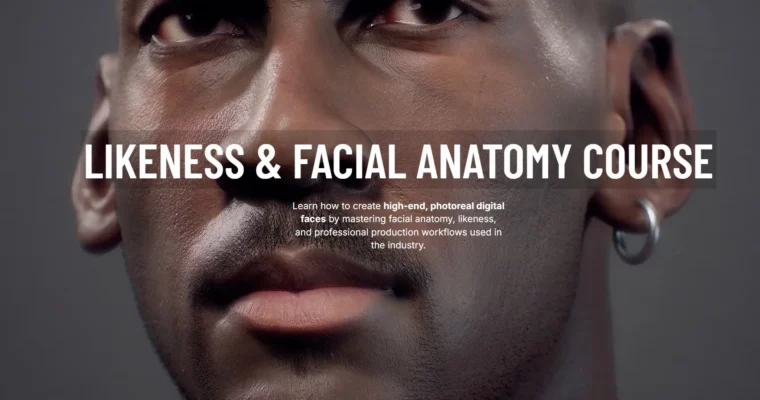
Likeness & Facial Anatomy Course by ArtHeroes teaches you how to create high-end photoreal digital faces in ZBrush. You will master facial anatomy, character likeness, realistic skin details, and professional 3D production workflows used in the film and game industry. The course follows a step-by-step process — no eyeballing, no guessing — starting from a simple sphere and building up to a production-ready digital portrait with full Marmoset LookDev presentation.
🎯 What you’ll learn
- Create any likeness starting from a sphere using a proven, repeatable methodology
- Understand essential facial anatomy — skull structure, landmarks, muscles, and surface forms
- Sculpt accurate, believable likeness with confidence using structural knowledge
- Apply advanced skin texturing with TexturingXYZ map projection and porosity workflows
- Master a complete LookDev workflow in Marmoset Toolbag with ray tracing
- Create clothing for your character in Marvelous Designer and texture it in Substance Painter
- Present your character with studio-quality renders ready for portfolio and production
✅ Requirements
- Skills: Basic knowledge of ZBrush fundamentals (navigation, brushes, subtools). No prior anatomy knowledge required — the course teaches everything from the ground up.
- Tools: ZBrush (main tool), Marmoset Toolbag, Marvelous Designer, Photoshop, RizomUV, Substance Painter (some are optional for bonus modules). A drawing tablet is highly recommended.
- Hardware: Minimum 16GB RAM, dedicated GPU with 4GB+ VRAM, a 3-button mouse, and a drawing tablet (Wacom Intuos or similar).
📝 Description
Likeness & Facial Anatomy Course is a comprehensive 14-module ZBrush course by ArtHeroes, taught by industry veteran Marlon R. Nuñez (MrNunez). With over 16 years of experience at studios like Ubisoft, Blur Studio, Electronic Arts, Netflix, and Goodbye Kansas, Marlon brings real-world production knowledge to every lesson.
The course is built around a proven, repeatable likeness methodology that eliminates guesswork. Instead of relying on eyeballing or luck, you will learn to analyze a reference photo, understand the underlying anatomy, and systematically build a portrait that captures both the structural accuracy and the personality of the subject.
What makes this course different:
- Anatomy-first approach — You don’t just sculpt; you learn why the face looks the way it does. Each facial feature is preceded by an anatomy lesson covering bones, muscles, fat pads, and landmarks across different ethnic groups, genders, and age ranges.
- Start from a sphere — No pre-made basemesh. You begin with a simple sphere and build up using ZBrush’s ZSphere and ZWrap tools, learning a production workflow that scales to any character.
- Industry-standard texturing — Module 9 is dedicated to advanced skin texturing using TexturingXYZ multichannel displacement maps. You will learn to project high-resolution scan data, blend tileable textures, and control porosity for photorealistic skin.
- Full LookDev pipeline — The course covers the complete presentation workflow: BPR rendering in ZBrush, compositing in Photoshop, and a professional Marmoset Toolbag LookDev setup with ray-traced lighting and skin shaders.
- Bonus modules — Extra lessons on Marvelous Designer (creating clothing), RizomUV (UV unwrapping), Substance Painter (texturing), and fibermesh hair grooming add significant production value.
The course includes lifetime access to all video lessons, downloadable project files (ZBrush materials, cameras, moodboards, base mesh OBJ), and access to the private ArtHeroes Discord community for feedback and support.
🧑🎓 Who this course is for
- Intermediate ZBrush artists who want to break into photorealistic portrait sculpting and character art
- 3D character artists looking to master facial anatomy and develop a reliable likeness workflow
- Digital sculptors and modelers who want to create portfolio-ready, production-quality digital faces for film and games
- Self-taught artists who have been guessing their way through portraits and want a structured, anatomy-driven methodology
🧑🏫 About the Author
Marlon R. Nuñez (MrNunez) is a Creative Director and 3D character artist with over 16 years of industry experience. He has worked at Ubisoft, Blur Studio, Electronic Arts, Netflix, and Goodbye Kansas, contributing to AAA games, cinematic trailers, and feature films. He is the founder of ArtHeroes, a professional 3D character art academy, and runs the RenderThat YouTube channel where he shares free tutorials on ZBrush, skin texturing, Unreal Engine, and 3D character creation. His work has been featured on ArtStation and IMDB.
🏁 Final Result
- A fully sculpted, textured, and rendered photorealistic digital portrait, built from a sphere to final presentation
- A portfolio-ready Marmoset LookDev render with professional lighting, skin shaders, and camera setup
- A deep, reusable understanding of facial anatomy that applies to any future character or portrait project
- Practical experience with the complete production pipeline: sculpting → texturing → grooming → rendering → presentation
📢 Guys, this is a Group Buy campaign, check the GBC forum thread to get access
You can find the course preview in the download section below.
 Channel