Game Props – 3D Modeling & Texturing for Beginners by Dan Petrozziello

Duration:16.5 hours
Actual Duration:16h 22m
Release date:2026, July 23
Publisher:Udemy
Skill level:Beginner
Language:English
Exercise files:Yes
Software:Blender, Substance 3D Painter
Course URL:https://www.udemy.com/course/game-props-3d-modeling-texturing-for-beginners/
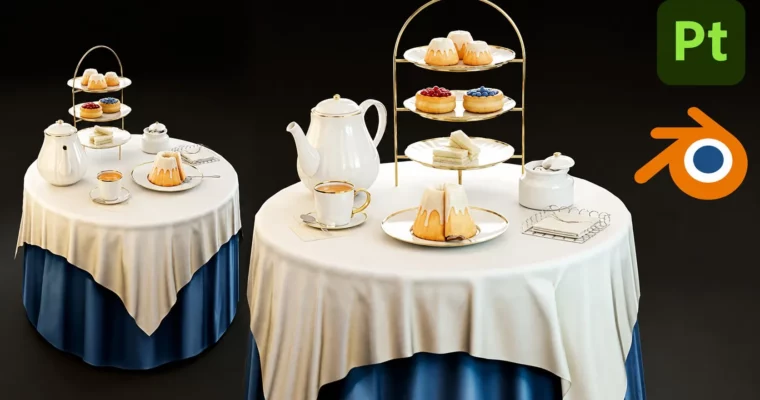
Learn to create game-ready 3D props from scratch using Blender and Substance Painter. This course walks you through the entire production pipeline, from modeling a full afternoon-tea diorama to texturing it with custom trimsheets and presenting it in a professional portfolio breakdown.
🎯 What you’ll learn
- Model clean, optimized 3D game props using Blender, from basic shapes to polished assets
- Understand UV unwrapping, retopology, and baking workflows for efficient, game-ready meshes
- Create high-quality textures in Substance Painter, including trimsheets and realistic surface details
- Build a complete game art pipeline: sculpting, modeling, baking, texturing, lighting, and rendering
- Create a clean project breakdown to showcase your work effectively in your portfolio
✅ Requirements
- Skills: No previous experience in 3D or texturing is required.
- Tools: Blender, Substance 3D Painter, and an image editing software (optional).
- Hardware: A computer capable of running Blender and Substance Painter.
📝 Description
This isn’t just a “follow along” tutorial. It’s a structured, beginner-friendly deep dive into the actual workflows used by professional game artists. You’ll start by modeling a complete afternoon-tea diorama in Blender, learning clean topology and efficient modeling techniques for each prop—from a simple sugar cube to a complex teapot.
Then, you’ll move into the texturing phase. The course covers UV unwrapping and baking high-poly detail into normal maps, before jumping into Substance Painter. You’ll learn to create smart materials and, crucially, build and apply a trimsheet—a powerful, industry-standard technique for texturing multiple assets efficiently.
Finally, you’ll learn how to light, compose, and render your scene for a professional portfolio. The course even covers creating a clear project breakdown, so you can show off your work in the best possible light. It’s a complete, end-to-end pipeline that gives you real, usable skills.
🧑🎓 Who this course is for
- Complete beginners who want to learn 3D modeling and texturing from scratch in a friendly, step-by-step way.
- Intermediate artists who want to strengthen their fundamentals and understand the full modeling-to-texturing pipeline for games.
- Experienced 3D artists who want to pick up skills for the real-time or gaming industry, or learn to leverage Blender and Substance Painter effectively.
🧑🏫 About the Author
Dan Petrozziello has over a decade of industry experience as a Vehicle Artist for flight simulators like X-Plane, creating high-fidelity aircraft used by real pilots. He’s also worked as Head of 3D in real-time architectural visualization, managing teams and production pipelines. Dan is a Certified Creator Program partner with both Microsoft and Bethesda, and he’s one of the head directors of The Arcane University, a Discord community of over 12,000 members where he mentors aspiring artists.
🏁 Final Result
- A portfolio-ready, fully textured 3D diorama of an afternoon-tea scene, complete with a professional breakdown and presentation shots.
 Channel