


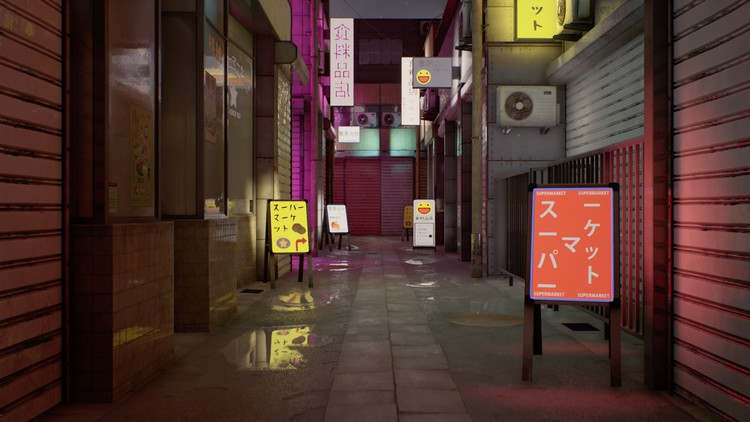
Japanese Alley 3D Game Environment Creation

Duration:00:00:00
Release date:2019, January 10
Skill level:Intermediate
Language:English
Exercise files:Yes
Course URL:https://www.udemy.com/japanese-alley-environment/
What Will I Learn?
Create an amazing complete game-ready 3D environment
Bake clean maps
Create realistic wet ground
Produce believable dirt, scratches and grime
Learn how to make moist-rain effects on window glass and buildings
Create professional UV maps
Create realistic glow materials
Understand proper scale for creating environments
High poly to low poly baked workflow
Use weighted vertex normals efficiently
Requirements
Basic knowledge of 3ds Max, Unreal, Substance Designer and Painter, Photoshop
Description
Instructor Info
Emiel Sleegers always had love for video games and when he was young, he started using Unity3D for programming but he found himself gravitating more towards the art of making games. Now he is currently working as an environment artist in Ubisoft. He contributed to creating AAA games such as Forza Horizon 3 and The Division 2. His all time favorite game is The Last of Us and that video game is what inspired him to want to work in the game industry. His advice for beginner artists is to focus on one aspect of gaming that they are passionate about, stick to it and get better at it. His hobbies include anything related to games or films, whether it be working on personal projects, freelance work or going out for movies.
Course Info
In this course, we will go over the entire process of how to create a Japanese Alley game environment. We will first start out with a blockout of the scene to achieve a proper sense of scale, and once that is done, we will go back to the blockout to 3d modeling the buildings. We will do a high poly to low poly workflow where we will create a high res and low res model and bake normal maps for them. We will go through the process of how to make the environment look realistic, how to use weighted vertex normals, and how to do smart, quick and clean unwrapping of uvs. Then we will jump into Substance Designer to create tilable textures such as metal, concrete, and tarmac. We will touch up on Substance Painter and little bit of Photoshop to texture our props. Once everything is modeled and textured, we will import everything in Unreal to setup our materials and lighting for a nice final render.
Who is the target audience?
Anyone who wants to know how to create a game environment
01 Introduction
001 Introduction
02 Blockout Modeling Preparing Textures
002 Going Over Reference
003 Creating the Blockout Part 1
004 Creating the Blockout Part 2
005 Creating the Blockout Part 3
006 Creating the Blockout Part 4
007 Setting up Blockout in Unreal Part 1
008 Setting up Blockout in Unreal Part 2
009 Creating the Buildings Part 1
010 Creating the Buildings Part 2
011 Creating the Buildings Part 3
012 Creating the Buildings Part 4
013 Creating the Buildings Part 5
014 Creating the Buildings Part 6
015 Creating the Buildings Part 7
016 Creating the Buildings Part 8
017 Creating the Buildings Part 9
018 Finish Creating the Buildings
019 Creating the Tarmac Texture Part 1
020 Creating the Tarmac Texture Part 2
021 Creating the Tarmac Texture Part 3
022 Creating the Tarmac Texture Part 4
023 Creating the Tarmac Texture Part 5
024 Creating the Rollup Door Texture Part 1
025 Creating the Rollup Door Texture Part 2
026 Creating the Rollup Door Texture Part 3
027 Finish Creating Rollup Door Texture
028 Creating the Metal Panels Part 1
029 Creating the Metal Panels Part 2
030 Creating the Stone Tiles Part 1
031 Creating the Stone Tiles Part 2
03 Unwrapping Texturing and Game Engine Setup
032 Creating the Aircon Unit Part 1
033 Creating the Aircon Unit Part 2
034 Creating the Aircon Unit Part 3
035 Unwrapping Our Aircon Unit
036 Baking our Aircon Unit Part 1
037 Baking our Aircon Unit Part 2
038 Texturing the Aircon Unit Part 1
039 Texturing the Aircon Unit Part 2
040 Creating the Neon Signs Part 1
041 Creating the Neon Signs Part 2
042 Creating the Neon Signs Part 3
043 Creating the Neon Signs Part 4
044 Finish Creating the Neon Signs
045 Creating the Utility Pole Part 1
046 Creating the Utility Pole Part 2
047 Creating the Utility Pole Part 3
048 Creating the Rollup Door Part 1
049 Creating the Rollup Door Part 2
050 Creating the Rollup Door Part 3
051 Creating the Painted Metal Texture
052 Unwrapping Our Scene
053 Unwrapping the Windows
054 Unwrapping the Windows Part 2
055 Unwrapping the Windows Part 3
056 Adding the Utility Poles and Wires Part 1
057 Adding the Utility Poles and Wires Part 2
058 Creating Any Fencing
059 Exporting our Objects
060 Placing all Final Rollup Doors Part 1
061 Placing all Final Rollup Doors Part 2
062 Importing our Assets and Setting Up Materials Part1
063 Importing our Assets and Setting Up Materials Part 2
064 Placing our Neon Lights Part 1
065 Placing our Neon Lights Part 2
066 Balancing the Lights and Textures Part 1
067 Balancing the Lights and Textures Part 2
068 Setting Up Post Processing Part 1
069 Setting Up Post Processing Part 2
070 Balancing our Scene
071 Creating our Window Textures
072 Adding Wetness to our Materials
073 Placing our Final Props Part 1
074 Placing our Final Props Part 2
04 Polishing the Environment
075 Polishing the Lighting
076 Improving our Tarmac Texture Part 1
077 Improving our Tarmac Texture Part 2
078 Improving our Tarmac Texture Part 3
079 Improving our Tarmac Texture Part 4
080 Improving our Tarmac Texture Part 5
081 Improving our Tarmac Texture Part 5.2
082 Improving our Tarmac Texture Part 6
083 Improving our Tarmac Texture Part 6.2
084 Improving our Tarmac Texture Part 7
085 Creating More Decals
086 Placing Decals and Balancing
087 Creating the Standup Advert Signs Part 1
088 Creating the Standup Advert Signs Part 2
089 Creating the Standup Advert Signs Part 3
090 Making Tiles Dirty and Adding More Decals
091 Making Standup Signs Emmissive
092 Adding One More Sign Advert
093 Making the Glass Decals Part 1
094 Making the Glass Decals Part 2
095 Outro
 Channel




could you please upload this
Uartsy – Concepting Futuristic Cityscapes in Photoshop
Has been added to transcode queue. Will upload in couple days.
Hi, when I click in any of your links I get below message:
Database Error:
Failed connecting to the database with the supplied connection details. Please check the details are correct and your MySQL user has permissions to access this database.
we had a general database failure. It is already fixed.
could you please upload this
Victorian Era 3D Game Environment
https://www.udemy.com/course/victorian-game-environment/
that one is missing