Ad Clicks : Ad Views : Ad Clicks : Ad Views : Ad Clicks : Ad Views : Ad Clicks : Ad Views :
Oh Snap!

It looks like you're using an adblocker. Adblockers make us sad. We use ads to keep our content happy and free. If you like what we are doing please consider supporting us by whitelisting our website. You can report badly-behaved ads by clicking/tapping the nearby 'Advertisement' X text.

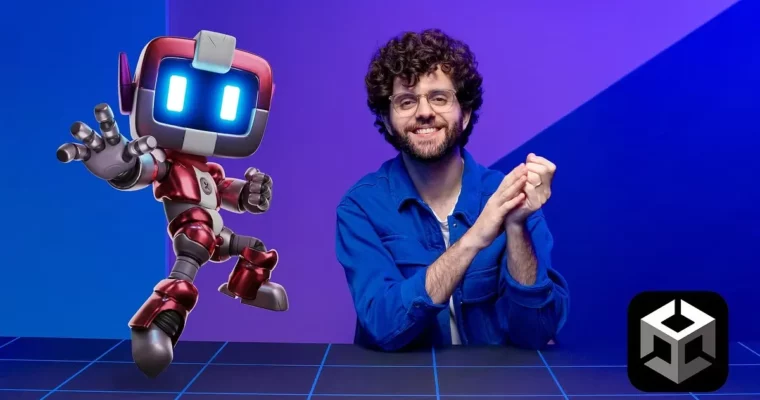
Basics – Unity by André Cardoso

Basics – Unity by André Cardoso

/

Author:André Cardoso

Actual Duration:7h 31m

Release date:2024, April

Publisher:Domestika

Skill level:Beginner

Language:English

Exercise files:Yes

Software:Unity, Visual Studio

Course URL:https://www.domestika.org/en/courses/5108-basics-unity

Learn Unity from scratch and build your first playable game without getting lost in the docs.

If you have opened Unity once and closed it in panic, this one is for you. André walks you through the editor, the core tools, and simple game logic step by step, so you end up with something playable instead of just another empty project.

🎯 What you’ll learn

  • Navigate the Unity editor, scenes, and Hierarchy without second-guessing
  • Use GameObjects, components, and Prefabs to build levels fast
  • Write basic C# scripts for movement, input, and collisions
  • Add Rigidbody physics, audio, and lighting to make things feel alive
  • Create simple game UI with menus, score, and health
  • Build and export a playable game you can share

✅ Requirements

  • Skills: No game dev experience needed, just basic computer skills
  • Tools: Unity Hub + Unity (free version works), Visual Studio or VS Code for code editing
  • Hardware: PC or Mac that can run Unity 2021+, 8GB RAM minimum, 3-button mouse recommended

📝 Description

This is a true zero-to-playable course. You start with a blank project and learn how Unity actually thinks — scenes, GameObjects, and components. No theory dumps. You click, drag, break stuff, fix it, and pretty quickly you have a little world running.

Then we get into the fun part: making it move. You will pick up just enough C# scripting to handle player input, movement, and collisions. André keeps the code short and readable, and always ties it to something you can see in the Scene view. If you have never coded before, you will still keep up.

Later on it is all about game feel. We add Rigidbody physics, sound effects, particles, and simple UI so it stops feeling like gray boxes and starts feeling like a game. You will also learn how to structure with prefabs so your project does not turn into a mess.

By the end you know how to test and export a playable build. Nothing fancy, just solid fundamentals you can reuse for platformers, shooters, or whatever weird idea you have next.

🧑‍🎓 Who this course is for

  • Total beginners who want to design their own video games in Unity
  • 2D / 3D artists and designers who want to stop depending on programmers for prototypes
  • Hobbyists and students thinking about getting into game dev

🧑‍🏫 About the Author

André Cardoso is a Game Developer focused on Unity and real-time interactive projects. He works on gameplay systems, prototypes, and small playable experiences, with a teaching style built for beginners. His thing is breaking down editor workflows and code into plain, practical steps you can actually remember.

🏁 Final Result

  • A small playable 3D level built in Unity with movement, collisions, UI, and audio — ready to build to PC/WebGL and add to your portfolio.
Curriculum

📋 Course content

  1. Module 1:  Getting Comfortable in Unity
    • Installing Unity and setting up your first project

    • Editor tour: Scene, Game, Hierarchy, Inspector, Project
    • GameObjects, Transforms and components explained
  2. Module 2:  Building Your First Scene
    • Level blockout with primitives and ProBuilder basics
    • Materials, lighting and cameras that look decent
    • Prefabs and organization for clean projects
  3. Module 3:  Adding Gameplay with C#
    • Variables, methods and MonoBehaviour lifecycle
    • Player movement and input handling
    • Collisions, triggers and Rigidbody physics
  4. Module 4:  Making It Feel Like a Game
    • Simple UI: HUD, menus and buttons
    • Audio sources, particles and feedback
    • Win / lose logic and game states
  5. Module 5:  Polish and Share
    • Build settings for PC and WebGL
    • Testing, fixing common beginner bugs
    • Final mini-project: playable level
Watch online or Download for Free
Basics – Unity by André Cardoso
NAME
SIZEDURATION
Course 1- Introduction
54.1 MB38m
U1- Introduction
8.9 MB7m
0_Welcome
8.9 MB7m
U2- Interface Overview
6.3 MB6m
U3- Scene Navigation
7.4 MB4m
U4- Creating Basic Objects
4.3 MB3m
U5- Modifying the Object’s Position, Rotation, and Scale
12.8 MB7m
U6- Understanding Object Hierarchy
10.3 MB5m
U7- Starting to Practice
4.1 MB2m
Course 2- Assets and Components
76.3 MB47m
U1- Introduction to Assets
4.9 MB3m
U2- Creating a Material Asset
12.1 MB8m
U3- Introduction to Components
14.1 MB9m
U4- Adding Physics!
14.3 MB8m
U5- Creating a Prefab
19.4 MB10m
U6- Starting to Practice
11.6 MB6m
Course 3- Game Logic
122.3 MB1h 48m
U1- Creating Your Own Components
11.3 MB12m
U2- “If” Conditions
10.3 MB10m
U3- Simple Inputs
11.3 MB12m
U4- Accessing Components
17.5 MB14m
U5- Code Variables
18.8 MB14m
U6- Handling Errors
10 MB5m
U7- Spawning and Destroying Objects
12.3 MB11m
U8- Creating Triggers
14.1 MB11m
U9- Starting to Practice
16.6 MB14m
Course 4- Animation
90.1 MB1h 14m
U1- Creating Animated Clips
19.8 MB14m
U2- Using the Animator
14.6 MB13m
U3- Triggering Animations Via Code
11.5 MB9m
U4- Improving Animation Code
20.4 MB18m
U5- Editing Animation Curves
9.7 MB8m
U6- Starting to Practice
14.1 MB10m
Course 5- Building Levels
83 MB1h 13m
U1- Managing Different Scenes
14 MB10m
U2- Transitioning Within Scenes
9.4 MB9m
U3- Creating Targets for the Level
12 MB10m
U4- Making Targets Show Up in Intervals
20.6 MB17m
U5- Adding a Timer and Score for Each Level
14.5 MB13m
U6- Starting to Practice
12.5 MB11m
Course 6- Adding UI and Sounds
61.7 MB52m
U1- Creating UI with the Canvas
15.2 MB11m
U2- Making Buttons Work
11.1 MB9m
U3- Adding a Score Text
10.8 MB10m
U4- Adding Credits to the Game
14.2 MB11m
U5- Starting to Practice
10.4 MB8m
Course 7- The Last Touches
90.4 MB56m
U1- Adding Particles to the Project
16.6 MB11m
U2- Adding Sounds and External Assets
14.4 MB10m
U3- Using the Asset Store
23.7 MB13m
U4- Sharing Your Game with the World
19.1 MB10m
U5- Tips for the Future
5.2 MB3m
U6- Starting to Practice
11.3 MB7m

Download all Videos (45)
577.4 MB7h 31m

Project Files (Assets, Resources)
55.3 KB

Download all

Join us on
  Channel    and      Group

Leave a Comment

Your email address will not be published. Required fields are marked *