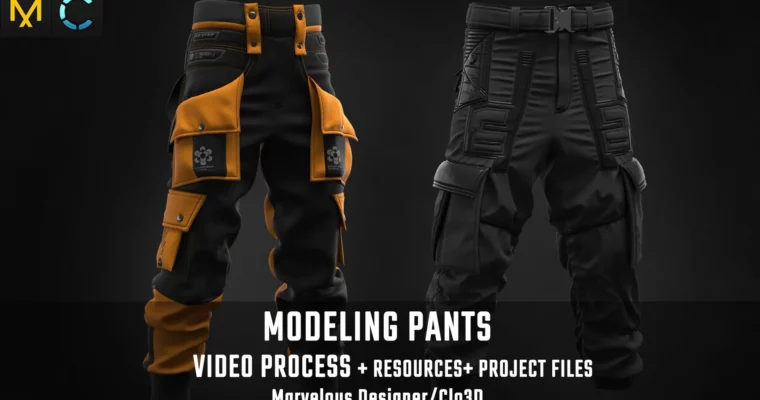
Tutorial MD – Clo3D – Modeling Pants by Vadim Meshcherekov

Duration:4 hours 34 minutes
Actual Duration:4h 34m
Release date:2023
Publisher:Artstation
Skill level:Intermediate
Language:English
Exercise files:Yes
Software:CLO3D, Marvelous Designer
Course URL:https://www.artstation.com/marketplace/p/9ewjx/tutorial-md-clo3d-modeling-pants
This tutorial focuses on the practical work behind a believable pair of digital pants: constructing the garment in CLO3D or Marvelous Designer, refining the fit, and pushing the result toward a clean asset for realistic rendering. It assumes you already know the basic interface and want to spend your time on garment construction rather than first-time software setup.
🎯 What you’ll learn
- Build pants from 2D garment patterns in CLO3D or Marvelous Designer
- Adjust fit and silhouette on a character avatar
- Refine fabric simulation to create believable folds and tension
- Finish garment details for a realistic render-ready asset
✅ Requirements
- Skills: Familiarity with the basic CLO3D or Marvelous Designer interface and garment simulation workflow
- Tools: 3-button mouse
- Hardware: A computer capable of running CLO3D or Marvelous Designer; a dedicated GPU is recommended for smoother viewport work and final renders
📝 Description
The course stays tightly focused on one production task: making pants that do not look like a quick cloth-sim pass. You work from the underlying pattern construction, then shape how the garment sits on an avatar. That means paying attention to the areas that usually give the game away: the waistband, crotch, knees, hems, and the direction of fabric folds.
The emphasis is on bringing a garment to a high-quality finish for realistic rendering, rather than simply generating a simulated result. This is useful for character artists who need clothing that can survive closer camera shots and fit into a polished render pipeline.
Because the tutorial expects existing familiarity with the software, it is best treated as a focused workflow study. Pause at each construction decision and ask what physical cause creates each wrinkle: compression, stretching, gravity, or collision. That habit transfers to jackets, skirts, tactical gear, and other digital garments.
🧑🎓 Who this course is for
- Intermediate character artists who already use CLO3D or Marvelous Designer
- 3D artists building realistic clothing for character renders
- Digital-fashion learners who want a focused pants-construction workflow
🧑🏫 About the Author
Vadim Meshcherekov is a 3D character artist specializing in realistic garment creation and cloth simulation. His work focuses on bringing digital clothing to a production-ready finish, with an emphasis on construction accuracy and believable fabric behavior. He shares his workflow through detailed tutorials aimed at artists who want to move beyond basic simulation and achieve render-quality results.
🏁 Final Result
- A simulated, fitted pair of render-ready digital pants with a refined silhouette, construction-based details, and believable fabric behavior.
 Channel