Stylized Rendering with Brushstrokes by REQUIRES UPDATE

Duration:1h 31m
Actual Duration:1h 31m
Release date:2024, November
Publisher:Blender Studio
Skill level:Intermediate
Language:English
Exercise files:Yes
Software:Blender
Course URL:https://studio.blender.org/training/stylized-rendering-with-brushstrokes/
This workshop dives into using the Brushstroke Tools extension for Blender, a powerful addon that lets you build scenes with a painterly, artistic look. It’s all about achieving a flexible and convenient workflow to get that unique, hand-crafted aesthetic in your 3D projects.
🎯 What you’ll learn
- Fundamentals of the Brushstroke Tools addon.
- Creating basic fill and draw layers.
- Controlling fill layer properties.
- Distributing brushstrokes for grooming.
- Animating elements like rivers.
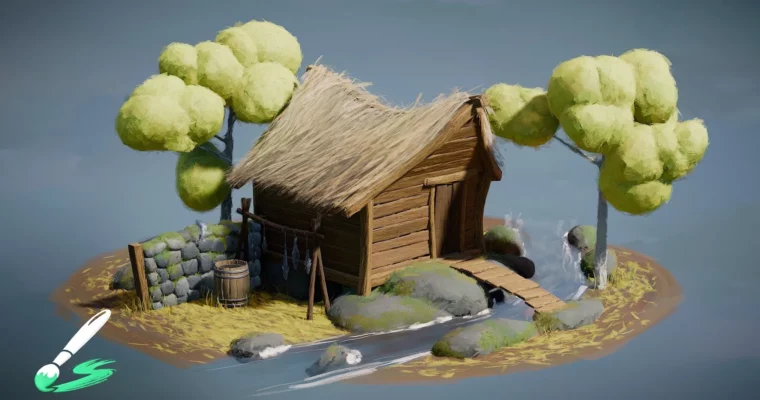
- Building stylized assets like painted huts and deformable walls.
- Achieving a polished, painterly final look.
✅ Requirements
- Skills: Familiarity with the Blender interface and basic 3D concepts.
- Tools: Blender (with the Brushstroke Tools extension installed).
- Hardware: A computer capable of running Blender smoothly.
📝 Description
This workshop is your guide to mastering the Blender Studio Brushstroke Tools extension. You’ll learn how to leverage this addon to build scenes that have a distinct, painterly quality. We start with the essentials, covering the quick-start guide to get you comfortable with the addon’s interface and core functions. From there, we’ll move into practical application, building a demo scene of a fishing hut. You’ll explore various methods for distributing brushstrokes, giving you the control needed to achieve your desired artistic style. The course emphasizes a flexible workflow, allowing you to adapt the tools to your specific creative vision.
🧑🎓 Who this course is for
- 3D artists looking to add a painterly, stylized look to their scenes.
- Blender users interested in exploring non-photorealistic rendering techniques.
- Hobbyists and professionals wanting to experiment with unique texturing and asset creation workflows.
- Anyone who wants to create visually appealing, artistic 3D environments.
🏁 Final Result
- A completed, portfolio-ready stylized scene of a painterly fishing hut, demonstrating proficiency with the Brushstroke Tools extension.
 Channel