Ad Clicks : Ad Views : Ad Clicks : Ad Views : Ad Clicks : Ad Views : Ad Clicks : Ad Views :
Oh Snap!

It looks like you're using an adblocker. Adblockers make us sad. We use ads to keep our content happy and free. If you like what we are doing please consider supporting us by whitelisting our website. You can report badly-behaved ads by clicking/tapping the nearby 'Advertisement' X text.

Unreal Engine 5  7 Course in 1 ultimate mega course UE5 by Unreal magic

Unreal Engine 5 7 Course in 1 ultimate mega course UE5 by Unreal magic

/

Author:Unreal magic

Duration:31.5 hours on-demand video

Actual Duration:31h 25m

Release date:2025, May

Publisher:Udemy

Skill level:Beginner

Language:English

Exercise files:Yes

Software:Unreal Engine 5

Course URL:https://www.udemy.com/course/unreal-engine-5-7-course-in-1-ultimate-mega-course-ue5

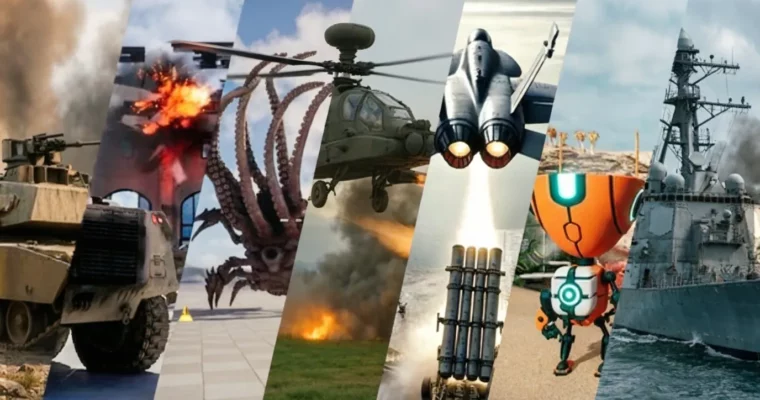
Master Unreal Engine 5 by building 7 distinct game projects, from fighter jets to FPS and destruction mechanics.

This massive Unreal Engine 5 course packs seven distinct game development projects into one ultimate learning experience. You’ll dive into creating everything from high-octane fighter jet combat and realistic tank simulations to chaotic building destruction and immersive FPS gameplay. It’s your all-in-one ticket to mastering UE5 for game development.

🎯 What you’ll learn

  • Fighter jet game mechanics with radar and missile systems
  • M1 Tank game mechanics, including artillery and destruction
  • Helicopter game mechanics with anti-air defenses
  • Ship on ocean game mechanics with anti-ship artillery
  • Chaos destruction physics for buildings and environments
  • FPS shooter game mechanics with AI enemies and item pickups
  • Platformer mechanics including jetpacks, elevators, and moving platforms

✅ Requirements

  • Tools: You just need Unreal Engine 5 installed.

📝 Description

This course is a powerhouse, combining seven different game development projects into one comprehensive package. You’ll start with an absolute beginner’s section to get you comfortable with Unreal Engine 5.

Then, dive into specific game genres:
1. Fighter Jet Course (F18): Learn to build an Ace Combat-style game using the Chaos Vehicle System. You’ll implement flight mechanics, engine effects (VFX and sound), missile systems, and enemy AI with radar and SAMs.
2. Tank Course (M1 Abram): Master tank game development, from engine and wheel setup to movement, UI elements (health, reload, turret rotation), and artillery enemies that predict player movement.
3. Helicopter Course (Apache): Explore helicopter mechanics, including wheel and rotor control, flight dynamics using the Vehicle Movement Component, ground proximity effects, and anti-air gun defenses.
4. Ship on Ocean Course (Destroyer): Create a ship game that floats on a dynamic ocean. You’ll implement ship blueprints, weapon systems, and anti-ship artillery as enemies.
5. Chaos Destruction Course (Building): Get hands-on with Chaos Destruction, learning how to make objects destructible, adjust their properties for explosions, and create detailed destruction effects on buildings made of various materials.
6. FPS Course (M4): Build a complete FPS character with movement, aiming, weapon mechanics, VFX, sound, UI (ammo, health, shields), and a reload system. You’ll also implement AI enemies (like a Kraken) and a modular item system.
7. Platforms Course (Stack O Bot): Develop platformer mechanics, including character movement with animations, jetpacks, interactive doors, different types of elevators, fans for launching players, stompers, and spline-based moving platforms.

By the end, you’ll have a robust portfolio showcasing your ability to create diverse game mechanics and systems in Unreal Engine 5.

🧑‍🎓 Who this course is for:

  • Anyone looking to develop their own games from scratch.
  • Aspiring game developers aiming for a job as an Unreal Engine developer.

🧑‍🏫 About the Author

Unreal magic has been passionate about game creation since childhood. Starting with PCB design and C programming, they explored various languages like C#, C++, Java, JavaScript, and PHP before focusing on game development. After two years mastering Unity, they transitioned to Unreal Engine and Blender eight years ago, falling in love with the workflow and dedicating long hours to creating in the engine.

🏁 Final Result

  • A portfolio showcasing 7 distinct game projects, including a fighter jet combat simulator, a tank warfare game, a helicopter action game, a naval combat experience, a building destruction simulation, a fully functional FPS, and a challenging platformer.
Curriculum

📋 Course content

  1. Introduction
    • Introduction
    • Install unreal engine
    • Create game
    • Navigating through level
    • Position in level
    • Rotating and scaling
    • Content drawer
    • Importing
    • Materials
    • Blueprint
    • Event graph
    • Variables
    • Location
    • Event tick
    • Vector variable
    • Timers
    • Flip flop
    • Boolean
    • Platform
    • GameMode
    • Character class
    • Spring arm and camera
    • Input mapping context
    • Input action
    • Going forward and backward
    • Move left and right
    • Look around
    • Jump
    • Animation blueprint
    • Animation blueprint event graph
    • State machine
    • BlendSpace
    • Jump and Fall
    • Land animation
  2. Fighter Jet Course F18
    • Create and Import
    • Wheeled vehicle blueprint
    • Look around fighter jet
    • Wheel setup
    • Aerofoil setup
    • Thruster setup
    • Arcade controll setup
    • Vehicle setup
    • Set thrust
    • Interp to
    • Set brake
    • Handbrake
    • Wheel animation
    • Wheel radius
    • Thrust VFX
    • Engine sound
    • Widget blueprint
    • Widget animation
    • Throttle UI
    • Set pitch input
    • Modify Bone
    • Pitch value
    • Aileron and elevator
    • Finterp to for pitch value
    • Roll input
    • Roll aileron and elevator
    • Finterp to for Roll
    • Yaw input
    • Rudder rotation
    • Rudder Yaw Finterp to
    • Front chasis joint
    • Hydrolics
    • Front gear door
    • rear doors
    • Left gear
    • Right gear
    • Timeline for gears
    • Open and close gears
    • Check altitute
    • Missiles and hardpoints
    • Missile Reload system
    • Other Missile Done
    • Missile blueprint
    • Missile meta sound
    • Missile sound attenuation
    • Missile explosion
    • Shoot missiles
    • Kill camera
    • Missile rotation
    • Track camera cancelation
    • Target class
    • homing missile
    • Targetting system
    • Targeting system UI
    • Destroy target event
    • Change target
    • Third target problem
    • Change target with input
    • Missile UI
    • Calculating GForce
    • Destroy Jet
    • Import sam system files
    • Radar blueprint
    • Radar door
    • Radar rotation
    • Radar lock on system
    • Radar hit event
    • Damage Radar
    • Missile system blueprint
    • Missile Looking up
    • Missile rod position
    • Connect radar system to missile system
    • Pass target to missile system
    • Missile system Rotation
    • Sam missile
    • Fire sam missile
    • Sam system collisions
    • Missile system bug fix
    • destroy fighter jet
    • fire all missiels
    • Destroy missile system
  3. Tank Course M1 Abram
    • Create and import
    • Tank gamemode
    • Wheel setup
    • Engine setup
    • Look up and down
    • Look left and right
    • Going forward
    • Going backward
    • Wheel animation
    • End wheels
    • Tank tracks
    • Tank track position
    • Going left and right
    • Track animation for turn in place
    • Handbrake
    • rotate turret joint
    • Calculate delta rotation
    • Gun pitch
    • Crosshair widget
    • Crosshair location
    • Tank projectile
    • Fire gun of tank
    • Gun visual effect
    • Add torque when firing
    • Fire recoil
    • Reload progress bar
    • Projectile explosion
    • Engine sound
    • Tank tracks sound
    • Tank UI widget
    • Import Arty files
    • Blueprint for Arty
    • Distance to tank
    • Target in range
    • Rotate arty
    • Predict where tank will be after one second
    • Arty Rotation
    • Arty projectile
    • Arty fire VFX
    • Arty gun motion
    • Apply damage in radius
    • Tank Health system
    • Health bar
    • Destroy tank
    • Arty get radial damage
    • Arty get destroyed
  4. Helicopter Course Apache
    • Create project and import files
    • Create helli blueprint
    • Wheel setup
    • Wheel radius
    • Wheel rotation
    • Look up Down
    • Look left Right
    • Handbrake
    • Input action for moving up and moving down
    • Engine setup
    • Modify Rotor bone
    • Rotor rotation
    • Engine manager
    • Diffrent Rotor Speed
    • Finterp to
    • Hovering
    • Check height with line trace
    • Dust VFX location
    • Dust prop speed
    • Engine meta sound
    • Engine sound
    • check if we are on the ground
    • Engine shutdown
    • Go forward and backward
    • Move right and left
    • Turn in place
    • Helli missile
    • Missile Sound
    • Missile Explosion
    • Fire missile
    • Number of missile
    • Reload missiles
    • Missile UI
    • Crosshair
    • Anti air gun Blueprint
    • Modify gun bones
    • Calculate gun direction
    • Anti air gun projectile
    • Fire the guns
    • Randomize direction of projectiles
    • Anti air gun VFX
    • Gun fire sound
    • Helli health system
    • Health bar UI
    • Destroy Helli
    • Helli tip over damage
    • Projectile hit helli sound
    • Destroy anti Air Gun
    • Fix collision of anti air gun
    • Rear rotor movement
  5. Ship on Ocean Course Destroyer
    • Create project and make it ready for Ship
    • Ship blueprint
    • Ship pontoons
    • Input mapping
    • Moving forward and backward
    • Rotate blades
    • Force Factor
    • Blade rotation
    • Going left and right logic
    • Use force local to go right
    • Go left right smoother
    • Rotate ship gun
    • Gun camera
    • Switch between cameras
    • Rotate gun with controller
    • Gun line trace
    • Crosshair
    • Crosshiar visibility
    • gun fire conditions
    • Ship projectile
    • Ship projectile VFX
    • Fire calculated projectile
    • Gun fire VFX
    • Gun recoil
    • Gun Fire rate
    • Gun camera zoom
    • Anti ship blueprint
    • Box trace
    • Anti ship gun pitch
    • Check can shoot
    • Anti Ship projectile
    • Anti ship Projectile force and damage
    • Anti ship VFX
    • anti ship recoil
    • Apply damage to antiship
    • Destroy antiShip
    • Ship destroyed
    • Health UI
    • Fix bug Radial damage is not working
  6. Chaos Destruction Course Building
    • Create destruction project
    • APC blueprint
    • Wheel class
    • Look around APC with mouse
    • Go forward and backward
    • Handbrake
    • Wheel animation
    • Vehicle steering
    • modify gun bone
    • Calculate Gun rotation
    • APC projectile
    • Fire weapon
    • Hit physics body
    • Import destruction files
    • Fracture sphere
    • Fracture material
    • Damage threshhold
    • Damage with Projectile
    • Change power of explosion
    • Size of clusters
    • ExplotionVFX
    • Ancher fields
    • Attach two Geometry collection
    • Destroy ancher filed
    • 3D files Folders
    • Fracture corner wall
    • Fracture middle wall
    • Fracture middle window
    • Fracture glasses
    • Fracture interior
    • Creating bulding part01
    • Creating building part02
    • Creating building part03
    • Creating building part04
    • Creating roof top
    • Roof gaps
    • Damage threshold
    • Convert building to blueprint
    • Adding ancher fileds
    • Initilization fields
    • Anchor filed for windows Explaining
    • Anchor filed for the rest of the windows
    • Fix falling part
    • Roof anchor fields
    • Explain smart projectile
    • Apply destructable damage
    • Find touched anchor fields
    • Anchor field to be destroyed
    • Destroy all overlapped anchor fields
    • Make destruction more real
    • APC Engine sound
  7. FPS Course M4
    • Create project and import files
    • FPS Blueprint
    • Look around
    • Go forward backward
    • Go left and right
    • Add gun
    • Sprinting
    • Animation blueprint
    • Get character speed
    • Blend spaces
    • Crosshair UI
    • Crosshair wings
    • Aiming
    • Start aiming
    • Aiming animations
    • Aim walking
    • Anim montages
    • Muzzle flash
    • Firing sound and shell eject
    • Line trace when we are aiming
    • Line trace for not aiming state
    • Return results
    • Fire tracer VFX
    • Fire Impact VFX
    • Gun burst mode
    • Print string tip
    • Ammo manager
    • Reload gun custom event
    • Fill up the magazine
    • Use Rest of the ammo in storage
    • Reload manualy
    • Reload animation
    • Reload sound
    • Firing when sprinting
    • Fix running and gunning
    • Ammo UI background
    • Horizental box widget
    • Ammo UI for magazine and storage
    • Update ammo UI
    • Ammo Item
    • Kraken blueprint
    • AI controller
    • Kraken Move to
    • Check if player is in range
    • Kraken chase player
    • Kraken get damage
    • Kraken health system
    • Kraken Health UI
    • Kraken Health bar Visibility
    • Kraken animation blueprint
    • Kraken death animation
    • move to decorator
    • Kraken Attack task
    • Kraken attack animations
    • Kraken damage player
    • Player health and shield system
    • Player health UI
    • Update health UI
    • Item type
    • Item pickup
    • Game over UI
    • Fottstep sound
    • Input not working after reset
  8. Platforms Course Stack O Bot
    • where this course is coming from
    • Install unreal engine
    • Create project
    • Create character class
    • Create gamemode
    • Enhanced input
    • Move Enhanced input
    • Going right or left check
    • Going forward and backward check
    • Move character
    • Control rotation and forward vector and right vector
    • Add controller yaw input
    • Add controller pitch input
    • Make movement better
    • Jump
    • Import animations
    • Idle state
    • Run state
    • BlendSpaces
    • Lean amount calculation
    • Finterp to
    • Air locomotion state machin
    • Jump state
    • Jump blend space
    • Fall state
    • Land states
    • Land rules
    • Create blueprint
    • Spline points
    • Control points
    • Duration
    • Create actor class
    • Elevator settings
    • Go to end location
    • Begin and End overlap event
    • Go to start location
    • Go to end location
    • End and start location variables
    • Go to end location smoothly
    • Go to start location smoothly
    • Tolerance in distance
    • Bug fix
    • create stomper blueprint
    • Timeline
    • Timeline setting
    • Push character
    • Bug fix
    • Fan blueprint class
    • Animate Fan
    • Timer on loop
    • Shoot the player
    • widget blueprint introduction
    • Show widget in game
    • Show Height UI
    • update height
    • Max height UI
    • Update max height
    • Progress bar UI
    • Coin UI
    • Increase Coin
    • Add coin for new max height
    • Item blueprint class
    • Random rotation
    • Collision settings
    • Pick item up
    • Pickup meta sound
    • Game system
    • Moving platform
    • Elevator
    • Stomper
    • Fan
    • Item
    • Package the game
    • Packaging fix
    • Opening projects
    • Door blueprint
    • Check player
    • Close and open door
    • Open and close door smoothly
    • Creating elevator V02
    • Elevator being too fast
    • elevator going down
    • add jetpack mesh and FX
    • Turn on Thruster
    • Jetpack variables
    • Toggle jetpack function
    • Player hover with jetpack
    • Jetpack reset
Watch online or Download for Free
Unreal Engine 5 7 Course in 1 ultimate mega course UE5 by Unreal magic
NAME
SIZEDURATION
1 – Introduction
122.6 MB12m
3 – 02Fighter Jet
958.5 MB5h 47m
4 – 03Tank
596.6 MB3h 15m
5 – 04Helicopter
656.1 MB3h 16m
6 – 05Ship
539 MB3h 5m
7 – 06Destruction
733.4 MB3h 46m
8 – 07FPS
663.6 MB3h 56m
9 – 08Jumpy
862.5 MB5h 36m
436 – Fan
11.5 MB2m


Join us on
  Channel    and      Group

Leave a Comment

Your email address will not be published. Required fields are marked *