It looks like you're using an adblocker.
Adblockers make us sad. We use ads to keep our content happy and free. If you like what we are doing please consider supporting us by whitelisting our website. You can report badly-behaved ads by clicking/tapping the nearby 'Advertisement' X text.
Complete Blender to Unreal Engine 5 Course (Silent Hill F) by Jan Benkwtiz
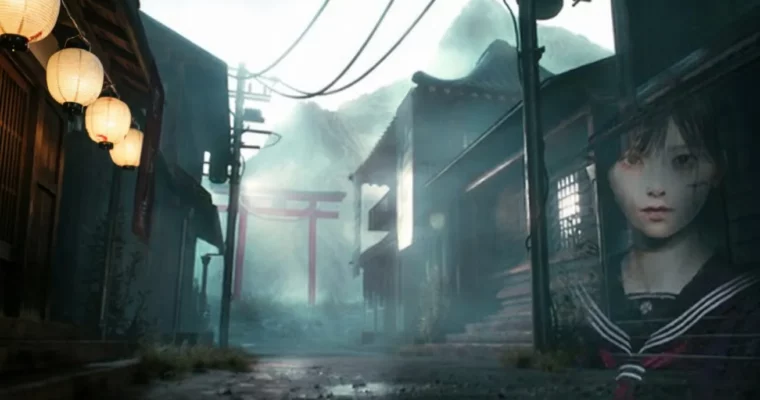
Build a cinematic Silent Hill F-inspired Japanese horror game environment from scratch using Blender and Unreal Engine 5.
This course walks you through the entire process of creating a cinematic game environment, inspired by Silent Hill F, using Blender and Unreal Engine 5. You’ll go from initial modeling and texturing to final animation and post-production, building a portfolio-ready scene.
🎯 What you’ll learn
Create realistic PBR Texturing using Substance 3D Painter.
Master modular modeling techniques in Blender for complex assets.
Implement Parallax Occlusion Mapping and Vertex Painting in Unreal Engine 5.
Sculpt detailed terrains and mountains using GAEA.
Animate characters, cloth, and props for cinematic sequences.
Achieve high-fidelity renders with Unreal Engine 5’s Movie Render Queue.
Polish your cinematics with post-production in DaVinci Resolve.
✅ Requirements
Skills: Basic knowledge in Blender.
Hardware: You should have an RTX graphics card.
📝 Description
This course offers a complete production pipeline for creating a cinematic game environment. You’ll dive into the world of AAA game environment creation by building a Silent Hill F-inspired Japanese horror scene using Blender and Unreal Engine 5. The training covers mastering modular modeling to craft authentic Japanese house elements, including gutters, roofs, stones, wood planks, poles, and windows, plus iconic assets like a Torii gate and Japanese lantern. You’ll learn advanced workflows such as UV unwrapping in Blender, full PBR texturing in Substance Painter for realistic materials, and vertex painting with parallax occlusion for depth and immersion. The course also guides you through sculpting stunning mountains and terrains in GAEA, bringing everything to life with cloth animations in Blender and Marvelous Designer, and animating a Japanese girl in flowing garments, dynamic banners, and eerie movements. You’ll seamlessly import FBX files, textures, and animations into UE5, harnessing cinematic lighting for atmospheric fog and tension. Using the Movie Render Queue for high-fidelity renders, you’ll polish your project with post-production techniques to create a captivating cinematic trailer. By the end, you’ll produce triple-AAA quality environments ready for portfolios or indie games, blending horror aesthetics with Japanese folklore for unforgettable results. Step-by-step guidance ensures professional outcomes, even with no prior experience.
🧑🎓 Who this course is for:
Beginners with basic knowledge and intermediate 3D Artists.
🧑🏫 About the Author
Jan Benkwtiz is an instructor with a 4.1 rating, known for his 11 courses and 1,913 students. He is most active on YouTube, where he shares free content and tutorials on Blender and Unreal Engine 5. His primary goal is to bridge the gap for 3D Artists transitioning from Blender to bringing their assets to life with interactive gaming elements inside Unreal Engine 5.
🏁 Final Result
A portfolio-ready, triple-AAA quality cinematic game environment inspired by Silent Hill F, complete with detailed assets, realistic texturing, atmospheric lighting, and animations.
Curriculum
📋 Course content
Introduction
Introduction3:27
Preparation
Preparation8:25
Creating our Terrain in GAEA
Creating our Terrain in GAEA24:41
Updating our Terrain and export for Blender1:18
Prepare the terrain mesh in Blender
Prepare the terrain mesh in Blender15:32
Import the terrain mesh into Unreal Engine 5 and prepare basic lighting
Import the terrain mesh into Unreal Engine 5 and prepare basic lighting15:45
Blockout
Blockout40:30
Writing down the assets we will need to model for our game environment
Writing down the assets we will need to model for our game environment11:36
Modeling and UV unwrap the wooden planks and poles
Modeling and UV unwrap the wooden planks and poles20:37
Modeling and UV unwrap the wooden walls
Modeling and UV unwrap the wooden walls50:15
Modeling and UV unwrap more walls and doors
Modeling and UV unwrap more walls and doors58:24
Modeling and UV unwrap window frames
Modeling and UV unwrap window frames39:16
Modeling and UV unwrap the small roof
Modeling and UV unwrap the small roof34:55
Modeling and UV unwrap V type roof and main roof
Modeling and UV unwrap V type roof and main roof1:17:37
Modeling and UV unwrap gutters
Modeling and UV unwrap gutters29:19
Modeling and UV unwrap a balcony and metal shutters and stone bricks
Modeling and UV unwrap a balcony and metal shutters and stone bricks1:33:00
Prepare our assets for baking and texturing in Substance 3D Painter
Prepare our assets for baking and texturing in Substance 3D Painter35:37
Create our own wood materials
Create our own wood materials42:26
Create metal and roof textures
Create metal and roof textures1:11:23
Import our Assets and Textures into Unreal Engine 5
Import our Assets and Textures into Unreal Engine 536:05
Place assets to modular build houses in Unreal Engine 5
Place assets to modular build houses in Unreal Engine 529:03
More tips for modular build in Unreal Engine 5 and manage / clean up our scene
More tips for modular build in Unreal Engine 5 and manage / clean up our scene31:33
Enhance our terrain mesh for our scene in Blender
Enhance our terrain mesh for our scene in Blender14:01
Parallax Occlusion Material with Height Blending four our Terrain
Parallax Occlusion Material with Height Blending four our Terrain12:19
Create two Materials for our Terrain Vertex Paint Blend in Quixel Mixer
Create two Materials for our Terrain Vertex Paint Blend in Quixel Mixer33:38
Paint our parallax occlusion Material for our Terrain
Paint our parallax occlusion Material for our Terrain44:52
Add foliage from Polyhaven
Add foliage from Polyhaven23:04
Import the electrical poles and model cables with the Curve Modifier in Blender
Import the electrical poles and model cables with the Curve Modifier in Blender23:53
Import the japanese Character and animate a simple Kimono for her
Import the japanese Character and animate a simple Kimono for her35:05
Model the lantern for the Character
Model the lantern for the Character1:31:26
Rig the lantern and animate it in Blender
Rig the lantern and animate it in Blender20:20
Import the lantern and finish the Character animation
Import the lantern and finish the Character animation38:29
Create the Mountain in GAEA
Create the Mountain in GAEA24:23
Displace the Mountain Mesh in Blender and texture it in Substance 3D Painter
Displace the Mountain Mesh in Blender and texture it in Substance 3D Painter41:08
Add the Mountain to our scene and create cinematic lighting (from scratch)
Add the Mountain to our scene and create cinematic lighting (from scratch)1:02:16
Add simple grass wind to our grass foliage and add a Spotlight
Add simple grass wind to our grass foliage and add a Spotlight19:56
Lets animate some cloth banners to enhance our scene in Blender
Lets animate some cloth banners to enhance our scene in Blender31:49
Import the animated Banners and model the Torii Gate
Import the animated Banners and model the Torii Gate1:04:01
Texture the Torii Gate and import into Unreal Engine 5
Texture the Torii Gate and import into Unreal Engine 539:58
Finishing up our scene and prepare a cinematic scene
Finishing up our scene and prepare a cinematic scene31:06
Post Production in DaVinci Resolve
Post Production in DaVinci Resolve24:53
New Vertex Paint Master Material with Displacement / Parallax Occlusion
New Vertex Paint Master Material with Displacement / Parallax Occlusion42:53
Watch online or Download for Free
Complete Blender to Unreal Engine 5 Course (Silent Hill F) by Jan Benkwtiz




 Channel






Provided files different from the course