Ad Clicks : Ad Views : Ad Clicks : Ad Views : Ad Clicks : Ad Views : Ad Clicks : Ad Views :
Oh Snap!

It looks like you're using an adblocker. Adblockers make us sad. We use ads to keep our content happy and free. If you like what we are doing please consider supporting us by whitelisting our website. You can report badly-behaved ads by clicking/tapping the nearby 'Advertisement' X text.

Zbrush Advance Creature Sculpting for Production by Nexttut Education Pvt.Ltd.

Zbrush Advance Creature Sculpting for Production by Nexttut Education Pvt.Ltd.

/

Author:Nexttut Education Pvt.Ltd.

Duration:41 hours on-demand video

Actual Duration:40h 45m

Release date:2025, May

Publisher:Udemy

Skill level:Intermediate

Language:English

Exercise files:Yes

Software:ZBrush, Marmoset Toolbag

Course URL:https://www.udemy.com/course/zbrush-advance-creature-sculpting-for-production

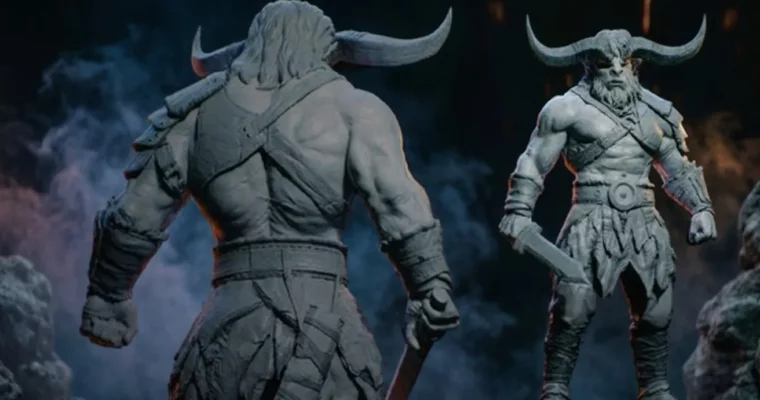
Sculpt highly detailed and believable creature anatomy in ZBrush, create dynamic poses, and present your work in cinematic renders.

Ready to take your creature sculpting skills to the next level? This course dives deep into creating incredibly detailed and believable creatures right in ZBrush. You’ll learn to craft everything from intricate anatomy and textures to dynamic poses and professional presentations, making your portfolio stand out.

🎯 What you’ll learn

  • Sculpting highly detailed and believable creature anatomy.
  • Crafting realistic leather and metal armor details.
  • Sculpting believable hair and fur for characters.
  • Creating dynamic and engaging character poses.
  • Presenting your creature in cinematic quality renders.

✅ Requirements

  • Skills: A basic understanding of the ZBrush interface and sculpting tools is required. You should be comfortable with navigation, basic brushes, and basic sculpting techniques. Familiarity with fundamental anatomy principles is recommended.
  • Tools: ZBrush, Marmoset Toolbag (for rendering).
  • Hardware: A computer capable of running ZBrush and Marmoset Toolbag smoothly.

📝 Description

Struggling to sculpt believable creatures with intricate details and dynamic poses in ZBrush? This course is your roadmap to overcoming those challenges and creating truly stunning creature designs. We’ll guide you through the entire process, from blocking out forms to adding fine details and presenting your work like a pro. You’ll learn advanced techniques for sculpting anatomy, crafting realistic materials like leather and metal, and even styling hair. Plus, we cover how to pose your character effectively and set up cinematic renders in Marmoset Toolbag for a portfolio-ready finish.

🧑‍🎓 Who this course is for

  • Intermediate 3D artists and character artists looking to elevate their sculpting skills.
  • Artists who want to master character modeling from start to finish.
  • Anyone aiming to create detailed, believable creatures for games or VFX.

🧑‍🏫 About the Author

Nexttut Education Pvt. Ltd. is a team of industry professionals dedicated to creating high-quality, production-ready courses for 3D students. Founded by Nalini Kanta Jena, who has been teaching and working in the game industry since 2008, Nexttut focuses on bringing real-world experience into the classroom. They collaborate with talented artists who have at least 5+ years of experience in film and game development, ensuring students learn relevant, up-to-date techniques. Their goal is to help students become job-ready artists.

🏁 Final Result

  • A portfolio-ready, highly detailed 3D creature sculpt with dynamic posing and professional presentation renders, showcasing your advanced ZBrush and Marmoset Toolbag skills.
Curriculum

📋 Course content

  1. Introduction
    • Introduction1:48
    • Concept & Color ID11:16
    • Custom UI & Sculpting Tips16:31
    • Asset Workflow13:03
  2. Basic Sculpting
    • Basic Proportion26:18
    • Adding Horns & Hairs25:57
    • Adding Basic Anatomy16:24
    • Refining the Overall Shape17:28
  3. Forearm Leather & Metal
    • Forearm Leather & Metal26:44
    • Forearm Leather Pieces22:11
  4. Lower Garment Sculpting
    • Blockout Leather Skirt22:28
    • Sculpting Leather Belt24:43
    • Adding Horns Bandage16:35
    • Lower Garment Sculpting24:54
  5. Chest Armor & Trousers
    • Chest Leather Armor21:37
    • Blockout Trousers16:17
    • Blockout Footwear Leather14:59
    • Blockout Footwear Bandage17:24
    • Adding Straps Buckles24:03
  6. Design Changes & Refinements
    • Concept Design Changes9:23
    • Forearm Metal Redesign21:46
    • Blockout Shoulder Pad19:03
  7. Chest Details & Straps
    • Chest Leather Details26:39
    • Chest Straps Primary Forms18:58
    • Chest Straps Edge Details19:43
    • Chest Straps Wrinkles16:35
  8. Shoulder & Arm Straps
    • Shoulder Straps Details24:11
    • Arm Straps Basic Form18:56
    • Arm Straps Adding Details23:35
  9. Shoulder Pad Sculpting
    • Shoulderpads Basic Forms19:48
    • Subtool Management9:55
    • Shoulderpad Sculpting Details22:46
    • ShoulderPad Stitches21:11
    • ShoulderPad Wrinkles26:06
  10. Metal Damage & Wear
    • Metal Dents17:26
    • Metal Damage14:06
    • Top Metal Damage25:24
  11. Forearm Leather Detailing
    • Forearm Leather Big Forms22:03
    • Forearm Straps Basic Forms25:59
    • Forearm Straps Details26:49
    • Forearm Soft Leather Details26:34
    • Forearm Leather Stitches19:34
  12. Leather Skirt Detailing
    • Back Leather Skirt Detail21:16
    • Sculpting Leather Folds24:38
    • Right Side Leather Skirt11:21
    • Front Right Leather Skirt24:25
    • Leather Stitches & Tension22:21
    • Front Left Leather Skirt16:00
    • Left Leather Skirt Details22:39
    • Leather Skirt Accessory26:38
    • Leather Skirt Bandages26:56
  13. Fabric Detailing
    • Left Fabric Detailing26:19
    • Right Fabric Refining25:19
  14. Belt Sculpting
    • Belt Leather Stitches24:32
    • Belt Leather Detailing14:30
    • Belt Metal24:10
  15. Refining Forms
    • ShoulderPad Refinement7:07
    • Highpoly écorché Reference1:24
    • Fixing the Fingers26:24
    • Refining the Hands22:49
    • Refining the Arm25:15
    • Refining the Forearm & Torso26:00
  16. Skin & Face Details
    • Skin Breakups10:09
    • Teeth Refinement20:49
    • Face Secondary Form26:22
    • Body Overall Polish16:25
    • FingerPose & Secondary form16:54
    • Additional Model Refinement17:25
  17. Sword Modeling
    • Sword Blade Shape16:53
    • Sword Handle Modeling16:46
    • Sword Leather Wrap23:59
    • Sword Adding Scratches27:00
    • Sword Case Modeling26:37
    • Sword Leather Hangers13:40
    • Sword Leather Details16:46
  18. Leg & Boot Bandages
    • Leg Bandage Basic Forms24:42
    • Leg Bandage Details24:51
    • Trousers Details10:14
    • Boots Bandage Basic Forms23:41
    • Boots Bandage Details26:03
    • Boots Leather Sculpting23:51
    • Boots Assets24:42
    • Shoes Adding Details22:01
  19. Posture & Horns
    • Refining Posture22:10
    • Horns Base Shape26:29
    • Horns Adding Details26:26
  20. Beard & Hair Sculpting
    • Beard Details26:22
    • Hair Basic Forms16:01
    • Hair Establishing Flow15:42
    • Hair Adding Secondary Shapes27:17
    • Hair Details25:05
  21. Necklace & Body Refinement
    • Necklace Initial Modeling24:00
    • Necklace & Accessory16:46
    • Body Form Refinement24:01
    • Muscle Definition17:11
  22. Skin & Nail Details
    • Adding Nails26:44
    • Skin Details Base Noise24:47
    • Skin Details Adding Pores21:00
    • Skin Details Wrinkles25:05
    • Skin Details Torso24:06
    • Skin Details Scars26:43
  23. Hand Details
    • Hand Tertiary Details25:07
    • Hand Micro Details25:59
    • Hand Nails Details22:30
  24. Texturing & Presentation
    • Polypaint (Coloring)15:24
    • Final Adjustments27:19
    • Posing The Body21:06
    • Posing The Arms20:19
    • Posing The Fist25:14
    • Refining Teeth & Hands17:12
    • Finalising The Pose18:14
  25. Export & Rendering
    • Decimation7:15
    • Exporting Textures10:02
    • Marmoset Setup7:01
    • Basic Lighting14:36
    • Camera Setting & Material18:12
    • Cinematic Lighting19:57
    • Rendering & Presentation18:10
    • Compositing10:16
  26. Conclusion
    • Sword Refinement18:00
    • Conclusion0:28
Watch online or Download for Free
Zbrush Advance Creature Sculpting for Production by Nexttut Education Pvt.Ltd.
NAME
SIZEDURATION
01 – Introduction
40.4 MB42m
06 – Sword High-Poly Detailing
126.4 MB2h 21m
07 – LowerBody High-Poly Detailing
190.3 MB3h 0m
10 – Rendering & Presentation
142.1 MB2h 3m

Download all Videos (121)
2.4 GB40h 45m


Download all

Join us on
  Channel    and      Group

Leave a Comment

Your email address will not be published. Required fields are marked *