44 Hard Surface Kitbash + Full Process Tutorial by Vizyon Designers

Actual Duration:8h 49m
Release date:2025, April
Publisher:Artstation
Skill level:Beginner
Language:English
Exercise files:Yes
Software:Blender, RizomUV
Course URL:https://www.artstation.com/marketplace/p/nDDJB/44-hard-surface-kitbash-full-process-tutorial
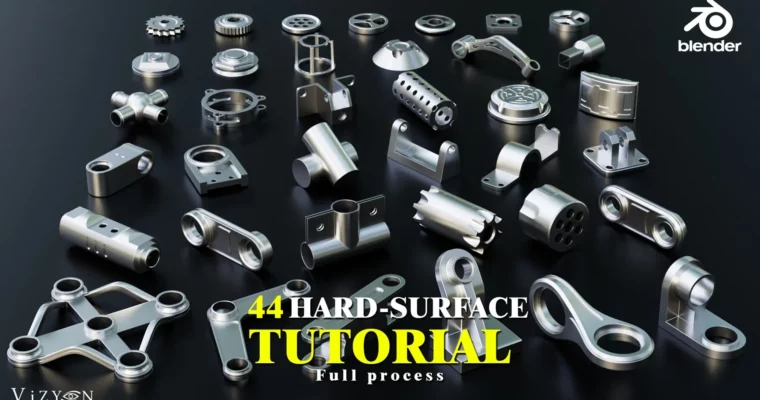
44 no-fluff hard surface demos in Blender plus the full kitbash library to drop straight into your projects. You watch the screen capture, copy the moves, and end up with clean parts you actually understand.
🎯 What you’ll learn
- Model clean hard surface parts with correct bevels and supporting edges
- Build mechanical details, panels, vents, and sci-fi greebles from scratch
- Keep quad topology clean for subdivision and easy edits
- Prep models for texturing with organized UVs and multiple export formats
- Reuse kitbash pieces to speed up robots, props, and vehicles
✅ Requirements
- Skills: Basic knowledge of Blender UI, navigation, and basic modeling tools
- Tools: Blender, RizomUV for UV review, 3-button mouse and keyboard
📝 Description
This is not a talk-over-theory thing. The videos are straight screen recordings with shortcut display on, so you see every extrude, bevel, and boolean as it happens. You pause, copy it, rewind. Good if you already know your way around Blender and just want reps.
You get 44 demos that cover the stuff you run into daily: panels that need tight edges, cylinders that need clean intersections, details that have to survive subdivision without pinching. All models use quad topology and subdivision is left unapplied, so you can still tweak everything after.
On the practical side, everything is numbered and matches the PDF and JPEG previews. Models are already UV unwrapped in RizomUV and come in .Blend, .Max, .FBX, and .OBJ. No materials included, which is intentional – you bring your own shaders and drop the parts into any pipeline.
🧑🎓 Who this course is for
- Blender users with basics down who want solid hard surface habits
- Concept artists and modelers building sci-fi props, robots, and vehicles
- Anyone who wants a reusable personal kitbash library built by themselves
🧑🏫 About the Author
Vizyon Designers is a studio focused on hard surface modeling assets and production-oriented tutorials. They release kitbash sets and process breakdowns built around clean topology and real studio use. Their work is geared toward modelers who need parts that actually hold up in close-ups and texturing.
🏁 Final Result
- A complete 44-piece hard surface kitbash library with clean quads, UVs, and multi-format exports, plus the workflow to build your own new parts from scratch.
 Channel