Unreal Engine x Houdini Water Tutorial – Complete Workflow Course by Mikkel Lassalle

Duration:Over 6 Hours
Actual Duration:6h 11m
Release date:2025
Publisher:Gumroad
Skill level:Beginner
Language:English
Exercise files:Yes
Software:Houdini, Unreal Engine
Course URL:https://mkls.gumroad.com/l/UExHoudini
Stop watching partial breakdowns that leave you hanging. This course takes you from an empty scene to two finished, portfolio-ready water shots with Houdini, Unreal Engine, and compositing in one straight line.
🎯 What you’ll learn
- Set up collisions, FLIP tank, and custom velocities for large-scale water sims
- Cache, review with flipbooks, and generate whitewater sources and solvers
- Mesh the main FLIP sim and build ocean displacement with textures
- Set up test renders, AOVs, animated cameras, and batch beauty renders
- Build, dress, and light full environments in Unreal Engine with sequencer
- Composite, grade, and finalize two cinematic VFX shots from start to finish
✅ Requirements
- Skills: Basic familiarity with Houdini UI and Unreal Engine basics, comfortable navigating 3D viewports and timelines
- Tools: Houdini for simulation and rendering, Unreal Engine 5 for environments, compositing app for final shots
- Hardware: Multi-core CPU for FLIP sims, 32GB+ RAM for caching, dedicated RTX GPU for rendering and Unreal
📝 Description
Here is the deal: FLIP fluid simulations are messy, heavy, and easy to get wrong. This course gives you a working system instead of theory. You get Mikkel’s personal simulation template, render template, and ocean template, plus an animated Alembic model with textures, HDRIs, sky, fog, and birds. You start from there and learn how to bend it to any model and any fluid behavior.
In Houdini you set up collisions, build the FLIP tank, push motion with custom velocities, and actually look at flipbooks to decide what to keep. Then you cache the sim properly, build your whitewater source and solver, and mesh the result so it holds up in close-up renders. No skipped steps, no magic values. You see the test renders, the AOVs, and what to fix before you burn hours on a batch.
Then it switches to Unreal Engine. You build two full environments from scratch – project setup, plugins, levels, Level Sequencer, set dressing, lighting, and render settings. Cameras come over from Houdini so everything lines up. You render the backgrounds in Unreal and the hero water in Houdini, which is exactly how you keep large-scale water shots fast and flexible without trying to sim an entire ocean.
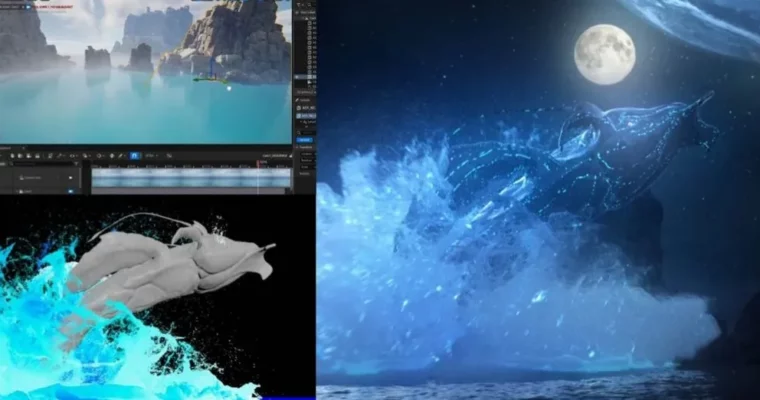
The last chunk is all compositing. You take both shots through multiple passes to final grade and polish. What you see in the promo is what you build in class – same two shots, same process. If you want to make water work that looks like it belongs in a film and understand the full pipe behind it, this is a solid way in.
🧑🎓 Who this course is for
- Beginners in Houdini who want a shortcut into large-scale FLIP without months of trial and error
- 3D and environment artists who want to mix Houdini water sims with Unreal Engine backgrounds
- Anyone tired of tutorials that stop at the sim and never show rendering, environment, and final composite
🧑🏫 About the Author
Mikkel Lassalle is a VFX artist with over 15 years of experience and the creator behind the Unreal Engine x Houdini Dragon Project. He focuses on large-scale simulations and full-shot workflows – sim to render to final picture – rather than isolated effects tests. His teaching style is practical and production-minded, built around reusable templates and clear, repeatable steps you can apply to your own models and ideas.
🏁 Final Result
- Two finished cinematic water VFX shots combining Houdini FLIP + whitewater renders with Unreal Engine environments, fully composited, graded, and ready for your reel.
 Channel