Creating a Large-Scale Aerial Shot by Frederick Vallee

Duration:7h 27m 53s
Actual Duration:7h 27m
Release date:2024
Publisher:Gnomon
Skill level:Intermediate
Language:English
Exercise files:Yes
Software:Houdini, Arnold, Nuke
Course URL:https://www.thegnomonworkshop.com/workshops/creating-a-large-scale-aerial-shot
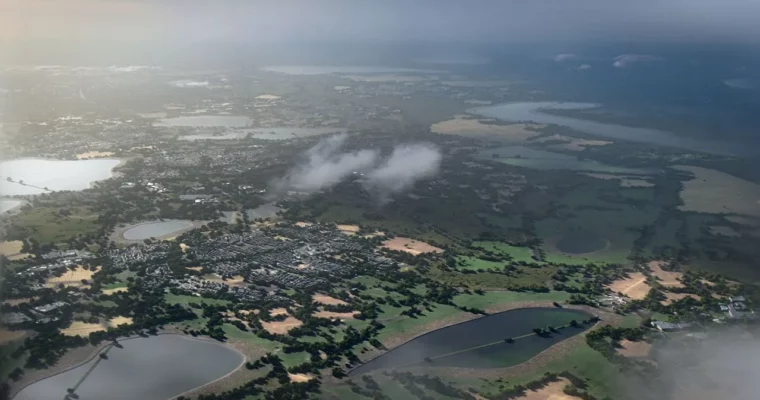
This workshop is all about building a massive, believable aerial shot without melting your workstation. Frederick Vallee shows you how to pull real-world OpenStreetMap data into Houdini, generate a procedural city, and surround it with a natural meadow. The whole thing is built with smart optimization in mind—think procedural duplication and level-of-detail tricks—so you can iterate fast. Then, you’ll take your render into Nuke for the final polish, adding atmosphere and mood to sell the shot.
🎯 What you’ll learn
- Import and process OpenStreetMap data for procedural city generation.
- Create realistic procedural buildings and urban infrastructure.
- Blend natural meadow environments with generated urban landscapes.
- Optimize procedural networks for efficient rendering and iteration.
- Compose and light aerial views for cinematic storytelling.
- Enhance procedural renders using Nuke for professional finishing.
✅ Requirements
- Skills: Basic understanding of Houdini.
- Tools: 3-button mouse.
- Hardware: Minimum 16GB RAM, dedicated GPU.
📝 Description
This isn’t about brute-forcing a scene with millions of polygons. Frederick focuses on a smart workflow that prioritizes efficiency. You’ll start by pulling real geographic data from OpenStreetMap to build the bones of your city. From there, it’s all about procedural generation in Houdini—using VOP nodes and groups instead of heavy VEX scripting to keep things accessible.
The course is broken into clear, digestible chapters. You’ll learn how to scatter vegetation that actually looks natural, texture your environment with a mix of procedural and manual control, and set up a lighting pass that’s designed to be finished in compositing. The final lessons are all about Nuke, where you’ll layer fog, adjust color, and add those final cinematic touches that turn a good render into a great shot. It’s a practical, production-focused look at the entire pipeline.
🧑🎓 Who this course is for
- Environment artists with basic Houdini knowledge looking to level up their procedural skills.
- Technical artists wanting to integrate real-world geographic data into their workflow.
- Beginners curious about procedural workflows who want a clear, step-by-step guide.
🧑🏫 About the Author
Frederick Vallee is an Environment Generalist Technical Director at Industrial Light & Magic. With over eight years in the VFX industry, he’s worked at studios like Goodbye Kansas, Moving Picture Company, and Double Negative. His credits include Jurassic World Rebirth, Silo, and Fast & Furious 9. He brings that real-world production experience directly into this workshop.
🏁 Final Result
- A fully realized, photorealistic aerial shot of a procedural city blending into a natural meadow, ready for a portfolio or demo reel.
 Channel