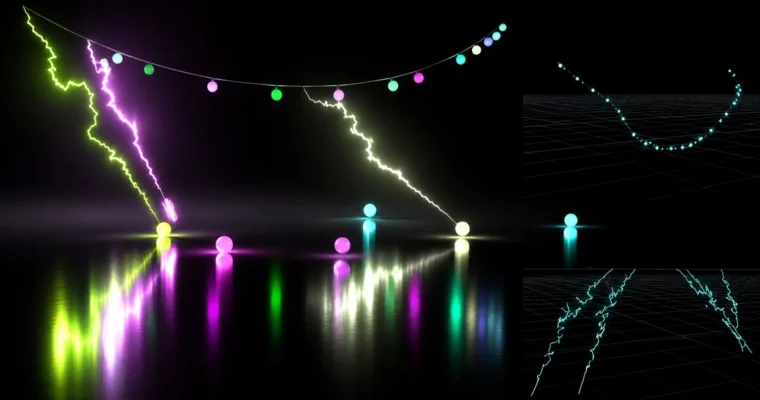
Houdini FX Vellum and Energy Effects by Eric Ebling

Duration:2h 51m
Actual Duration:2h 51m
Release date:2024
Publisher:Udemy
Skill level:Intermediate
Language:English
Exercise files:Yes
Software:Houdini
Course URL:https://www.udemy.com/course/houdini-fx-vellum-and-energy-effects/
Tired of Vellum sims that fall apart for no reason? In this Houdini course you build a small FX shot from scratch – a deforming wire with stuck-on pieces that break free, plus crackling lightning effects driven right by the sim.
🎯 What you’ll learn
- Set up Vellum with multiple constraint types and glue objects together so they sim as one and break apart on cue
- Build custom color and specialty attributes to drive flicker and intensity procedurally from your sim
- Use constraints to get a bendy wire look and make attached pieces behave like rigid bodies
- Create procedurally generated lightning with geometry lights driven by Vellum
- Simplify constraint setup with geometry groups and broken-constraint logic for shading
✅ Requirements
- Skills: Basic Houdini UI, node networks, keyframing, and diving in and out of networks
- Tools: Houdini installed – Apprentice, Indie, or FX version will work
- Hardware: Multi-core CPU, 16GB+ RAM, dedicated GPU for faster sims and renders
📝 Description
This is not a button-click tutorial. You build a real shot, the way it happens in production. We start with Vellum constraints and pinning. You learn how to glue a few objects together, let them interact as one system, then break them apart when you want. Geometry groups keep the whole thing manageable instead of a node mess.
Then we get sneaky. Broken constraints are not just trash data. We use them to drive custom attributes for color, fade, and flicker. So your shader actually reacts to the sim. The wire stays bendy, the chunks stuck to it act rigid, and when they pop off it reads great on render without extra hand animation.
Next up is the fun part – electricity. You will generate procedural lightning bolts straight from the Vellum motion and light the scene with geometry lights. It is the kind of effect clients ask for all the time, and yes, FX artists often have to pull it off fast. We also cover how to layer in extra ground lightning for that last-minute notes version.
A quick heads up on VEX. There is a fair amount of it here with wrangles. Nothing crazy, and Eric shows non-VEX ways too so you see the difference. But if you want to work in a studio, you need to at least read VEX when a lead hands you a rig. Every lecture comes with a working HIP file plus PDF cheat sheets, so you can compare your file when your result looks off.
🧑🎓 Who this course is for
- Beginner to intermediate Houdini artists who want to actually understand Vellum
- Houdini users who struggle with constraints, pinning, and breaking logic
- Anyone who needs to create procedural lightning and energy effects for production shots
🧑🏫 About the Author
Eric Ebling is a working Houdini FX artist with real production experience in post. He also teaches the Master Houdini FX course, so he knows how to explain the stuff juniors usually trip over. His thing is practical control – pinning, Vellum setups, VEX basics, and fast fixes when client notes land at 5pm.
🏁 Final Result
- A finished FX shot with a deforming Vellum wire, breaking rigid fragments, flickering energy shading, hero lightning bolts plus a ground lightning pass – ready to cut into your reel.
 Channel