It looks like you're using an adblocker.
Adblockers make us sad. We use ads to keep our content happy and free. If you like what we are doing please consider supporting us by whitelisting our website. You can report badly-behaved ads by clicking/tapping the nearby 'Advertisement' X text.
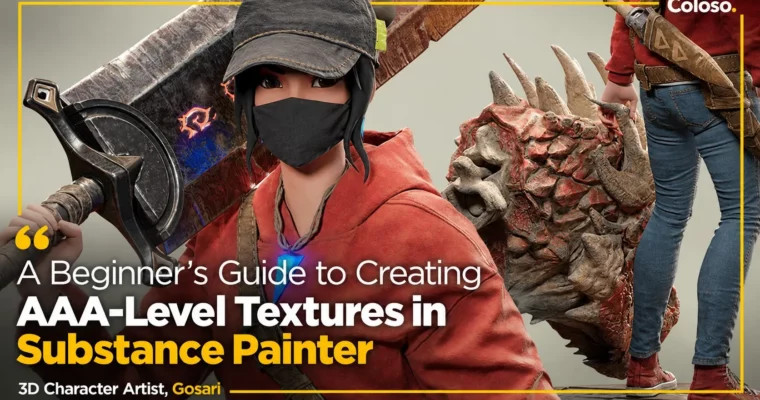
A Beginner’s Guide to Creating AAA-Level Textures in Substance Painter by Gosari
Learn AAA-level character texturing in Substance Painter from 3D artist Gosari, from UI basics to finished textures.
Class focuses solely on Substance Painter, from UI and baking to finished AAA character textures. You get 50 short chapters, 14+ hours, plus Gosari’s Smart Materials and modeling data you can use in your portfolio.
🎯 What you’ll learn
Set up Substance Painter UI, shelves, resolutions and display options for daily work
Import models and bake mesh maps (normal, AO, ID, curvature) with Matching By Name
Work with layers, fill layers, Smart Materials, Smart Masks, generators and filters
Use blending modes, anchor points, decals, stencils, symmetry and projection correctly
Build your own Gosari_Detail masks and reusable Smart Materials
Organize texture and layer data so it is reusable in the next project
Export textures with correct padding, map size and type
✅ Requirements
Skills: Basic understanding of 3D space, no prior Substance Painter experience needed
Tools: Substance 3D Painter 8.1.2 (example data may not open in lower versions), 3-button mouse
Hardware: Minimum 16GB RAM, dedicated GPU recommended for baking and 4K texturing
📝 Description
This is an all-in-one Substance Painter class. No hopping between tools: you learn the program’s UI, how it works under the hood, and the essential features actually used on AAA projects — filters, generators, Smart Materials, Smart Masks, blending modes and Anchor Points.
Gosari teaches in short, dense chapters. Instead of long boring theory lectures, you watch a quick texturing pass, then break it down: why the layer is built that way, how the mask drives it, how to reuse it. You build Gosari_Detail masks and Smart Materials once and reuse them for a decade.
A big block of the class is hands-on material work: white fabrics that still look natural, folds in fabric and leather, dry rubber like tires and soles, smooth leather, weather-beaten metal, shine-through crystal with mesh maps and emissive, reptile scales and monster skin, bone-like dry surfaces. Stitches get a whole lesson — 36 types, applied in about 10 seconds.
You also get class files: 13 Gosari-exclusive Smart Materials and 9 types of modeling data (Overwatch-style suits, stylized concept base; base body proportions based on Epic Games’ Fortnite data). Plus data management habits: organizing by texture and layer so the next project starts fast.
Total: 50 videos, 14 hours 38 minutes. Captions: English. Level: basic — fits beginners, entry-level students, and working artists fixing their PBR workflow.
🧑🎓 Who this course is for
Beginners and students who tried learning Substance Painter alone and got lost in features
Entry-level 3D / character artists who want a correct foundation before portfolio work
Working modelers who want faster, cleaner AAA-level texturing habits
🧑🏫 About the Author
My name is Gosari, and I am a 3D character artist with a passion for Substance Painter. Seven years in character modeling on global AAA projects, developing character assets as part of modeling teams, plus lectures at gaming conference art sessions. Known among students for simple, clear teaching with room for personal creative flexibility.
🏁 Final Result
Finished, portfolio-ready character suit textures (fabric, metal, leather, rubber, scales) built with your own reusable Smart Materials
Personal library: Gosari_Detail masks, Anchor-based details, stitches, and organized layer data for future projects
Curriculum
📋 Course content
SECTION 01. Before Running Substance Painter
Understanding the Basics of Substance Painter (why it is popular, how to fully utilize it, do I still need Photoshop?)
Websites with Great Assets for Substance Painter (Substance 3D Assets, Community Assets, ArtStation, SketchFab)
Three Key Points in PBR Textures (what is PBR, base colors, roughness, normal / height maps)
Introducing Modeling Exercises and Things to Note (modeling exercises, Gosari’s Smart Materials, most-used features)
SECTION 02. Deep Dive into the UI
Taking a Quick Tour of the UI (2D/3D, MBC, cameras, layout, Settings, background color, language, shortcuts)
Adding High-Quality Stitches in 10 Seconds (36 stitch types, how to use them)
Additional Useful Features (file rename to reduce size, Tab to hide UI, keep object visible while painting, wrong-spot fixes, cross-material folder links, pause rendering, F to refocus, alpha options)
SECTION 05. Starting Texturing
Dividing Regions (apply Smart Materials, merge chapters 13/14/35 into 38_Gosari_First, divide by texture with 4 key and ID maps, black layer at bottom)
Start by Uploading Anything (analyze and modify layers, blend 38_Gosari_First into existing texture, adjust base color / roughness)
Creating Detail Layers for Alternating Use (Smart Masks setup, grunge / dirt, 40_Gosari_Detail_up, folder organization)
Creating and Using an AO Map Folder (AO baked as Always, blending by project / concept)
Boosting the Quality of Fabric Textures (fabric patterns, stitches on specific parts)
Improving the Quality of Metal Textures (three patterns, worn look)
Improving the Quality of Leather Textures (leather patterns, stitches, scratches)
Easy Ways to Create Realistic Folds (pattern maps, folds from materials, height maps in fill layers)
Creating Skin of Creatures Like Dragons (natural dragon scales, bone textures, color temperature, mesh maps + Anchor Points)
Texturing Details That Go Well with AAA Projects (seams, stitches, symmetry-free modeling, silhouette emphasis)
Exporting Textures (presets, padding value, map size and type, naming)
Simple Rendering in Iray (Iray basics, simple render, saving images)
Improving the Quality of Leather Textures
Easy Ways to Create Realistic Folds (pattern maps, height maps)
Creating Skin of Creatures Like Dragons (scales, color temperature, mesh maps + Anchor Points)
Texturing Details That Go Well with AAA Projects (seams, stitches)
Export setup: padding, map size and type
Final polish: base color correction, white / achromatic fabrics, dry rubber, smooth leather, reptile skin, bone look
SECTION 06. What You Should Do after Finishing This Class
How to Improve Your Texturing Skills (samples, references, scanned data, other games data)




 Channel