Ad Clicks : Ad Views : Ad Clicks : Ad Views : Ad Clicks : Ad Views : Ad Clicks : Ad Views :
Oh Snap!

It looks like you're using an adblocker. Adblockers make us sad. We use ads to keep our content happy and free. If you like what we are doing please consider supporting us by whitelisting our website. You can report badly-behaved ads by clicking/tapping the nearby 'Advertisement' X text.

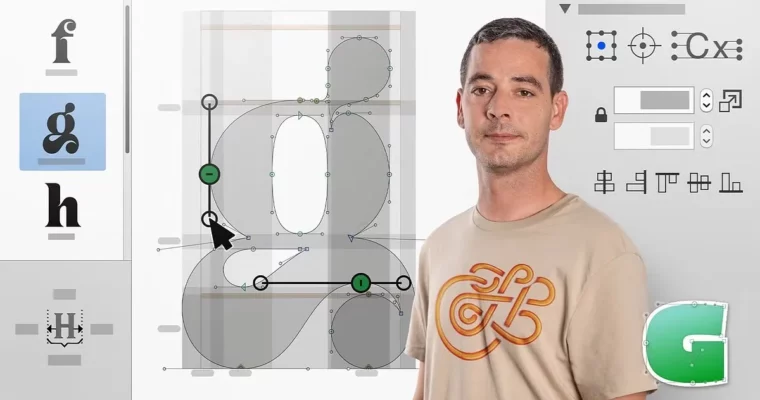
Introduction to Glyphs by Wete

Introduction to Glyphs by Wete

/

Author:Wete

Actual Duration:9h 12m

Release date:2020, October

Publisher:Domestika

Skill level:Beginner

Language:English

Exercise files:Yes

Software:Glyphs

Course URL:https://www.domestika.org/en/courses/1200-introduction-to-glyphs

Design your first working font from scratch using Glyphs, from drawing letters to exporting.

If you have always wanted to make your own font but got lost in the software, this one is for you. Wete breaks down Glyphs into plain steps and shows you how to go from blank file to usable typeface.

🎯 What you’ll learn

  • Navigate the Glyphs interface and set up a new font file correctly
  • Draw clean letters with paths, nodes, and components
  • Control proportions, weight, and contrast across glyphs
  • Apply spacing and kerning for readable text
  • Test, fix issues, and export your font as OpenType

βœ… Requirements

  • Skills: Basic computer skills and understanding of vector shapes, no prior type design needed
  • Tools: Glyphs 3 app installed, mouse or trackpad
  • Hardware: macOS computer capable of running Glyphs

πŸ“ Description

Wete keeps it simple and hands-on. You start with a blank file and learn how the Glyphs app actually thinks β€” font info, masters, sidebearings, all that stuff explained without jargon. No theory dump, just what you need to click to get moving.

Then you draw. A lot. You will work with BΓ©zier paths, clean up nodes and handles, and reuse shapes with components so your a, e, g actually look like they belong together. You will also learn how to spot bad curves and fix wobbly outlines before they become a problem.

Finally, you make it work as a real font. That means proper spacing and kerning, quick proof tests in apps, and a clean OpenType export you can install and use. By the end you understand the full loop: draw, space, test, fix, ship.

πŸ§‘β€πŸŽ“ Who this course is for

  • Graphic designers and lettering folks who want to turn sketches into usable fonts
  • Beginners curious about type design who need a clear intro to the Glyphs workflow

πŸ§‘β€πŸ« About the Author

Wete is a graphic designer and typography artist focused on custom letterforms and font creation. He works across branding, editorial, and type projects, building letters from sketch to final digital file. In this course he shares his everyday type design workflow in Glyphs, with practical tricks he uses on real client work.

🏁 Final Result

  • A complete, installable display font designed by you β€” with lowercase, capitals, numbers, and basic punctuation, ready to show in your portfolio.

Curriculum

πŸ“‹ Course content

  1. Module 1:  Getting Started with Glyphs
    • How Fonts Work and What You Need
    • Interface Tour and Font Setup
    • Masters, Glyphs Panel, and Basic Settings
  2. Module 2:  Drawing Your Letters
    • Drawing with BΓ©ziers: Nodes and Handles
    • Building n, o, h and Key Lowercase Letters
    • Capitals, Numbers, and Punctuation
    • Using Components and Anchors for Accents
  3. Module 3:  Spacing and Refinement
    • Spacing Theory in Practice
    • Kerning Pairs and Proofing
    • Testing at Different Sizes
  4. Module 4:  Export and Share
    • Final Checks and Cleanup
    • Exporting to OpenType
    • Presenting Your Finished Font
Watch online or Download for Free
Introduction to Glyphs by Wete
NAME
SIZEDURATION
Course 1- Features and Advantages of Using Glyphs
32.2 MB20m
U1- Presentation- introduction to Glyphs
4.9 MB2m
U2- Glyphs and Glyphs Mini
4 MB5m
U3- Download and install
4.3 MB2m
U4- Accessories
14.5 MB6m
U5- Practice
4.6 MB3m
0_Practice
4.6 MB3m
Course 2- Getting to Know the Interface
35.9 MB36m
U1- Create a new file or project
4 MB3m
U2- Walk through the interface
6.3 MB6m
U3- Menus
10.3 MB12m
0_Menus
10.3 MB12m
U4- Font Window and Glyph Window
4.3 MB5m
U5- Additional windows
5.9 MB4m
U6- Practice
5.1 MB5m
0_Practice
5.1 MB5m
Course 3- Font Information
35.6 MB45m
U1- What is font info-
2.6 MB2m
U2- Source
3.3 MB4m
0_Source
3.3 MB4m
U3- Masters
9.6 MB12m
0_Masters
9.6 MB12m
U4- Instances
7.3 MB10m
0_Instances
7.3 MB10m
U5- Features
4.5 MB5m
0_Features
4.4 MB5m
U6- Other settings and notes
3.8 MB4m
U7- Practice
4.4 MB5m
0_Practice
4.4 MB5m
Course 4- Making Your First Drawings
73.5 MB1h 14m
U1- Advantages of drawing in Glyphs
4.1 MB4m
U2- Review of basic tools
7.8 MB10m
U3- BΓ©zier curves, points and directions
14.6 MB20m
U4- Layers (versions) and image tracing
20.4 MB14m
U5- Import from Illustrator
16.8 MB13m
U6- Practice
9.8 MB11m
0_Practice
9.8 MB11m
Course 5- Drawing Tools
90.7 MB1h 35m
U1- Draw a letter, the orthogonality of the points
11.3 MB15m
U2- Adjust dimensions and curves
6.7 MB8m
U3- Transformations
6.4 MB8m
U4- Filters
14.1 MB16m
0_Filters
14.1 MB16m
U5- Components
12.9 MB15m
0_Components
12.9 MB15m
U6- Accents
16.9 MB12m
0_Accents
16.8 MB12m
U7- Practice
22.4 MB17m
0_Practice
22.3 MB17m
Course 6- Basic Concepts about Spacing
36.7 MB44m
U1- Spacing basics
5.5 MB9m
U2- Assign metrics
7.4 MB8m
U3- Kernings and kerning groups
9.6 MB10m
U4- Test spacing
6.9 MB6m
U5- Practice
7.3 MB9m
0_Practice
7.3 MB9m
Course 7- Going Beyond the Letters
92.2 MB1h 18m
U1- A type is not just designing letters
4.3 MB1m
U2- Open type features- what they are and what they are for
7.2 MB12m
U3- Create additional characters and nomenclature
16.7 MB13m
U4- Generate open type features
18.9 MB10m
U5- Test open type features
10.9 MB6m
U6- Scripts and other useful tools
19.9 MB17m
U7- Practice
14.3 MB15m
0_Practice
14.2 MB15m
Course 8- Typographic Families and Variable Fonts
73.2 MB1h 2m
U1- What is a font family
5 MB6m
U2- What are variable types and what do they allow us-
25.2 MB6m
U3- Define axes
4.5 MB5m
U4- Generate and define masters
11.8 MB13m
U5- Generate and define Instances
8.9 MB10m
U6- Practice
17.7 MB20m
0_Practice
17.7 MB20m
Course 9- Exporting and Generating an Executable File
116.5 MB1h 34m
U1- File types, usage and differences
3.8 MB5m
U2- Prior check
30.1 MB20m
0_Prior check
30.1 MB20m
U3- -Export- window
4.8 MB6m
U4- Generate OTF – TTF file
17.3 MB13m
U5- Generate variable file
13.2 MB11m
U6- Webfonts
12.4 MB10m
0_Webfonts
12.4 MB10m
U7- Practice
34.9 MB26m
0_Practice 1
17.8 MB15m

Download all Videos (57)
585.8 MB9h 12m

Project Files (Assets, Resources)
48.6 KB

Download all

Join us on
  Channel    and      Group

Leave a Comment

Your email address will not be published. Required fields are marked *