It looks like you're using an adblocker.
Adblockers make us sad. We use ads to keep our content happy and free. If you like what we are doing please consider supporting us by whitelisting our website. You can report badly-behaved ads by clicking/tapping the nearby 'Advertisement' X text.
2.5D Game Dev Beginner Friendly Course by Hyper Dev
Build a complete 2.5D platformer in Unreal Engine 5 from scratch, learning planning, combat, enemy AI, and packaging along the way.
This course takes you from a completely blank Unreal Engine project to a fully packaged 2.5D platformer. You’ll learn how to combine 2D sprites with 3D environments, build combat systems, create enemy AI, and finish with a game you can actually ship. No prior experience needed — just a willingness to build something real.
🎯 What you’ll learn
Use Unreal Engine 5 and its 2D and 3D features for game creation
Create a fully packaged, playable game from start to finish
Implement sprite art, flipbooks, and sound design into your project
Beat procrastination using planning and scoping principles (DCAA)
Build melee and ranged enemy AI with health bars and hitstun
Design a boss fight with phases and attack patterns
Create save systems, main menus, and level selection screens
✅ Requirements
Skills: Good grasp of English as a first or second language
Tools: A computer capable of running Unreal Engine 5
📝 Description
This isn’t a copy-paste tutorial. The whole point is to get you thinking like a game designer, not just clicking buttons. You’ll start with a blank project and work through the same steps a professional developer takes: planning, scoping, building, testing, and shipping.
The course is built around Unreal Engine 5 and uses PaperZD for sprite animation management. You’ll learn how to bring 2D sprites into a 3D world, creating that classic 2.5D look. Along the way, you’ll build a health system, a three-hit combo with input buffering, melee and ranged enemy AI, and a boss fight with multiple phases.
What sets this apart is the emphasis on planning. The instructor walks you through the DCAA planning principles so you can scope your own projects realistically and actually finish them. There’s also a full section on packaging your game — getting it into a playable build you can share or sell.
The pacing is deliberate. Each topic builds on the last, and there are knowledge checks to make sure you’re keeping up. If you’re coming from Unity, this course is specifically designed to get you up to speed with blueprints and Unreal’s way of doing things.
🧑🎓 Who this course is for
Unity developers looking to switch to Unreal Engine
Absolute beginners who want to learn game development from zero
Tutorial hoppers who want one complete course that takes them from start to finish
🧑🏫 About the Author
Hyper Dev is a game development studio run by working game developers. The team focuses on practical, project-based education that mirrors real industry workflows. Their approach emphasizes planning and scoping so students don’t just learn tools — they learn how to finish projects.
🏁 Final Result
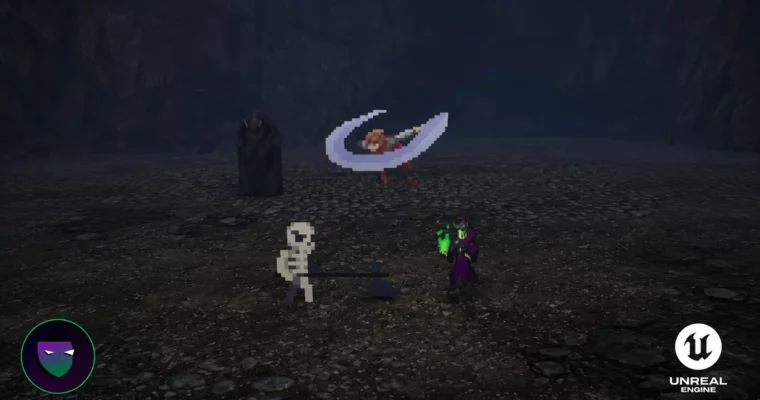
By the end of this course, you’ll have a fully packaged 2.5D platformer with a player character, melee and ranged enemies, a boss fight, save system, main menu, and level selection screen. It’s a complete, playable game you can share, iterate on, or use as a foundation for your own ideas.
Curriculum
📋 Course content
Module 1: Project Setup and Fundamentals
Get Unreal Engine And Start The Project As A Blueprints Project2:43
Setting Up The Developer Level5:12
Installing PaperZD and Change Unreal’s Starting Level4:32
Adding A Player Character Blueprint to the world8:23
Importing Art into Unreal Engine for the player character4:43
How to manage sprites and flipbooks9:57
How to plan out your game using DCAA principles5:08
In depth explanation of how to add controller inputs18:03
Module 2: Player Movement and Animation
Left and Right movement with Keyboard and Controller8:15
Setting Up PaperZD for animation management10:38
Play Idle Animation through PaperZD5:29
Play The Run Animation through PaperZD6:35
Changing sprite direction based off movement direction4:51
Control Setup and Code For Adding A Jump5:11
Adding A Jump-Start animation4:36
Jump Animation Transitions logic7:02
Module 3: Environment and Level Design
Creating Platforms For your platformer4:38
Adding Platformer 3D Assets From Quixel4:50
Adding a Simple 3D Environment to your 2.5D Platformer Part 11:29
Adding a Simple 3D Environment to your 2.5D Platformer Part 24:24
Watch Me Do Some Basic Level Design21:51
Module 4: Health, Combat, and Player Attacks
Creating A Simple Health System Part 13:04
Adding an Object that reduces the players health13:18
Creating A Death Screen User Interface15:59
Adding A Player MeleeAttack event3:56
Creating A Combat Dummy Part 120:26
Making A Player Attack Part 114:45
Player Sword Attack Animation Part 17:22
Using Custom Animation Notifies For the Hitbox8:35
Setting Up The Grounded 3 Hit Combo with Hard Input Lockout12:37
Module 5: Enemy AI
Enemy AI – Detecting When The Player is in range8:50
Moving towards the player when the player is in detection range (704)
Adding Art To The Melee Enemy6:48
Adding damage hitbox for Melee Enemy attack11:32
Melee Enemy Hitstun and Death all in one11:29
Setting Up The Sprites For The Ranged Enemy2:59
Spawn in a Projectile that goes to the player location on launch13:27
Ranged Enemy Enters Hitstun on Taking Any Damage10:05
Module 6: Advanced Systems and Polish
Creating A Save System Part 127:42
Adding A Continue Button22:09
Level Selection Based Off Game Save19:02
Creating An Intro Movie Part 19:01
Adding 3D Environment To The Main Menu Part 10:59
Lessons On Lighting Part 117:36
Adding A Sword Attack To The Player15:06
More Complex Melee Enemy AI Behaviour Using Blueprints20:07
Module 7: Boss Fight and Final Packaging
Preparations For Creating Final Boss AI7:38
Final Boss Part 123:39
Final Boss Part 26:15
Final Boss Part 31:16:47
Packaging Your Game Part 17:44
Testing Your Game Build6:51
What To Do Moving Forward3:06
Watch online or Download for Free
2.5D Game Dev Beginner Friendly Course by Hyper Dev




 Channel