Redesign and Remake Game Assets by Arrimus 3D

Duration:72.5 hours
Actual Duration:71h 37m
Release date:2024
Publisher:Udemy
Skill level:Intermediate
Language:English
Exercise files:Yes
Software:3ds Max, ZBrush, Plasticity
Course URL:https://www.udemy.com/course/redesign/
This course is all about taking old, clunky game models and giving them a second life. You’ll work through several full projects, recreating assets from the Gamecube, PS2, and even Sonic Generations, while learning how to stay faithful to the original design or completely flip it with your own creative twist. Arrimus 3D walks you through his entire workflow across 3ds Max, ZBrush, and Plasticity, so you can see exactly how a pro tackles remakes from start to finish.
🎯 What you’ll learn
- Recreate old video game models with poly-modeling, sculpting, and CAD modeling.
- Redesign existing assets by adding your own creative spin.
- Work efficiently across 3ds Max, ZBrush, and Plasticity in a single pipeline.
- Use displacement, kitbashing, and retopology to bring low-poly models to life.
✅ Requirements
- Skills: Basic understanding of modeling and navigation in Max and ZBrush. Familiarity with Plasticity is helpful but not required.
- Tools: 3-button mouse, drawing tablet recommended for sculpting.
- Hardware: Minimum 16GB RAM, dedicated GPU with at least 4GB VRAM.
📝 Description
Remakes are everywhere right now. From Final Fantasy 7 to Resident Evil 4, the industry is hungry for people who can take old, dated models and bring them up to modern standards. This course shows you exactly how that’s done, using real projects pulled from classic games.
You’ll start with a Gamecube-era model and recreate it faithfully using ZBrush sculpting and some poly-modeling in 3ds Max. The focus here is on matching the original design while adding the detail that modern audiences expect. You’ll sculpt organic forms, damaged metal, and cloth, then texture everything quickly in ZBrush for client presentations.
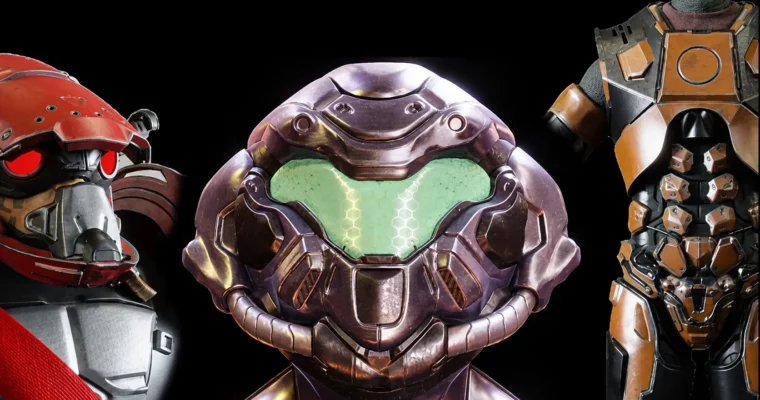
From there, things get more creative. A PS2-era model gets a full remodel, mostly in Max, with some damage work done in ZBrush. Then you’ll take a super low-poly Sonic Generations model and rebuild it with added detail in key areas. The HEV suit from Half-Life 2 gets a fresh spin using both Max and Plasticity, showing you how to combine traditional poly-modeling with CAD workflows to create hard-surface detail that would be painful to do otherwise.
The course wraps up with a futuristic makeover of Leon Kennedy from Resident Evil 2 Remake, where you’ll use ZBrush and Max to push a modern asset even further. Throughout all these projects, you’ll pick up techniques for retopology, kitbashing, displacement, and procedural materials that you can apply to your own work immediately.
New videos and sections are added regularly, so the content keeps growing. If you’re into remakes, reboots, or just want to get better at modeling, this course has a ton of practical, hands-on knowledge.
🧑🎓 Who this course is for
- Modelers and artists who want to work on remakes, reboots, or remasters in the game or movie industry.
- Fans who want to create custom content based on their favorite franchises.
- Cosplayers and 3D printing enthusiasts looking to create detailed pieces and figurines.
- Beginners and seasoned pros alike who want to learn refined remodeling techniques.
🧑🏫 About the Author
Arrimus 3D is a well-known 3D artist and educator with years of experience in the industry. He’s built a strong following by sharing his workflows and techniques for 3ds Max, ZBrush, and Plasticity. His teaching style is practical and direct, focusing on real-world problems and solutions rather than abstract theory. He’s known for breaking down complex processes into manageable steps, making advanced techniques accessible to a wide range of skill levels.
🏁 Final Result
- A portfolio-ready collection of redesigned game assets, including a full character recreation, a sci-fi shield, and multiple armor pieces.
- Practical experience working across three major 3D applications in a single production pipeline.
- A solid understanding of how to approach remakes and redesigns, from faithful recreations to creative reinterpretations.
 Channel