Realistic 3D Car Creation In Blender by 3D Tudor

Duration:14h 42m
Actual Duration:14h 42m
Release date:2026, July 23
Publisher:Udemy
Skill level:Beginner
Language:English
Exercise files:Yes
Software:Blender
Course URL:https://www.udemy.com/course/realistic-3d-car-creation-in-blender
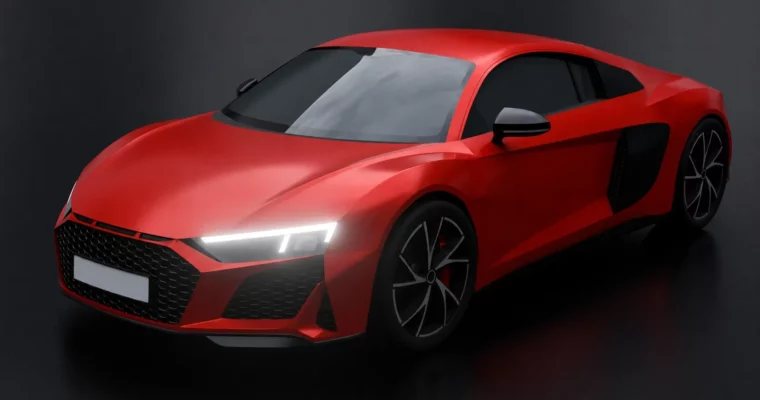
This course is a straight shot to building a realistic, high poly car in Blender. No fluff, no skipping steps. You’ll start with a blank scene and end with a fully detailed sports car model, learning the exact workflows used for professional hard surface modeling along the way.
🎯 What you’ll learn
- Create a fully realized high poly 3D car model from start to finish
- Professional reference setup techniques to ensure accurate proportions and clean topology
- Build complex car body panels using advanced modeling tools and workflows
- Techniques for modeling high detail elements such as headlights, taillights, grills, rims and tires
- Learn to maintain clean topology, proper edge flow and subdivision ready geometry
- Tips for solving common modeling challenges and improving modeling speed
✅ Requirements
- Skills: No prior experience in Blender or 3D modeling is required.
- Tools: A willingness and motivation to learn and follow the modeling process step by step.
- Hardware: Blender installed on your computer (free and open-source).
📝 Description
This isn’t a theory-heavy lecture series. It’s a real-time, hands-on build where you follow every single modeling decision. You’ll start by setting up your scene and aligning blueprints for accurate proportions. From there, it’s straight into building the car’s body panels, tackling complex shapes like the hood, fenders, and bumpers.
The course then moves into the details that make a model stand out: grills, vents, spoilers, and a full lighting system including headlights and taillights. You’ll also build a complete wheel assembly with rims, tires, brake discs, and calipers. The final section covers applying materials and setting up a studio render to show off your work.
Every lecture is recorded in real time, so you see the exact process without cuts or time-lapses. This approach helps you understand the edge flow and topology decisions that lead to a clean, subdivision-ready model. By the end, you’ll have a portfolio-ready asset and the confidence to tackle your own car projects using the included blueprint pack.
🧑🎓 Who this course is for
- Beginners who want to learn realistic 3D car modeling in Blender
- Hobbyists and aspiring 3D artists looking to improve their modeling skills
- Students who want to create high poly, detailed vehicle models step by step
- Anyone interested in expanding their Blender knowledge through a practical project
- Artists who want to build a strong portfolio piece in hard surface modeling
🧑🏫 About the Author
3D Tudor is a dedicated Blender educator known for creating detailed, project-based courses. With a focus on hard surface modeling and architectural visualization, 3D Tudor has helped thousands of students build practical 3D skills through clear, step-by-step instruction. Their courses emphasize real-world workflows and clean modeling techniques.
🏁 Final Result
- A fully detailed, realistic high poly sports car model
- A professional-quality render of the completed vehicle
- The skills and confidence to model additional vehicles using the included 7-car blueprint pack
 Channel