Make a fighting game in Unity by Pete Jepson

Duration:23 hours on-demand video
Actual Duration:23h 14m
Release date:2026, March
Publisher:Udemy
Skill level:Beginner
Language:English
Exercise files:Yes
Software:Unity
Course URL:https://www.udemy.com/course/make-a-fighting-game-in-unity
Build a complete, professional-looking two-player fighting game from scratch in Unity. This course walks you through every step, from importing free characters and animations to coding AI opponents and a character select screen. No prior coding experience needed.
🎯 What you’ll learn
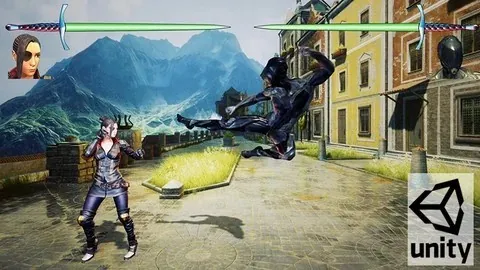
- Build a complete StreetFighter-style game in Unity 2020
- Add a variety of free characters with unique fighting styles
- Dynamically load characters and levels into a scene
- Create a main menu and character select screen
- Implement both 1-player and 2-player modes
- Set up gamepad controls for two players
- Create AI characters that fight realistically
- Add health bars, timers, and win/lose conditions
- Write clean, easy-to-understand C# code
- Use Unity’s Mecanim animator to manage fight animations
✅ Requirements
- Skills: No prior coding experience needed
- Tools: A PC, Mac, or Linux computer
- Hardware: Capable of running the latest version of Unity
📝 Description
This isn’t just a theory course. You’ll build a fully functional fighting game, step by step. We start by bringing in free characters from Mixamo and setting up their animations. Then we dive into the core mechanics: movement, jumping, and a combat system with punches, kicks, and special moves.
The real fun begins when we build the AI. You’ll program computer-controlled opponents that walk, block, attack, and react to your moves. They won’t just stand there—they’ll feel like a real player. We also set up a full two-player mode with gamepad support, so you can challenge a friend.
The course covers everything from the ground up. You’ll create a character select screen, a level select, and a main menu with options for difficulty and volume. We’ll use Unity’s Mecanim animator to blend between idle, walk, jump, and attack states, all controlled by clean C# scripts. By the end, you’ll have a polished game ready to export and share.
🧑🎓 Who this course is for
- Aspiring game developers who want to build a complete project from scratch
- Beginners looking for a practical, hands-on introduction to Unity and C#
- Anyone wanting a strong portfolio piece to showcase their game design skills
🧑🏫 About the Author
Pete Jepson is a qualified teacher with over 12 years of experience teaching game design. He has been using Unity since 2013 and has produced a series of popular courses on game development and animation. With over 68,000 students from 157 countries, Pete is dedicated to helping you learn. He responds quickly to questions and provides clear, step-by-step guidance.
🏁 Final Result
- A fully completed, playable fighting game with multiple characters, AI opponents, and a polished UI
- A portfolio-ready project that can be published on Steam or other platforms
 Channel