HOU236 – Pyrotechnic Explosions in Houdini (axiom) by Liam Whitehouse

Duration:5 hours 27 minutes
Actual Duration:5h 27m
Release date:2026, May 22
Publisher:FXPHD
Skill level:Intermediate
Language:English
Exercise files:Yes
Software:Houdini, Axiom, Karma XPU
Course URL:https://www.fxphd.com/details/679/
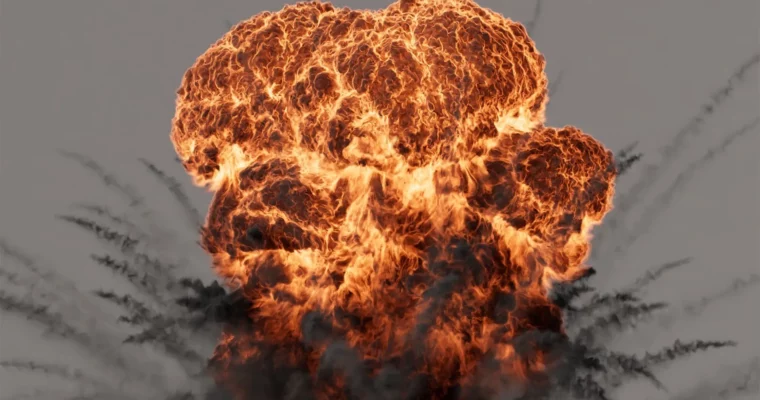
This course, taught by VFX artist Liam Whitehouse, focuses on creating detailed pyrotechnic explosions using Houdini, the Axiom GPU solver, and Karma XPU in Solaris. You’ll learn to leverage Axiom’s GPU power for high-detail smoke and fire simulations, integrating them with Houdini’s Pyro Burst and Pyro Trails tools. The entire pipeline, from sourcing to final rendering, is covered.
🎯 What you’ll learn
- Set up and control the Axiom GPU sparse fluid solver for explosions.
- Use the Pyro Burst Source node to create explosive simulations.
- Convert Houdini Pyro sources for compatibility with Axiom.
- Light and render cinematic explosions with Karma XPU.
- Create dark and light smoke layers for visual complexity.
✅ Requirements
- Skills: Intermediate knowledge of Houdini and basic 3D concepts.
- Tools: Axiom (free version available), Houdini 20.
- Hardware: Dedicated GPU (NVIDIA recommended for Axiom), minimum 16GB RAM.
📝 Description
This course is a practical walkthrough for creating pyrotechnic explosions that look like they belong in a blockbuster film. Liam Whitehouse shows you how to use the Axiom GPU solver to get high-detail smoke and fire without the long simulation times. You’ll start by setting up a Pyro Burst source, then convert it to work with Axiom’s naming conventions. The real magic happens when you dive into the Axiom solver settings, tweaking animated noise and disturbance to get realistic explosive movement.
Lighting is a key focus. You’ll use the Pyro Bake Volume node to create light scattering through transparent smoke, giving your explosion a cinematic look. The course also covers adding secondary smoke trails with Pyro Trails, simulating debris without complex particle setups. Finally, you’ll build a node network in Solaris, set up your shaders, and render everything with Karma XPU. The result is a fully lit, review-ready VFX shot.
🧑🎓 Who this course is for
- Houdini artists looking to specialize in pyro and explosion effects.
- VFX artists wanting to integrate GPU-based solvers like Axiom into their pipeline.
- Intermediate users who want to move from basic simulations to production-ready shots.
🧑🏫 About the Author
Liam Whitehouse is a VFX artist and professor with extensive experience in Houdini and pyro simulations. He has worked on high-end visual effects for film and television, bringing a practical, industry-focused approach to his teaching. His courses are known for breaking down complex techniques into clear, actionable steps.
🏁 Final Result
- A fully rendered, cinematic explosion shot with dark and light smoke, fire, and volumetric lighting, ready for VFX review.
 Channel