Creating Stone Wall Materials in Substance Designer by Josh Lynch

Duration:2h 50m 23s
Actual Duration:2h 50m
Release date:2019
Publisher:Gnomon
Skill level:Intermediate
Language:English
Exercise files:Yes
Software:Substance Designer, Marmoset Toolbag
Course URL:https://www.thegnomonworkshop.com/workshops/creating-stone-wall-materials-in-substance-designer
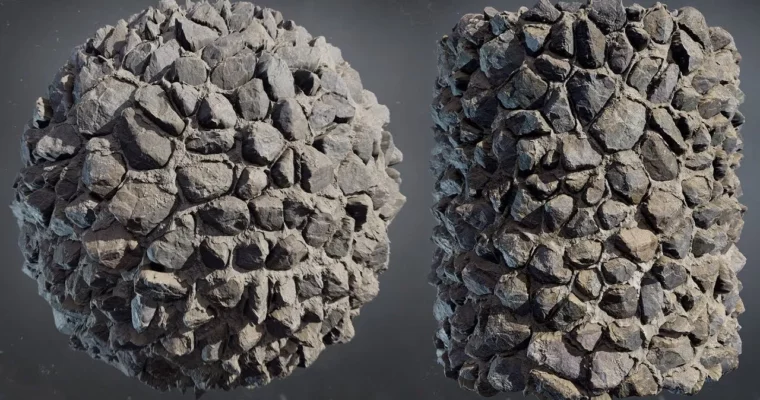
Senior Environment Artist Josh Lynch breaks down his entire process for creating believable stone wall materials in Substance Designer. This isn’t just about clicking nodes; it’s about building a solid foundation with reference analysis, planning your attack, and using a layered, non-destructive workflow that you can apply to any surface.
🎯 What you’ll learn
- How to analyze reference photos and plan a material before opening Substance Designer.
- A methodical, non-destructive workflow for building complex stone patterns.
- Techniques for layering surface noise, edge wear, and erosion for realism.
- How to create believable mortar with gravity simulation and surface detail.
- Strategies for building organized graphs with subgraphs and exposed parameters.
✅ Requirements
- Skills: Intermediate experience with Substance Designer’s interface and node system.
- Tools: Substance Designer, Marmoset Toolbag (or similar 3D viewer).
- Hardware: A computer capable of running Substance Designer smoothly.
📝 Description
This workshop is a masterclass in thinking like a texture artist. Josh Lynch doesn’t just show you the nodes; he explains the why behind every decision. The core philosophy here is that a great material starts long before you open the software. You’ll learn how to pick the right reference, establish a “plan of attack,” and build your material from the ground up using a structured, non-destructive approach.
The course dives deep into the practical side of Substance Designer. You’ll see how to use core nodes to sculpt stone patterns, layer surface breakup details, and create mortar that actually looks like it belongs. Josh emphasizes building complexity gradually, using subgraphs and exposed parameters to keep your graphs organized and flexible for late-stage changes. He also shares his tricks for getting the most out of the software, like using Non-Uniform Blur over standard bevels for more realistic results.
What sets this apart is the focus on real-world application. Josh constantly checks his work in 3D view, discusses how textures hold up with and without displacement, and explains the practical artistic judgment needed to balance PBR principles with visual quality. By the end, you’ll have a repeatable workflow that you can adapt to create any kind of material, not just stone walls.
🧑🎓 Who this course is for
- Intermediate Substance Designer users who want to improve the realism of their materials.
- Environment and texture artists looking for a structured, production-ready workflow.
- 3D generalists who need to create high-quality, reusable surfaces for games or film.
🧑🏫 About the Author
Josh Lynch is a Senior Environment Artist at Sony Santa Monica with over 12 years of experience in AAA game development. He has worked on blockbuster titles like God of War Ragnarök, Tom Clancy’s The Division 2, Middle-Earth: Shadow of War, and multiple Call of Duty games. Beyond his studio work, Josh is a dedicated educator who has taught at SIGGRAPH, Gnomon, and GDC, and continues to share his expertise through his Gumroad tutorials.
🏁 Final Result
- A complete, production-ready stone wall material with a fully organized Substance Designer graph.
- A deep understanding of a repeatable, non-destructive workflow for creating any procedural material.
- The ability to analyze reference and plan a material strategy before starting technical work.
 Channel