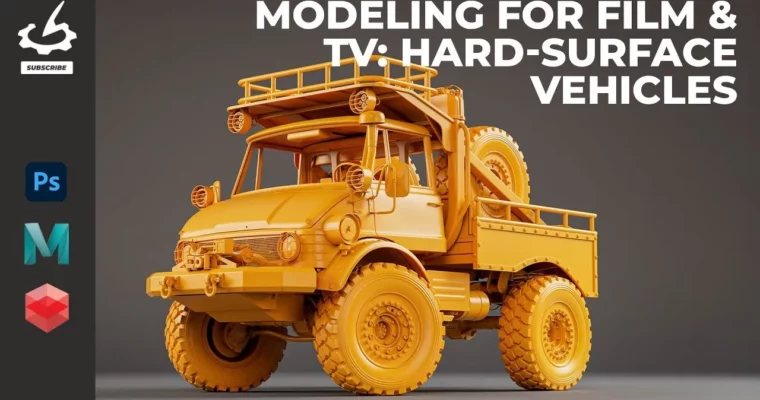
Modeling For Film & TV: Hard-Surface Vehicles by Josh Docherty

Duration:2h 52m 13s
Actual Duration:2h 52m
Release date:2025
Publisher:Gnomon
Skill level:Intermediate
Language:English
Exercise files:Yes
Software:Maya, Redshift, Lightroom, Photoshop
Course URL:https://www.thegnomonworkshop.com/workshops/modeling-for-film-tv-hard-surface-vehicles
Want to make your 3D vehicles look like they belong on the big screen? This workshop dives into how professionals in film and TV craft top-tier, production-quality hard-surface vehicles. You’ll learn to build stunning models even when you’ve only got limited references, a common challenge in fast-paced VFX pipelines.
🎯 What you’ll learn
- Model high-resolution vehicles from minimal reference materials.
- Effectively use camera lineups for accurate proportions.
- Create clean, robust topology for seamless downstream use.
- Optimize models for texturing, rigging, animation, and lighting.
- Implement industry best practices for pipeline-ready assets under tight deadlines.
✅ Requirements
- Skills: Familiarity with 3D modeling principles, understanding of topology.
- Tools: PureRef, Maya, Arnold, Redshift (optional), Lightroom, Photoshop.
- Hardware: A computer capable of running Maya and rendering software.
📝 Description
This workshop focuses on creating production-quality hard-surface vehicles for film and TV, even when you don’t have full scan data. Instructor Josh Docherty, an experienced VFX artist, walks you through his workflow using Maya, Redshift, and Photoshop. You’ll learn how to tackle modeling from limited references, a crucial skill for quick turnarounds in complex shows. The course emphasizes building clean, robust models that work seamlessly with other departments like texturing, rigging, and lighting, ensuring efficiency across the entire VFX pipeline. Josh shares industry best practices and practical tips to achieve high-quality results, adhering to the same standards used in major studios.
🧑🎓 Who this course is for
- Junior-level modelers and above looking to elevate their vehicle modeling skills.
- Artists aiming to work in film and television VFX studios.
- Professionals seeking to refine their workflow and adopt industry-standard best practices.
- Intermediate and senior artists wanting to strengthen their professional techniques.
🧑🏫 About the Author
Josh Docherty is a seasoned Freelance Senior Asset Artist specializing in Modeling & Texturing, with over eight years in the industry. He’s contributed to more than 30 films and TV shows, plus over 20 commercials, and currently works with giants like Industrial Light & Magic and WetaFX. Josh has also collaborated with studios like Blink Industries and The Mill, and created cinematics for the gaming industry. His expertise covers the full modeling pipeline, including hard-surface, environment, creature, and character creation, alongside texturing, lighting, and rendering.
🏁 Final Result
- A portfolio-ready, high-resolution hard-surface vehicle model, optimized for professional VFX pipelines, demonstrating industry-standard modeling techniques and clean topology.
 Channel