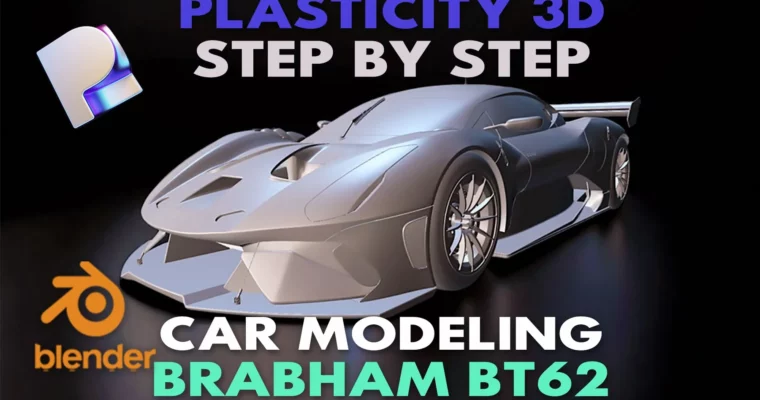
High-Detail Car Surface Modeling for Plasticity 3D Brabham BT62 by Poly Paul

Duration:24 hours
Actual Duration:25h 42m
Release date:2024, December
Publisher:Artstation
Skill level:Intermediate
Language:English
Exercise files:Yes
Software:Plasticity 3D, Blender
Course URL:https://www.artstation.com/marketplace/p/ovdXO/high-detail-car-surface-modeling
24 hours of fully narrated, high-res content that skips the fluff and gets straight to building a Brabham BT62 in Plasticity 3D. Poly Paul walks you through his personal workflow—starting from the door instead of the wheel—and shows you how to create clean, production-ready surfaces using splines and patches. No hand-holding, just practical techniques you can apply to any car project.
🎯 What you’ll learn
- Build complex car body panels using spline curves and patch surfaces in Plasticity 3D.
- Master a clean CAD surface modeling workflow for automotive design.
- Texture your model in Blender without needing UVs.
- Organize your scene files and radial menus for faster iteration.
✅ Requirements
- Skills: Basic understanding of Plasticity 3D 1.4 interface and navigation.
- Tools: 3-button mouse, drawing tablet recommended for precision.
- Hardware: Minimum 16GB RAM, dedicated GPU for 4K video playback.
📝 Description
This isn’t your typical “start with the wheel” tutorial. Poly Paul takes a different route—kicking off with the car door—because that’s where the real surface complexity lives. Over 51 videos, you’ll learn his exact spline and patches workflow for creating clean CAD surfaces that look like they came straight from a design studio.
The course is split into two video quality options: 3840 x 2160 for those who want every pixel, and 1920 x 1080 for smoother playback on slower machines. You also get Plasticity scene files, Blender OBJ files, and reference images to follow along. Plus, there are two JSON files to install Poly Paul’s custom radial menu—a small touch that speeds up your modeling significantly.
What sets this apart is the focus on professional modeling methods rather than shortcuts. Each technique is broken down into simple, fast-paced videos that you can revisit anytime. The texturing section in Blender is a bonus—no UV unwrapping required, just smart material placement.
🧑🎓 Who this course is for
- Intermediate Plasticity 3D users who want to level up their surface modeling skills.
- Automotive 3D artists looking for a clean, CAD-based workflow for car design.
- Hobbyists and professionals who prefer a no-nonsense, project-based learning approach.
🧑🏫 About the Author
Poly Paul is a seasoned 3D modeler specializing in automotive design and CAD surface modeling. With years of experience in Plasticity 3D, he has developed a unique workflow that prioritizes clean geometry and efficient patch construction. His teaching style is direct and practical, focusing on real-world techniques rather than theory. He is known for his detailed, fully narrated tutorials that break down complex car modeling into manageable steps.
🏁 Final Result
- A fully detailed, textured Brabham BT62 model ready for portfolio presentation.
- Mastery of spline-based surface modeling in Plasticity 3D.
- A reusable workflow for creating any car model from blueprints.
 Channel