It looks like you're using an adblocker.
Adblockers make us sad. We use ads to keep our content happy and free. If you like what we are doing please consider supporting us by whitelisting our website. You can report badly-behaved ads by clicking/tapping the nearby 'Advertisement' X text.
Mastering Geometry Nodes in Blender by Businge Ismail
Go from zero to procedural wizard by building motion graphics, generators, and simulations entirely with Blender's Geometry Nodes.
This course is a straight shot into Blender’s Geometry Nodes—no fluff, just practical workflows for building procedural generators, motion graphics, and simulations. You’ll start with the node editor basics and quickly move to creating real projects like a traffic simulator, a crowd system, and a fully animated tree. It’s built for artists who want to stop clicking and start coding their 3D scenes visually.
🎯 What you’ll learn
Create satisfying procedural animations using Geometry Nodes
Build custom generators for forests, clouds, and ropes
Use simulation zones for particle effects and crowd systems
Integrate UV unwrapping and shaders with node-based workflows
Hardware: Dedicated GPU recommended for simulation work
📝 Description
This isn’t a theory-heavy lecture series. It’s a hands-on masterclass where you build real stuff. You’ll start by understanding how Geometry Nodes actually work—data types, point clouds, and attributes—then immediately apply that knowledge to create a forest generator. From there, you’ll tackle curves, learning to instance objects along paths and animate them for a traffic simulator or a crowd system.
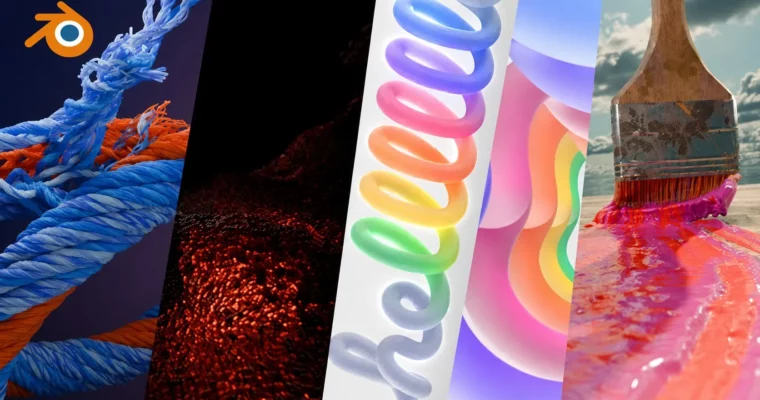
The course really shines in its project-based approach. You’ll build a melting effect, a procedural tree with flowers, a cloud generator, and even a paint brush simulation that leaves a trail. Each project teaches you a specific node or technique—like the Proximity Node for creating forest paths or the Simulation Zone for particle effects. By the end, you’ll have a portfolio of procedural assets and animations that demonstrate real mastery.
What sets this apart is the focus on practical, repeatable workflows. You’re not just following steps; you’re learning why each node works and how to combine them for your own projects. Whether you’re into motion graphics, game environments, or VFX, these skills transfer directly.
🧑🎓 Who this course is for
Blender users who want to move beyond manual modeling into procedural workflows
Motion graphics artists looking to create dynamic, data-driven animations
Game designers and VFX artists needing efficient, non-destructive asset generation
🧑🏫 About the Author
Businge Ismail is a web designer and developer with over a decade of experience. He started his career in a small VFX company, producing visual effects, before transitioning into web development. His background in VFX gives him a unique perspective on 3D workflows, and he’s passionate about sharing practical, project-based knowledge. With over 3,500 students and a 4.3 instructor rating, he knows how to break down complex topics into digestible lessons.
🏁 Final Result
A portfolio of procedural generators including a forest, cloud system, and animated tree
A fully functional paint brush simulation with physics and paint trails
Multiple motion graphics animations like logo reveals and text effects
A crowd simulation and traffic system built entirely with nodes
Curriculum
📋 Course content
Module 1:Introduction to Geometry Nodes
Mastering Geometry Nodes In blender_promo1:39
What you will learn1:24
Introduction to the Geometry Nodes editor6:13
Geometry Nodes Data types5:31
How data flows between nodes6:28
Point Clouds7:11
Using Point Clouds For Instancing7:27
Creating Custom Inputs6:06
Data Visualization6:51
Geometry Attributes6:11
Vertex Manipulation6:46
Forest Generator7:40
Module 2:Working with Curves
Section Intro Curves0:22
Using Curves in Geometry Nodes6:29
Instancing On Curves7:32
Animating Curves8:02
Curve End Point Selection9:02
Using the Attribute Statistics Node5:52
Using Points to Curves Node6:50
Make Objects Follow a Curve Path7:18
Creating A Traffic Simulator in Geometry Nodes5:20
Creating A Simple Crowd Simulation in Geometry Nodes9:02
Simple Crowd Simulation part 211:43
Simple Crowd Simulation part 38:15
UV Unwrapping in Geometry Nodes10:18
Module 3:Powerful Nodes
Section Intro Powerful Nodes0:17
Using the Proximity Node8:33
Creating a Forest Path Using the Proximity Node12:00
Making Environments with the Named Attribute10:40
Using Group Nodes6:58
Using the Switch Node9:28
Power of the Math Node7:52
Using the Raycast Node8:51
Using the repeat zone3:10
Using the Simulation Zone3:42
Using the Foreach Element Zone5:33
Module 4:Exercises
Section Intro Exercises0:22
Making A Melting Effect with Geometry Nodes13:51
Animating A Flower Garden With Geometry Nodes9:27
Making Satisfying Renders With GN18:44
Creating Procedural Roots20:51
Creating A Particle Simulation16:01
Creating Clones And Effectors14:24
Animating Particles to stick on a Surface16:31
MGNB_Wavy Particles3:03
MGNB_Course Outro0:22
Module 5:Motion Graphics Projects
Apple Motion Graphics27:26
Creating Custom Forces with Geometry Nodes16:51
Motion Graphics with Geometry Nodes11:55
Creating an Assemble tool in geometry nodes25:49
Rope and thread generator35:50
Making TV Like Motion Graphics Text Animation17:07
Making a Logo Reveal Animation in blender24:22
Procedural cloth threading animation30:55
Module 6:Advanced Generators
Make A Cloud Generator With Geometry Nodes10:08
Procedural tied chains and ropes22:37
Animated Procedural Tree part 120:55
Animated Procedural Tree part 26:59
Animated Procedural Tree part 3 uv unwrapping and materials6:59
Animated Procedural Tree part 4 Adding flowers to the tree9:16
Animated Procedural Tree part 5 Adding flowers to the tree7:30
Animated Procedural Tree part 6 Adding flowers to the tree6:27
Module 7:Grass and Wind Simulation
Instancing grass on a plane3:58
Adding wind animation to the grass4:21
Creating wind deformation9:02
Concluding and finalizing the animated grass project2:31
Module 8:Paint Brush Simulation
Setting up4:14
Setting up brush physics6:59
Setting up the brush hairs9:16
Multiplying the brush strands6:12
Meshing the brush strands4:17
Creating the paint trail10:10
Meshing the paint5:58
Adding paint to the brush5:00
Mixing in extra colors and conclusion12:14
Watch online or Download for Free
Mastering Geometry Nodes in Blender by Businge Ismail




 Channel