


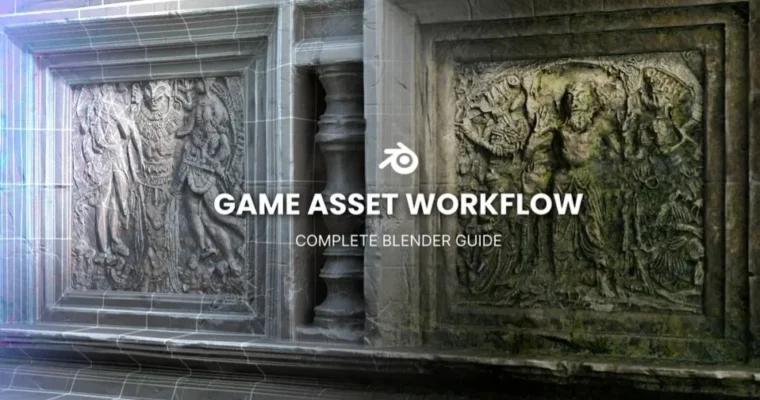
Game Asset Workflow – A Complete Blender Guide by Creative Shrimp

Duration:11+ Hours
Actual Duration:11h 23m
Release date:2025, February
Publisher:Gumroad
Skill level:Intermediate
Language:English
Exercise files:Yes
Software:Blender, Godot
Course URL:https://creativeshrimp.gumroad.com/l/Game-Asset-Workflow-Complete-Blender-Guide
Ready to build awesome game assets but feel lost in the technical weeds? This course from Creative Shrimp breaks down the entire game asset workflow in Blender, guiding you from the initial blockout all the way to exporting for game engines. It’s your comprehensive roadmap to creating stunning, professional-quality assets.
🎯 What you’ll learn
- Master modeling and sculpting techniques for high-detail assets.
- Create realistic PBR materials and textures.
- Understand UV mapping and texture baking.
- Optimize assets for game engines through retopology and decimation.
- Export your finished assets for use in game development.
✅ Requirements
- Skills: Familiarity with Blender’s interface, basic tools, and menus. Prior experience with simple 3D tutorials is recommended.
- Tools: Blender (version 4.3 or later), Godot (version 4.3 or later).
- Hardware: A computer capable of running Blender and Godot smoothly.
📝 Description
This course dives deep into the complete game asset creation pipeline using Blender. You’ll follow a real-world project, building an ancient wall asset from scratch. The curriculum is split into two main sections: Designing the Asset covers everything from initial blockout and high-poly sculpting to detailed texturing using PBR materials. The second section, Optimizing for Game Engines, focuses on crucial steps like UV unwrapping, normal map baking, decimation, and preparing your model for real-time performance. We’ll explore various techniques, including depthmap-based displacement and custom triplanar mapping, and even touch upon AI-driven methods for tasks like depth detection. The course emphasizes practical application, ensuring you understand the ‘how’ and ‘why’ behind each step.
🧑🎓 Who this course is for
- Intermediate 3D artists looking to specialize in game asset creation.
- Hobbyists who want to build portfolio-ready assets for games.
- Developers aiming to improve their 3D asset creation skills within Blender.
🧑🏫 About the Author
Creative Shrimp, founded by Gleb Alexandrov and Aidy Burrows, is renowned for its high-quality 3D art and educational content. Gleb, an art director and sculptor, handles the sculpting and materials. Aidy, a gamedev veteran and Blender expert, focuses on asset optimization, UVs, retopology, and texture baking. Together, they bring a wealth of industry experience to this comprehensive guide.
🏁 Final Result
- A portfolio-ready, game-ready ancient wall asset, complete with optimized geometry, UVs, and baked PBR textures, ready for integration into game engines like Godot.
 Channel



thank you you’re the best.