


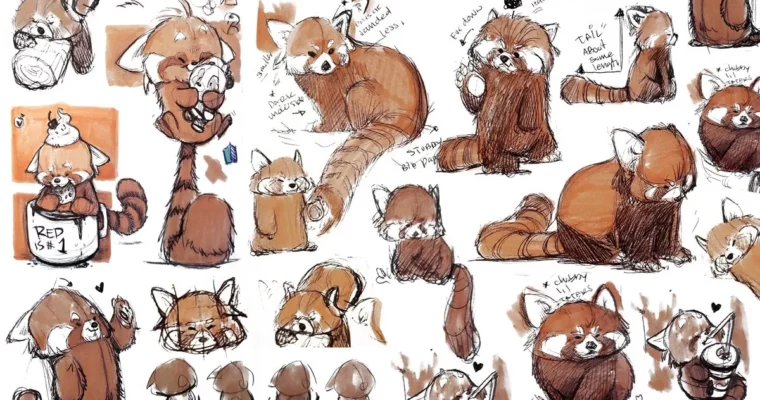
21 draw – Designing Fun Animal Characters by Rodgon

Duration:6+ hours
Actual Duration:6h 14m
Release date:2026, April 17
Publisher:21
Skill level:Intermediate
Language:English
Exercise files:Yes
Software:Adobe Illustrator, Clip Studio Paint, Pencil & Paper, Wacom Cintiq
Course URL:https://www.21-draw.com/course/fun-animal-characters/
Ready to draw some seriously cute animal characters? This course is your ticket to creating adorable creatures from the ground up, then polishing them into professional-level art. Whether you’re just starting out or looking to boost your skills, you’ll learn how to make characters that pop and are ready for anything, from stickers to branding.
🎯 What you’ll learn
- Create a wide range of cute animal characters.
- Use simple perspective to give your characters a 3D feel.
- Work with references to nail animal features and traits.
- Draw dynamic poses that really show off personality.
- Add outfits and accessories with easy techniques.
- Use Adobe Photoshop for raster drawing.
- Use Adobe Illustrator for vector drawing.
- Apply versatile techniques to make characters look cute and chubby.
- Discover handy tools and workflows to improve your digital art.
- Design characters for various uses like product design, branding, and stickers.
- Follow a client brief to professionally design and export characters in correct formats.
✅ Requirements
- Skills: Basic understanding of drawing principles, interest in character design.
- Tools: Pencil & Paper, Digital drawing software (e.g., Clip Studio Paint, Adobe Photoshop), Vector drawing software (e.g., Adobe Illustrator).
- Hardware: Drawing tablet (e.g., Wacom Cintiq) recommended for digital work.
📝 Description
Want to draw awesome animal characters? This course is your guide! Instructor Rodgon, a pro at fluffy creature design, will walk you through creating super cute cartoon animals from scratch and turning them into polished pieces. If you’re already an artist, you’ll learn how to boost your value in the booming market for cute animal art.
You’ll also pick up essential skills in digital drawing, professional illustration, and both raster and vector design. Each lesson is designed to improve your artwork, build confidence, and sharpen your drawing abilities. Get ready to have a blast creating charming animal characters that will capture everyone’s attention!
🧑🎓 Who this course is for
- Anyone who wants to draw cute animal characters.
- Artists looking to create cartoons based on real-life references.
- Individuals interested in learning both raster and vector drawing workflows.
- Those eager to learn new drawing techniques, tools, and skills.
🧑🏫 About the Author
Rodgon is an illustrator based in San Diego, with experience in both comics and animation. He actively shares art tips on social media, aiming to inspire aspiring artists. His expertise lies in designing cute and cuddly creatures, making him the perfect guide for this course.
🏁 Final Result
- A portfolio-ready collection of adorable animal characters, designed from scratch using professional digital illustration techniques, suitable for various applications like product design, branding, or personal projects.
 Channel


Please upload “21 draw – Beginner’s Guide to Drawing Pets by by Rodgon”
that one is missing
Beginner’s Guide to Drawing Pets by by Rodgon. Please