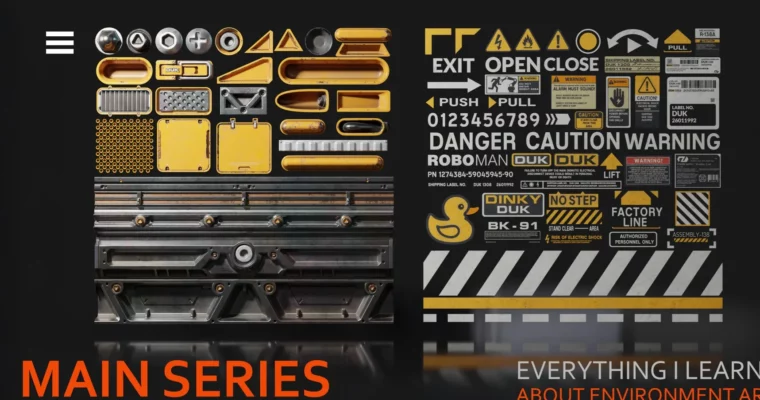
Everything I learnt about Environment Art – Part 3 – Decals & Trimsheets by Ben Keeling

Duration:5 hours 51 minutes
Actual Duration:5h 50m
Release date:2025, October 20
Publisher:Artstation
Skill level:Intermediate
Language:English
Exercise files:Yes
Software:Blender, Photoshop, Substance Painter
Course URL:https://www.artstation.com/marketplace/p/x9Bba/everything-i-learnt-about-environment-art-part-3-decals-trimsheets
This tutorial is your third deep dive into environment art, aimed at helping beginners and intermediate artists level up their skills. We’re focusing on two crucial techniques: decals and trimsheets, sharing hard-won lessons and practical advice from professional experience.
🎯 What you’ll learn
- Understanding the purpose and creation of decals in 3D environments.
- Practical application of decals using tools like Decal Machine.
- How to design and implement efficient trimsheets for asset creation.
- Workflow for texturing and baking trimsheets.
- Integrating trimsheets into your 3D scenes.
✅ Requirements
- Skills: Basic understanding of 3D modeling principles, familiarity with 3D software interfaces.
- Tools: Blender, Photoshop, Substance Painter, PureRef.
- Hardware: A computer capable of running the specified software smoothly.
📝 Description
This course dives into the practical application of decals and trimsheets, two essential techniques for creating detailed and efficient 3D environments. Each chapter starts with a clear explanation of the concepts, covering the ‘what,’ ‘why,’ and ‘how’ behind each method, along with the relevant tools and workflows. The theory is then immediately put into practice through live demonstrations, using examples drawn from personal art and professional experience. You’ll learn to integrate these techniques seamlessly into your own projects, enhancing realism and visual fidelity.
🧑🎓 Who this course is for
- Artists looking to add more detail and realism to their 3D environments.
- Beginners and intermediate 3D artists aiming to improve their game art pipeline.
- Anyone interested in learning efficient texturing and asset creation workflows.
🧑🏫 About the Author
Ben Keeling is an experienced environment artist sharing his hard-won knowledge. This tutorial series distills his personal lessons and professional insights, offering practical advice and step-by-step guidance. He aims to demystify complex environment art techniques, making them accessible to a wider audience.
🏁 Final Result
By the end of this course, you will have a solid understanding of how to create and implement decals and trimsheets, enabling you to produce more detailed and visually compelling 3D environments for your portfolio or game projects. You’ll also gain access to supplementary PureRef files with further breakdowns and resources.
 Channel