Ad Clicks : Ad Views : Ad Clicks : Ad Views : Ad Clicks : Ad Views : Ad Clicks : Ad Views :
Oh Snap!

It looks like you're using an adblocker. Adblockers make us sad. We use ads to keep our content happy and free. If you like what we are doing please consider supporting us by whitelisting our website. You can report badly-behaved ads by clicking/tapping the nearby 'Advertisement' X text.

Unity Real Time Strategy Build Your Own RTS Game by GameDev.tv Team (Chris Kurhan)

Unity Real Time Strategy Build Your Own RTS Game by GameDev.tv Team (Chris Kurhan)

/

Author:GameDev.tv Team (Chris Kurhan)

Duration:25.5 hours

Release date:2025, November

Publisher:Udemy

Skill level:Intermediate

Language:English

Exercise files:Yes

Software:Unity

Course URL:https://www.udemy.com/course/unity-rts

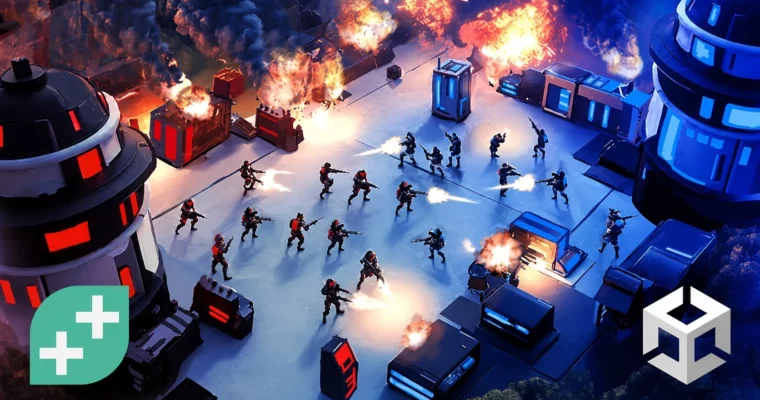
Build a full RTS game in Unity 6 with smart units, fog of war, and scalable systems—no magic, just solid code.

Build a full RTS game in Unity 6, from unit AI to fog of war. You’ll create smart systems that scale, using behaviour trees, ScriptableObjects, and an event bus. No hard-coded chaos—just clean, config-driven code.

🎯 What you’ll learn

  • Build your own RTS game in Unity, from units to buildings to upgrades and more.
  • Design gameplay systems that scale, so your project won’t buckle as it levels up.
  • Create unit AI that reacts to player input using behaviour trees (no magic, just logic).
  • Set up fog of war to keep your players guessing (and scouting like pros).
  • Develop a config-driven setup to add new units fast—no spaghetti code here.
  • Use ScriptableObjects to organise your game like a pro dev.
  • Hook up an event bus system so your units can talk without yelling across the codebase.
  • Craft upgrade systems that run from the editor, not hard-coded chaos.

✅ Requirements

  • Skills: Intermediate understanding of C# and a good grasp of using the Unity Editor.
  • Tools: A 3-button mouse.
  • Hardware: A computer capable of running Unity 6.

📝 Description

Ever dreamed of making your own real time strategy game but got totally pwned by the complexity? You’re not alone. RTS games are beasts—but this course is here to help you tame ’em.

You’ll build out a full RTS from scratch—units, buildings, upgrades, fog of war, the whole lot. You even get a starter project with models and a level, so you can hit the ground running.

Wanna make your units act less like chaos goblins? You’ll build behaviour trees that respond properly to player input. We’re talking powerful coding stuff too—event buses, ScriptableObjects, config-driven systems—big tools that make your game scalable and pro-level tidy.

Sick of hard coding every single stat or upgrade? You’ll make a fully editable system where new units and upgrades can be added in a flash. This course shows you how to build smart systems from the get-go, so your game grows with you.

If you’ve already got a decent handle on Unity and C#, and you’re keen to go deeper, this course is perfect for you. RTS fans and future AI masterminds, you’re gonna love it.

🧑‍🎓 Who this course is for

  • If you’re interested in making a Unity RTS game, then this is quite literally THE course for you!
  • Equally, if you’re looking to learn how to make complex Game AI – sign up now.
  • And if you’re already an intermediate C# / Unity dev and you’re looking to expand your skillset, you’re totally in the right spot.

🧑‍🏫 About the Author

The GameDev.tv Team has taught over 1 million students how to design, develop, and publish their own games using Unity, Unreal, Godot, Blender, and more. They are known for some of the highest-rated and best-selling game development courses on Udemy.

Chris Kurhan graduated with a Software Engineering degree after always tinkering with custom map editors in games like StarCraft and CounterStrike. He has been programming since he was old enough to understand Visual Basic. In 2015, he got into indie game development after working in enterprise software. In 2021, he started the LlamAcademy YouTube channel to share game dev knowledge, emphasizing accessibility with full project code available on GitHub.

🏁 Final Result

  • The bones of your very own RTS game, complete with unit AI, building systems, fog of war, and a minimap.
Curriculum

📋 Course content

  1. Module 1:  Welcome & Camera Setup
    • Welcome to the Course1:39
    • Initial Project Setup6:27
    • Cinemachine Camera7:55
    • Top-Down Keyboard Movement7:46
    • Camera Zoom14:09
    • Camera Rotation6:05
    • Mouse Edge Panning12:27
    • Level Bounds7:04
  2. Module 2:  Unit Selection & Movement
    • What is a Navigation Mesh?7:19
    • The NavMeshAgent & Moving on a NavMesh11:56
    • Unit Selection13:04
    • Unit & Decal Rendering Layers6:03
    • Right Click to Move8:09
    • Drag Selection UI10:37
    • A Slight Detour: The Event Bus14:08
    • Deselecting Units with the Event Bus4:27
    • Drag Select Multiple Units15:16
    • Add Units to Selection4:22
    • Areas and Obstacles9:00
    • A Method to Prevent Unit Dancing14:46
    • Multiple NavMeshes8:54
  3. Module 3:  Buildings & Commands
    • Our First Building – The Supply Hut6:24
    • Unifying Interactions with Buildings & Units3:43
    • ScriptableObjects as Configuration10:29
    • The Command Post3:53
    • Actions with the Command Pattern12:43
    • Command Context10:10
    • Show Commands on the UI13:14
    • Issue Commands from the UI14:17
    • The Build Unit Command12:17
    • Building Queue8:01
    • Diving into the UI13:56
    • The Progress Bar9:08
    • Showing the Build Progress15:35
    • Cancel Items in the Queue17:16
    • Even More Buildings & Units6:44
  4. Module 4:  Resource Gathering with Behavior Trees
    • Using Unity Behavior13:55
    • Custom Nodes in Unity Behavior10:40
    • Gatherable Supplies10:43
    • Unit Commands13:03
    • Gathering Supplies14:52
    • Return Supplies12:28
    • Smooth Gathering Movement5:39
    • Pick Better Gathering Locations5:34
    • Pick Only Not Busy GatherableSupplies13:10
    • Gathering Edge Cases11:54
    • Synchronize Animations11:25
    • Using Behavior Events10:12
    • Player Supplies5:38
    • Using Conditional Branches6:07
    • Returning Supplies11:34
  5. Module 5:  Building Construction & UI
    • Building UI Menus10:40
    • Split Unit and Building SOs11:23
    • Placing Buildings13:05
    • Build Building Action10:53
    • Parallel Execution in the Behavior Tree13:43
    • Animate Worker While Building7:33
    • Manage Competing Parallel Executions6:41
    • Finalize Building14:36
    • Cancel Building7:53
    • Unit Death Event4:05
    • Building Progress8:08
    • Resume Building12:54
    • Building Restrictions10:12
    • Building Restriction Visuals8:34
    • Distance Checking Restrictions7:27
    • Pay for Buildings7:45
    • Refund Cancellation3:28
    • Lock Unavailable Commands6:38
    • Lock Tooltips9:40
    • Dynamic Tooltips9:10
    • Single Unit Selected UI11:37
    • Building Under Construction UI14:03
    • Building Spawn Event4:35
    • Increase Health While Building7:52
    • Single Unit Commands9:00
    • Building Events14:58
    • Using Sub Graphs14:37
    • Building Edge Cases7:44
    • Configure the Buildings11:55
  6. Module 6:  Combat & Military Units
    • A New Tree for Military Units8:27
    • Taking Damage4:24
    • Sense Nearby Units9:52
    • AI Unit Awareness6:29
    • Attack Configuration6:51
    • The Attack Command5:28
    • Attack & Apply Damage13:11
    • Polish the Attack Behavior7:48
    • Attack-Move17:12
    • The Grenadier4:54
    • Grenadier Projectile Visualization11:16
    • Timing Projectile Damage4:00
    • Area of Effect Damage11:50
    • Create the Air Transport5:18
    • Unit Transport Configuration4:47
    • Load Units Behavior Tree7:43
    • Load Unit Command11:19
    • Load Into & Hidden Commands13:20
    • Load Multiple Units9:31
    • Unload Units9:37
    • Unit Transport UI11:47
    • Unit Load & Unload Events6:02
    • Polishing & Clean Up11:59
  7. Module 7:  Unit Ownership & Resources
    • Unit Ownership9:42
    • Event Bus Channels Per Owner10:55
    • Owners on the Player Input & UI3:08
    • Track Supplies Per Owner10:24
  8. Module 8:  Tech Tree & Upgrades
    • Tech Tree Scriptable Object11:38
    • Unlocking Dependencies9:41
    • Lock Commands with Unmet Dependencies5:21
    • Upgrade ScriptableObject8:41
    • Research Upgrades15:20
    • Multi-Tier Upgrades6:11
    • A More Responsive UI8:46
    • Apply Upgrades16:54
    • Generify Property Access13:03
    • Safeguard Base Configurations9:07
    • Handle Losing Dependencies6:21
    • Show Dependencies on the UI11:01
    • Multi-Building Research Locking8:50
  9. Module 9:  Fog of War
    • Fog of War Camera Setup12:21
    • Render the Fog10:16
    • Keep Track of Explored Locations11:25
    • Merge Visible & Explored Fog8:15
    • Softer Fog13:53
    • Unit Sight Configs8:22
    • Sight Ownership1:50
    • Determine Unit Visibility9:02
    • Hide Units in the Fog5:05
    • Hide Buildings in the Fog3:23
    • Hide Supplies in the Fog8:52
    • Placeholders in Explored Areas9:34
    • Placeholder Removal10:24
    • Block Clicks on Invisible Objects7:02
    • Unit Fog Amnesia10:30
    • Clean Up9:16
    • Prevent Building in the Fog10:01
  10. Module 10:  Minimap
    • Show the Minimap5:35
    • Unit Minimap Display7:29
    • Show Camera Bounds on the Minimap8:15
    • Hide Undiscovered Supplies7:06
    • Move the Camera with the Minimap10:43
    • Right Click on the Minimap9:02
    • Issue any Command on the Minimap5:55
  11. Module 11:  Polish & Final Features
    • Fix Some Sneaky Building Bugs11:07
    • Fix Some Sneaky Unit Bugs5:30
    • Unit Population Cost and Supply9:56
    • Finalize Unit Population Cost and Supply13:01
    • Start Location13:03
    • Show Damage on the UI11:00
    • Multiple Units Selected UI15:13
    • Control Groups15:33
    • Hotkeys7:11
    • Click Indicator8:31
    • Rally Points16:43
    • Mining Juice15:19
Watch online or Download for Free
Unity Real Time Strategy Build Your Own RTS Game by GameDev.tv Team (Chris Kurhan)
NAME
SIZEDURATION

Download all Videos (149)
3.2 GB


Download all

Join us on
  Channel    and      Group

Leave a Comment

Your email address will not be published. Required fields are marked *