Ad Clicks : Ad Views : Ad Clicks : Ad Views : Ad Clicks : Ad Views : Ad Clicks : Ad Views :
Oh Snap!

It looks like you're using an adblocker. Adblockers make us sad. We use ads to keep our content happy and free. If you like what we are doing please consider supporting us by whitelisting our website. You can report badly-behaved ads by clicking/tapping the nearby 'Advertisement' X text.

Full Course Unity 6 & C# – Complete Beginner to Intermediate by Bhairab Roy

Full Course Unity 6 & C# – Complete Beginner to Intermediate by Bhairab Roy

/

Author:Bhairab Roy

Duration:37 hours and 10 minutes

Release date:2025, September

Publisher:Udemy

Skill level:Beginner

Language:English

Exercise files:Yes

Software:Unity 6, C#

Course URL:https://www.udemy.com/course/complete-unity-6-c-course-beginner-to-intermediate/

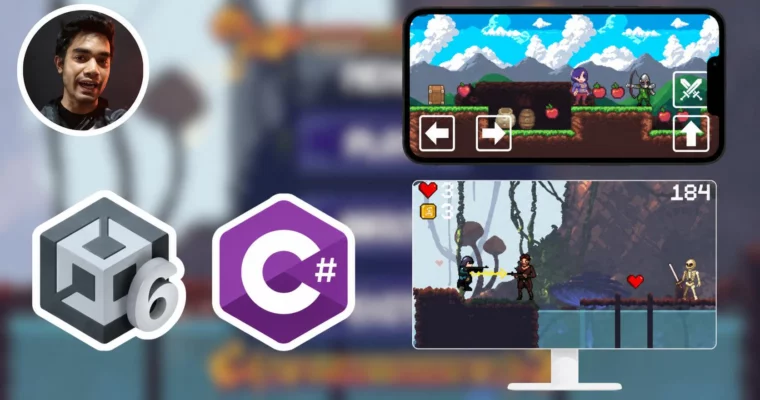
Build two complete 2D games from scratch while learning Unity 6 and C# programming, from absolute basics to mobile deployment.

This course is a straight shot from zero to making your own 2D games in Unity 6. You’ll build two complete projects—an endless runner and a platformer—while learning C# scripting, animation, UI, and mobile build setup. No prior experience needed; just bring a willingness to code along.

🎯 What you’ll learn

  • Master Unity 6 interface and core concepts like GameObjects, Components, and Scenes.
  • Write clean C# scripts for player movement, jumping, shooting, and enemy AI.
  • Implement tilemaps, parallax backgrounds, and camera systems.
  • Build complete UI systems including health bars, score counters, and game over screens.
  • Export your game for PC, WebGL, and Android (APK & AAB for Play Store).

✅ Requirements

  • Skills: Basic knowledge of physics and mathematics.
  • Tools: Unity 6 installed (free version is fine).
  • Hardware: A computer capable of running Unity 6 (dedicated GPU recommended).

📝 Description

This isn’t a theory-heavy lecture series. You’ll be writing code and building levels from the very first section. The course is split into two distinct projects: an endless runner and a platformer. The runner focuses on procedural tilemap spawning, parallax backgrounds, and a high-score system. The platformer project dives deeper into complex player mechanics like double/tple jumps, enemy AI with patrolling and chasing, destructible objects, and a full victory condition.

The teaching style is hands-on and direct. Each lecture covers a specific feature—like setting up a camera shake with Cinemachine or creating a singleton game manager—and you’ll see the code written in real-time. There are also quizzes and assignments to reinforce what you’ve learned. By the end, you’ll not only understand C# fundamentals like loops, functions, and classes, but you’ll also know how to package your game for PC, WebGL, and Android (including the specific settings for an AAB build for the Play Store).

🧑‍🎓 Who this course is for

  • Absolute beginners who have never opened Unity or written a line of C# code.
  • Intermediate learners who want to solidify their 2D game development skills with a structured, project-based approach.
  • Hobbyists looking to publish their first game on mobile or web platforms.

🧑‍🏫 About the Author

Bhairab Roy is a Unity and C# developer with over 4 years of experience in game development, specializing in 2D games. Since January 2024, he has been teaching game development, helping students improve their practical skills. He is passionate about building games and sharing knowledge in a clear, step-by-step manner.

🏁 Final Result

  • A fully playable 2D endless runner game with procedural level generation, enemies, and a high-score system.
  • A complete 2D platformer game with multiple levels, enemy AI, collectibles, traps, and a victory screen.
  • A ready-to-upload APK and AAB file for Android, plus a WebGL build for platforms like Itch.io.

Curriculum

📋 Course content

  1. Module 1: Unity 6 & C# Fundamentals
    • Introduction1:12
    • Creating Our Project & Unity 6 Basics Overview (UI)17:37
    • Player Setup12:52
    • Animation In Unity, Player Animation8:42
    • Animation Transition, Player Animation Transition9:30
    • C# Script in Unity, Player C# Script for Movement, Classes & Functions20:44
    • Player Acceleration & Player Jump with C#20:36
    • Collision in Unity, Player one time JUMP22:39
    • Animation Transition Player with C#11:12
    • Camera Follow Player C# Script12:20
  2. Module 2: Endless Runner – Tilemaps & Spawning
    • Introduction to Tile Map & Basics Overview14:00
    • Tiles Setup with Tile Map Collider14:43
    • Tile Ground Spawn Logic27:12
    • Making Multiple Tile Grounds: Process5:42
    • Tile Ground Spawner C# Script & Ground Spawn21:10
    • Random Tile Ground Spawn with C#7:22
    • Next Ground Tile Spawn C# Scripting19:42
    • For Loop in C# to Spawn Initial Ground Tiles8:15
    • Background Setup10:45
    • Parallax Effect & Endless Background26:55
  3. Module 3: Endless Runner – Combat & Enemies
    • Player Shooting C# Scripting24:05
    • Line Renderer Setup for Shooting Player25:39
    • Enemy Setup with Animation, Enemy 115:35
    • Enemy C# Script & Enemy Attack Scripting12:24
    • Enemy Animation Transition via C#, Enemy Shooting11:10
    • Enemy Shooting Raycast with C#18:21
    • Line Renderer Setup in Enemy for Shooting (Raycast)21:57
    • Enemy Health & Damage C# Scripting33:11
    • Floating Text & Floating C# Script22:43
    • Player Health & Damage C# Scripting, Player Script16:26
    • Enemy 2 Setup & Enemy 2 Script19:17
    • Enemy 2 Animation & Transition via C# Script14:01
    • Enemy Attack C# Scripting18:44
    • Enemy Health & Damage C# Scripting25:12
    • Fixing Line Renderer Bug, Player Shooting8:50
  4. Module 4: Endless Runner – UI, Game Manager & Polish
    • UI in Unity, Player Health UI14:05
    • Player Health UI C# Scripting5:44
    • Singleton Pattern, Making Clean Code17:57
    • Serialize Field, Hide in Inspector & Header to Code19:54
    • Game Manager C# Script & Player Die Explosion24:26
    • Camera Shake10:45
    • C# Scripting for Camera Shake15:32
    • Heart Setup with Animation, Collatable Items!14:55
    • Collecting C# for Heart16:50
    • Coin Setup & Collecting C# Script, Collectable Items!22:39
    • UI Coin & Scripting10:46
    • Current Score, Score UI & Score Manager C# Script24:27
    • Game Over UI Setup & Buttons in UNITY18:13
    • Scene Management C# Script to Load Scenes (Game Over UI)22:39
    • High Score Set C# Class27:18
    • Menu & About Scenes23:03
    • Menu & About Scene C# Script to Load different Scenes22:19
    • Traps & Player die Logic & Scripting (Fall Down)30:50
    • Making The LEVEL, Placing Everything!24:33
    • Audio in Unity & Sound Manager C# Script24:05
    • Building The GAME!8:30
  5. Module 5: Platformer Game – Advanced Mechanics
    • 1 – Player Movement C# Scripting22:17
    • 2 – Player Single, Double, Triple Jump Scripting33:25
    • 3 – Player Sprites Change, Sprites Setting up6:56
    • 4 – Player Flip C# Scripting14:28
    • 5 – Player All Animations Clips Creating15:29
    • 6 – Player Animation Transition Part 114:55
    • 7 – Player Animation Transition Part 210:19
    • 8 – Player Run, Jump Animation via C# Scripting21:53
    • 9 – Playing Player Random Attack Animation via Scripting20:00
    • 10 – Player Attack Function C# Scripting20:41
    • 11 – Enemy 1 Animations, Components Setup15:27
    • 12 – Enemy 1 Animation Transitions14:27
    • 13 – Enemy 1 Animation Transitions via Scripting24:51
    • 14 – Enemy 1 Flip via C# Scripting16:09
    • 15 – Enemy 1 Arrow Fire Scripting26:51
    • 16 – Enemy 1 Arrow C# Script & Destroy Arrow7:19
    • 17 – Enemy 1 Health & Damage C# Scripting18:44
    • 18 – Enemy 1 Death Animation, Destroy via C# Script21:04
    • 19 – Enemy 1 Hurt Animation via Scripting5:47
    • 20 – Floating Text & Spawn From Enemy 130:27
    • 21 – Random Floating Text Number C# Script13:34
    • 22 – Enemy Setup with Animation & C# Script19:22
    • 23 – Enemy 2 Patrolling C# Scripting33:51
    • 24 – Enemy 2 Move & Stop C# Scripting23:06
    • 25 – Enemy 2 Animation Transitions12:05
    • 26 – Enemy 2 Flip C# Scripting13:01
    • 27 – Enemy 2 Chase Player Scripting19:57
    • 28 – Enemy 2 Health & Damage C# Scripting29:38
    • 29 – Enemy 2 Hurt & Death Animation via Scripting15:31
    • 30 – Enemy 2 Attack Scripting to Damage Player25:20
    • 31 – Player Health & Damage C# Scripting28:39
    • 32 – Cinemachine Camera Install & Player Follow12:48
    • 33 – Camera Shake with Cinemachine & Shake Scripting31:52
    • 34 – Making Clean Code with Singleton11:59
    • 35 – Backgrounds & Parallax Effect with Cinemachine21:58
    • 36 – Tile Map Setting Up!22:20
    • 37 – Making The Level, Placing Tiles Process3:54
    • 38 – Barrel Setup, Destructible Object15:09
    • 39 – Pod & Barrel, Destructibles36:08
    • 40 – Destructible, Enemies Placing Process2:15
    • 41 – Saw Setup & C# Scripting Traps36:28
    • 42 – Spike Head, Trap17:29
    • 43 – Fire Setup, Trap20:11
    • 44 – Traps Damage on Player & Player Respawn, Trap22:02
    • 45 – Apple Setup, Collectable Items21:28
    • 46 – Apple Collect, Animation Scripting19:26
    • 47 – Heart Setup with Animation, Collectables13:45
    • 48 – Heart Collect C# Scripting22:05
    • 49 – UI Setup, Apple & Heart Icon15:05
    • 50 – Apple & Health of Player UI Scripting, UI14:09
    • 51 – Game Over UI Setup15:36
    • 52 – Using LeanTween to Bring up Game Over UI BG, UI17:39
    • 53 – Scene Management C# Script to Reload the Level & Menu, UI13:20
    • 54 -Victory UI & Scripting, UI23:07
    • 55 – Menu Scene Setup(Main Menu)18:02
    • 56 – About Menu Setup17:10
    • 57 – Play & Exit Buttons Scripting, UI15:28
    • 58 – Fixing The Bug & Loading Menu Scene Scripting6:49
    • 59 – Important Assignment for You!!1:40
    • 60 – Victory UI Bring up Scripting & Bug Fixing30:28
    • 61 – Collectable items placing & Traps etc…1:14
  6. Module 6: Build & Deploy
    • 62 – PC Build11:12
    • 63 – WEB Build7:35
    • 64 – Testing the Game(WEB)1:03
    • 65 – Uploading the Game on Website(Itch)15:51
    • 66 – Simple Input Install, Touch Buttons17:42
    • 67 – Jump & Attack Buttons Setup11:35
    • 68 – Hooking Jump & Attack Functions to Buttons12:29
    • 69 – Switching to Android, Some Settings & Screen Fit Checking6:36
    • 70 – Mobile Settings(Pretty Important)4:25
    • 71 – Testing the Game During Live Dev5:27
    • 72 -APK Build Steps, Setting Steps…18:25
    • 73 – But got Fixed and The Main Problem5:04
    • 74 – APK Manually drag into The Phone2:38
    • 75 – Testing The APK in Mobile2:29
    • 76 – AAB Build for Play Store Ready Game7:36
Watch online or Download for Free
Full Course Unity 6 & C# – Complete Beginner to Intermediate by Bhairab Roy
NAME
SIZEDURATION
6 – Floating Text & Player(Health & Damage)
314.7 MB
15 – Level Making
226.4 MB

Download all Videos (56)
7.5 GB


Download all

Join us on
  Channel    and      Group

Leave a Comment

Your email address will not be published. Required fields are marked *