The ULTIMATE Guide To Hard Ops & Boxcutter (2026) by Ryuu and Josh

Duration:20+ hours
Actual Duration:20h 22m
Release date:2025
Publisher:Blender Bros
Skill level:Intermediate
Language:English
Exercise files:Yes
Software:Blender
Course URL:https://www.blenderbros.com/the-ultimate-guide-to-hard-ops-boxcutter-2-0
Ready to supercharge your Blender workflow? This course is your express ticket to mastering Hard Ops and Boxcutter, two essential add-ons for any serious hard surface modeler. Forget slow, tedious work; you’ll learn to model 8x faster, turning complex ideas into stunning visuals in a fraction of the time. Built on over six years of professional modeling experience, this guide is packed with practical, real-world applications.
🎯 What you’ll learn
- Install, manage, and troubleshoot Hard Ops and Boxcutter.
- Understand the core differences and synergistic power of both add-ons.
- Master essential tools and menus within real-world modeling scenarios.
- Efficiently perform boolean operations, bevels, and array systems.
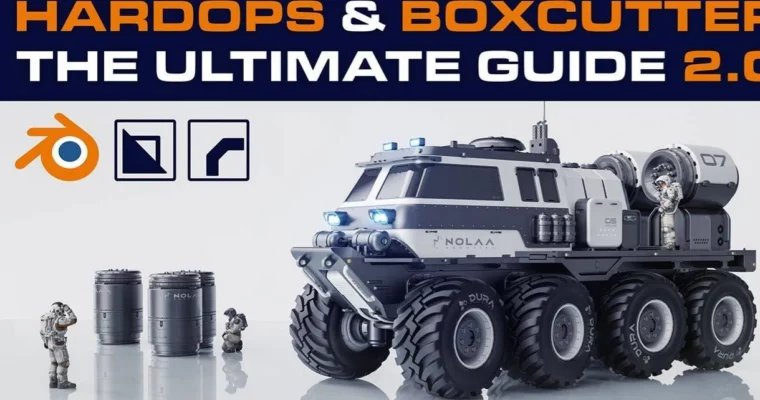
- Model a complete sci-fi truck from a basic blockout to a detailed asset.
- Apply greebling and surface detailing techniques for professional results.
- Optimize meshes and prepare them for rendering and texturing.
- Enhance renders with photoshop post-processing.
- Discover undocumented features and customize your workflow.
✅ Requirements
- Skills: Basic familiarity with the Blender interface.
- Tools: A 3-button mouse is highly recommended.
- Hardware: A computer capable of running Blender smoothly.
📝 Description
This isn’t just another tutorial; it’s a complete overhaul of how you approach hard surface modeling in Blender. We’ve rebuilt this course from the ground up, incorporating over six years of professional industry experience. You won’t just learn isolated features; you’ll see how Hard Ops and Boxcutter work together in real-world projects, building an intuitive and professional workflow. We cover everything from initial setup and troubleshooting to advanced techniques and creating portfolio-ready renders. Get ready to transform your modeling speed and quality.
🧑🎓 Who this course is for
- Anyone struggling with slow Blender workflows, especially with boolean operations and bevels.
- Users who own Hard Ops or Boxcutter but aren’t getting the most out of them.
- Individuals tired of piecing together conflicting free tutorials.
- Aspiring modelers who want to create complex sci-fi vehicles, mechs, or industrial assets.
- Anyone looking to build a strong, portfolio-worthy project.
- Artists aiming to significantly increase their modeling speed and efficiency.
🧑🏫 About the Author
Ryuu and Josh from Blender Bros bring over six years of professional 3D modeling experience to this course. They’ve worked on numerous industry projects, honing their skills with tools like Hard Ops and Boxcutter. Their passion is simplifying complex workflows and sharing practical knowledge, helping thousands of students worldwide improve their Blender skills.
🏁 Final Result
By the end of this course, you’ll have a fully detailed, professionally rendered sci-fi truck model, ready to showcase in your portfolio. You’ll possess a deep understanding of Hard Ops and Boxcutter, enabling you to model complex hard surface assets with incredible speed and precision.
 Channel