Realistic Real-time VFX course in Unity – From zero to Pro by Vladyslav Horobets

Duration:18 hours on-demand video
Actual Duration:17h 49m
Release date:2026
Publisher:Udemy
Skill level:Intermediate
Language:English
Exercise files:Yes
Software:Unity, Adobe Photoshop, Blender, EmberGen, Amplify Shader Editor
Course URL:https://www.udemy.com/course/realistic-real-time-vfx
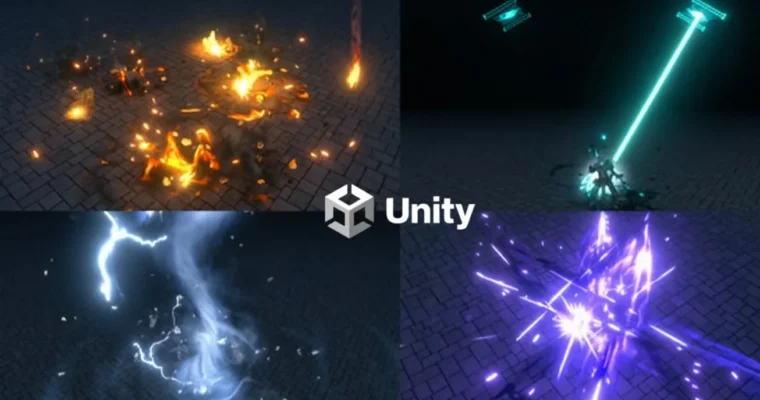
Ready to make awesome visual effects for games? This course is your ticket to becoming a VFX artist, covering everything from setting up Unity to creating complex effects like fire, ice, and magic spells. You’ll learn to craft stunning visuals that will make your projects pop.
🎯 What you’ll learn
- Create realistic and stylized real-time VFX
- Render animations in EmberGen
- Draw textures in Photoshop
- Make VFX models in Blender
- Present and animate your effects using Cinemachine
✅ Requirements
- Skills: Basic understanding of 3D concepts is helpful but not strictly required.
- Tools: Unity 2020+, Adobe Photoshop, Blender, EmberGen.
- Hardware: A computer capable of running Unity, Photoshop, Blender, and EmberGen smoothly.
📝 Description
This course dives into creating a wide variety of real-time visual effects within Unity, suitable for both beginners and seasoned professionals. You’ll start with the fundamentals, covering Unity interface setup, particle systems, materials, and textures. The curriculum progresses logically, building on previous lessons, so you’ll create textures and shaders for one effect and then apply them to subsequent ones. You’ll learn to draw textures in Photoshop, model assets in Blender, and render animations in EmberGen. Special attention is given to shader creation using Amplify Shader Editor, including practical examples like a two-sided cutout shader and a lightning shader. The course also touches on basic scripting and animating effects with Cinemachine, including camera shake. The instructor emphasizes a structured learning path, moving from simple to complex effects, with the goal of making even advanced techniques accessible. While some software requires purchase, free trial versions are available. Practicing 1-2 hours daily, you can expect to complete the course in about 3 months.
🧑🎓 Who this course is for:
- Beginners with no prior experience in creating VFX in Unity.
- Experienced special effects artists looking to expand their skillset.
- 3D Generalists, Programmers, and Animators wanting to add VFX capabilities.
- 3D Modellers interested in visual effects integration.
🧑🏫 About the Author
Vladyslav Horobets is a VFX artist with 10 years of industry experience, known for being a top visual effects seller on the Unity Asset Store. He has extensive experience working with both Unreal Engine and Unity, and has been creating VFX tutorials on YouTube for 9 years. Vladyslav possesses strong skills in shaders, models, and textures, and is proficient in C# programming and Unreal Engine’s Blueprints.
🏁 Final Result
- A portfolio showcasing a diverse range of realistic and stylized real-time VFX, including explosions, magical spells, elemental effects, and more, all created within Unity.
 Channel