It looks like you're using an adblocker.
Adblockers make us sad. We use ads to keep our content happy and free. If you like what we are doing please consider supporting us by whitelisting our website. You can report badly-behaved ads by clicking/tapping the nearby 'Advertisement' X text.
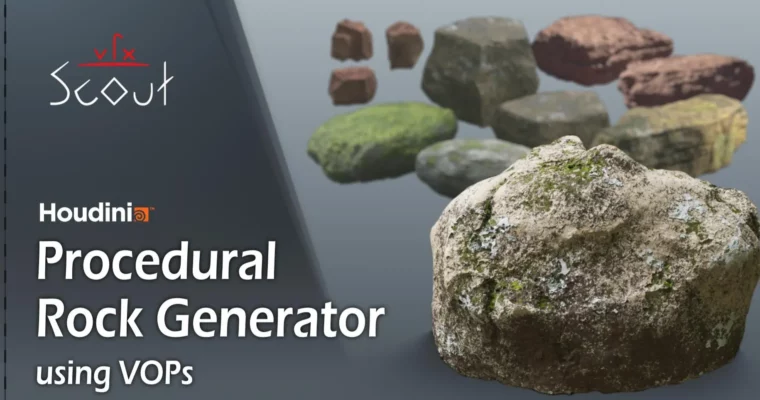
Procedural Rocks in Houdini using VOPs by Moritz H
Learn to build a versatile procedural rock generator in Houdini using VOPs.
Ready to ditch manual sculpting and generate an endless supply of rocks? This course dives into building a super flexible procedural rock generator right inside Houdini, all powered by VOPs. You’ll not only create a killer tool but also get a solid grip on core Houdini concepts like attributes and how to manipulate them. It’s perfect for intermediate users looking to unlock Houdini’s full potential, but beginners can also jump in for a fast-track learning experience.
🎯 What you’ll learn
Build a versatile procedural tool for generating unlimited rock variations.
Master core Houdini concepts like attributes and the VOPs context.
Learn techniques for shaping base forms, adding detail, and creating cracks.
Develop a procedural shader for realistic rock materials.
Understand how to integrate your generated assets into game design pipelines.
✅ Requirements
Skills: Familiarity with Houdini basics is recommended, but the course is structured for rapid learning.
Tools: A computer capable of running Houdini.
Hardware: A decent GPU is beneficial for rendering and viewport performance.
📝 Description
This course is your deep dive into procedural asset creation using Houdini and its powerful VOPs (Vector Operators) context. You’ll learn to build a highly adaptable tool that can generate an infinite variety of rocks and boulders. We’ll cover everything from setting up fundamental attributes and manipulating them with VOPs to creating complex geometry through subtraction and addition, distorting meshes, and adding intricate details like cracks and clusters. The course also includes a comprehensive section on building a procedural shader from scratch, covering noise combinations, color variations, moss effects, and advanced displacement techniques. You’ll finish by learning how to package your tool as an HDA (Houdini Digital Asset) and set up intuitive user controls.
🧑🎓 Who this course is for
Intermediate Houdini users looking to master VOPs and procedural workflows.
Beginners who want a fast-paced introduction to Houdini‘s powerful features.
Game developers aiming to create unique, high-quality environmental assets efficiently.
3D artists interested in procedural modeling and shader creation.
🧑🏫 About the Author
Moritz H is an experienced 3D artist specializing in procedural workflows and technical art. He brings a wealth of knowledge from his work in the VFX and game development industries, focusing on creating efficient and powerful tools within Houdini. His teaching style emphasizes practical application and understanding the underlying principles, making complex topics accessible.
🏁 Final Result
A fully functional, customizable procedural rock generator packaged as a Houdini Digital Asset (HDA).
A portfolio-ready, realistic procedural shader for your generated rocks.
A strong understanding of Houdini’s attribute system and VOPs for advanced procedural modeling.
Curriculum
📋 Course content
Fundamentals
Most important attributes (16m 47s)
Start using VOPs (19m 4s)
Groups, Boundingbox, Linking (12m 49s)
Copy attributes (7m 50s)
Tutorial watch advice (1m 30s)
Base Shape
Creating the Baseshape (23m 50s)
Creating the first small HDA (19m 13s)
Control the edges (11m 36s)
Reading attributes in channels and more (5m 55s)
Breakup high curvature edges (7m 1s)
Start building our Rock-Tool (10m 44s)
Testing Baseshapes and creating a Camerarig (10m 7s)
Subtract and Add extra Geometry
SUB – Control the subtraction Normal and Area (22m 0s)
SUB – Create the subtraction Geometry (16m 44s)
SUB – Start using VDBs to subtract the Shapes (8m 24s)
SUB – Clean up (1m 40s)
ADD – Analyse the Geometry to modify the Normals (10m 54s)
ADD – Scatter Area (16m 39s)
ADD – Creating the Geometry and write to VDBs (40m 14s)
Further distort the Mesh
Further distort the Mesh (19m 50s)
Adding the parameters to the Tool (25m 9s)
Cluster Shifting
Cluster shifting (9m 46s)
Extruding and working with Groups (13m 2s)
Adding the parameters to the Tool (8m 13s)
Layer Shifting
Create a Desert Rock (5m 17s)
Layerpattern, Masking, Matrixrotation (27m 53s)
Clean up and Adding the parameters to the Tool (8m 22s)
Deep Cracks
Creating the cracks (16m 19s)
Crack Details and deleting by reading from a VDBs (33m 49s)
Adding the parameters to the Tool (16m 56s)
Project details using Intersections (10m 20s)
Detailing
Transfering Attributes, Groups and add final Controls (20m 44s)
Detail Noises (25m 34s)
Remove Intersections (6m 32s)
Reduce, Adding UVs and needed Attributes (11m 51s)
Adding the parameters to the Tool +hidden Features (11m 20s)
Intuitive way of going through complex HDAs (7m 49s)
Start Creating the Procedural Shader
What is a procedural shader + Basic render Workflow (23m 59s)
Prepair the Rock Shader (8m 21s)
Grayscale Noises (8m 50s)
Combine Noises (8m 50s)
Extra Dirt and high Curvatures (18m 21s)
Brightness Shifting (14m 49s)
Color and Moss (3m 55s)
Moss Setup (27m 17s)
Creating a Material Builder (32m 39s)
Creating a new Rock Type (23m 41s)
Intuitive way of going through a Procedural Shader (27m 21s)
Displacement Part 1
Moss Displacement (4m 11s)
Overlay (10m 6s)
Displacement Part 2
Surface Displacement – UV based Noise (22m 16s)
More Surface Displacement (13m 4s)
Adding the parameters to the Shader (14m 21s)
Finishing
Setting Shader values (17m 30s)
Promote parameters to the Tool and Setting Presets (4m 46s)
Adding one more Feature while testing a New Rock Type (10m 26s)
Important Final Words (4m 35s)
Watch online or Download for Free
Procedural Rocks in Houdini using VOPs by Moritz H




 Channel