Photogrammetry Course Photoreal 3d With Blender And RealityScan by Gleb Alexandrov, Aidy Burrows

Duration:12 hours
Actual Duration:15h 7m
Release date:2026, February
Publisher:Creative Shrimp
Skill level:Intermediate
Language:English
Exercise files:Yes
Software:Blender, RealityScan, Gimp, Darktable, Meshroom
Course URL:https://www.creativeshrimp.com/photogrammetry-course
This course is a straight-up, no-nonsense guide to turning a camera into a 3D scanning rig. You’ll learn the entire pipeline, from snapping photos to having a clean, production-ready model in Blender. It’s built around free tools like RealityScan and Blender, so you can get pro results without spending a dime on software.
🎯 What you’ll learn
- Capture high-quality source photos for photogrammetry.
- Process scans in RealityScan and Meshroom.
- Clean up and retopologize raw scans in Blender.
- Extract tileable PBR materials from real-world surfaces.
- Build modular 3D environment assets from a single scan.
✅ Requirements
- Skills: Basic familiarity with Blender’s modeling tools. Some basic photography knowledge.
- Tools: An entry-level DSLR or mirrorless camera (a smartphone is also possible). A 3-button mouse.
- Hardware: An NVIDIA GPU with CUDA compute capability for RealityScan and Meshroom.
📝 Description
This isn’t a theory-heavy lecture. It’s over 12 hours of step-by-step tutorials where you’ll actually build stuff. You’ll start by learning the best practices for capturing photos that will actually work for photogrammetry—things like optimal camera settings and shooting patterns for different objects.
Then, you’ll jump straight into the software. The course covers both RealityScan and the open-source Meshroom, so you have options. You’ll learn how to process your photos into a raw 3D scan, then bring it into Blender for cleanup. This is where the real magic happens: you’ll fix holes, rebuild missing geometry, and retopologize the mesh to make it usable in any project.
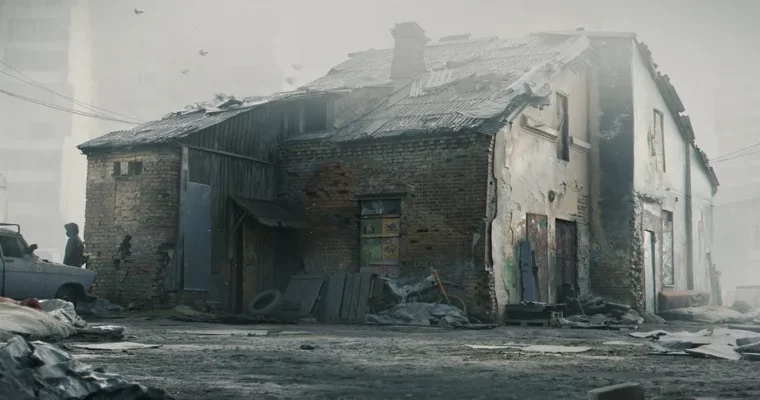
The advanced section is a beast. You’ll take a raw scan of an abandoned building and break it down into modular assets like bricks, window frames, and roof details. You’ll also learn how to extract tileable PBR materials from surfaces and blend them using heightmaps. By the end, you’ll have a pack of professional, versatile 3D assets ready for any environment.
🧑🎓 Who this course is for
- 3D artists who want to add real-world detail to their environments.
- Game developers looking to create high-quality, realistic props.
- Hobbyists who want to learn a professional-grade scanning workflow without expensive software.
🧑🏫 About the Author
Gleb Alexandrov and Aidy Burrows are the caffeinated and over-enthusiastic 3D artists behind Creative Shrimp. They’ve spent years perfecting their photogrammetry pipeline, and this course is the result of that experience. They are joined by Eugeny Palamarchuk, their lead photoscanner, who provides the on-the-ground expertise for capturing high-quality sources. Together, they’ve built a reputation for creating practical, no-fluff tutorials that get straight to the point.
🏁 Final Result
- A portfolio-ready pack of modular 3D environment assets based on a real-world scan.
- A collection of tileable PBR materials extracted from photographs.
- A complete, cleaned-up 3D prop ready for use in any project.
 Channel