


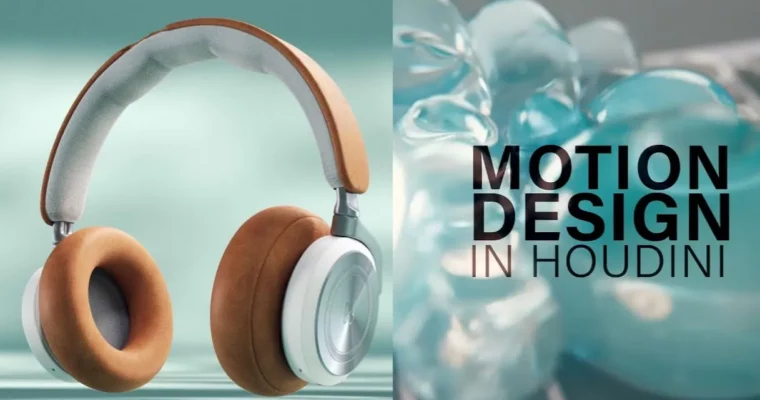
Motion Design in Houdini by Christopher Friesen

Duration:8-weeks
Actual Duration:15h 53m
Release date:2025, October
Publisher:Rebelway
Skill level:Intermediate
Language:English
Exercise files:Yes
Software:Houdini, After Effects, Nuke
Course URL:https://www.rebelway.net/motion-design-in-houdini
Ready to level up your motion design game? This course dives headfirst into creating procedural motion graphics and dynamic simulations using Houdini. You’ll learn to build your own tools, craft compelling animations, and bring your cinematic visions to life, from the initial idea all the way to the final render.
🎯 What you’ll learn
- Build procedural tools for motion design in Houdini.
- Create and art direct dynamic simulations like Vellum.
- Develop cinematic animations and sequences.
- Integrate VEX for advanced control and effects.
- Source, prep, and animate geometry for product reveals.
- Utilize heightfields and volumes in motion design.
- Composite final renders in Nuke.
✅ Requirements
- Skills: Intermediate understanding of 3D concepts, familiarity with Houdini‘s interface.
- Tools: Houdini, After Effects, Nuke.
- Hardware: A capable workstation for 3D rendering and simulation.
📝 Description
This course is all about exploring the art of motion design within Houdini. You’ll get hands-on experience building your own procedural tools, which is key for efficient and flexible motion graphics work. We’ll dive into creating dynamic simulations, learning how to art direct them to fit your creative vision. The curriculum is structured around practical projects, starting with foundational techniques and building up to a complex, multi-shot product reveal. You’ll learn to combine different approaches, including SOPs, VEX, and simulation methods, understanding why certain choices are made in a professional pipeline. Special attention is given to advanced topics like heightfields and volumes, adding another layer of sophistication to your motion design. The course culminates in final lighting, rendering, and compositing in Nuke, ensuring you have a complete understanding of the workflow.
🧑🎓 Who this course is for
- Motion designers looking to expand their toolkit with Houdini.
- VFX artists interested in procedural workflows for motion graphics.
- 3D animators wanting to create dynamic and complex animations.
- Anyone aiming to build a portfolio with high-end motion design work.
🧑🏫 About the Author
Christopher Friesen is a Senior FX Artist and now Senior Art Director at Framestore, bringing over 10 years of industry experience. His background spans motion design, filmmaking, photography, and general design, giving him a unique perspective. He has worked on numerous high-profile projects, showcasing his expertise in creating visually stunning and technically complex work.
🏁 Final Result
- A portfolio-ready project featuring a multi-shot product reveal with complex procedural motion design and dynamic simulations, rendered and composited to a professional standard.
 Channel




please upload week 8 content
done, enjoy..