Kitchen Design in 3ds Max and Corona Renderer by Abdalqader Miqdadi

Duration:2.5 hours on-demand video
Actual Duration:2h 27m
Release date:2026, October
Publisher:Udemy
Skill level:Beginner
Language:English
Exercise files:Yes
Software:3ds Max, Corona Renderer, DaVinci Resolve, CapCut
Course URL:https://www.udemy.com/course/create-a-photorealistic-kitchen-in-3ds-max-corona/
Want a real project instead of random tools demos? In this course you build a complete modern kitchen in 3ds Max and Corona Renderer — cabinets, faucet, stove, hood, shelves, lighting, materials, and a final walkthrough animation.
🎯 What you’ll learn
- Model a complete modern kitchen from scratch in 3ds Max, including cabinets, shelves, faucet, stove, and hood
- Create realistic interior lighting with Corona Sky, Corona Sun, and Corona Light
- Build and tweak Corona materials for wood, marble, metal, and kitchen surfaces
- Set up cameras, render settings, and photorealistic final shots
- Create a full interior animation and edit it into a finished video
✅ Requirements
- Skills: Basic familiarity with 3ds Max is helpful, but not required – built for beginners
- Tools: 3ds Max, Corona Renderer, DaVinci Resolve or CapCut for the final edit
- Hardware: Modern CPU for Corona rendering, 16GB+ RAM recommended, dedicated GPU helpful for viewport work
📝 Description
This is project-based, no fluff. You start with an empty scene and end with a finished kitchen you can put in your portfolio. We model everything step by step — cabinet doors, room shell, shelves, hood, electric stove, and a faucet. You will see how to keep the scene clean and organized so it actually renders well later.
Then we fix the part that makes or breaks interiors: light. You will work with Corona Sky, Corona Sun, and Corona Light to get soft, believable daylight, plus practicals and gobos for depth. No weird blown-out windows. Just balanced exposure that looks like a real photo.
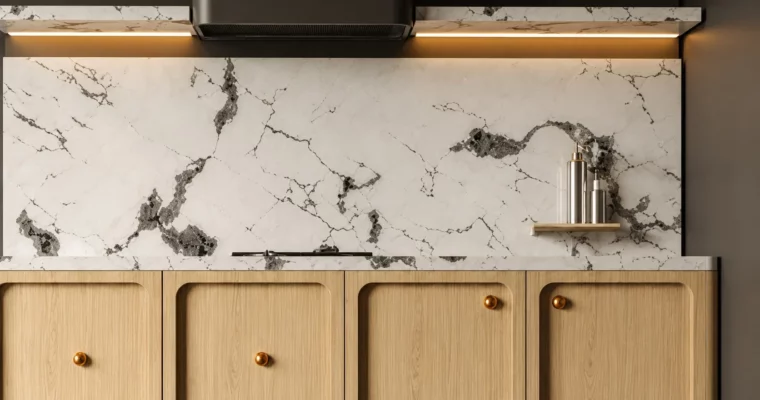
After that, materials. We build simple, solid PBR materials for wood cabinets, walls, shelves, brushed metal, and that tricky marble countertop. You will learn how to adjust glossiness, reflections, and maps so surfaces don’t look plastic or flat.
Last part is presentation. We set up the camera, dial in render settings for a sharp still, then switch to camera animation inside 3ds Max. You will animate the walkthrough, animate objects, and cut it together in DaVinci Resolve or CapCut into a clean client-ready video.
🧑🎓 Who this course is for
- 3D artists and beginners who want to learn interior modeling, lighting, and rendering through one full kitchen project
- Interior designers, architects, and freelancers who need photoreal kitchen visuals and simple walkthrough animations for clients
🧑🏫 About the Author
Abdalqader Miqdadi works in 3D interior visualization with a focus on practical 3ds Max workflows. He teaches by building real rooms from scratch — modeling, lighting, and rendering — instead of theory slides. This kitchen course follows his usual hands-on approach used for archviz portfolio pieces.
🏁 Final Result
- A complete photorealistic modern kitchen scene in 3ds Max + Corona with finished still renders and a walkthrough animation edited into a short video.
 Channel