It looks like you're using an adblocker.
Adblockers make us sad. We use ads to keep our content happy and free. If you like what we are doing please consider supporting us by whitelisting our website. You can report badly-behaved ads by clicking/tapping the nearby 'Advertisement' X text.
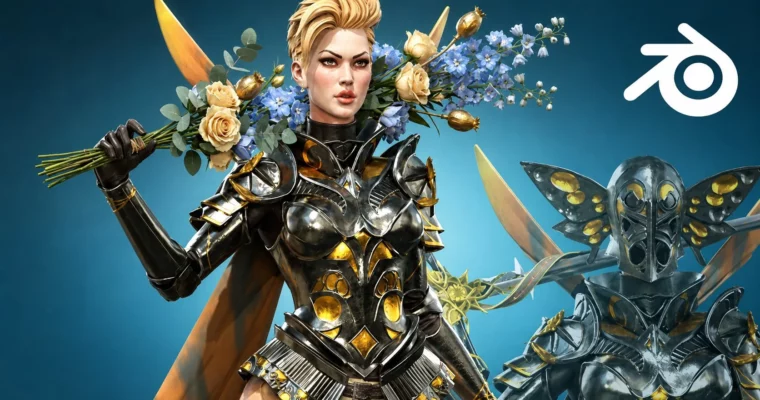
Full game character in Blender course – Moth Girl by NIkolay Naydenov
Build a complete game-ready character from scratch using only Blender and free addons—no other tools needed.
A complete game character pipeline, all inside Blender. No ZBrush, no Substance Painter, no external tools. This course walks you through sculpting, retopology, UV mapping, baking, and texturing a full character from start to finish.
🎯 What you’ll learn
Sculpt a high-poly female character with armor and wings in Blender
Retopologize complex geometry for game-ready models
Create and optimize UV maps for efficient texturing
Bake normal, diffuse, roughness, and metalness maps
Texture paint and retouch materials directly in Blender
Rig and pose the character for portfolio presentation
✅ Requirements
Skills: Basic knowledge of Blender navigation and tools
Tools: 3-button mouse, drawing tablet recommended
Hardware: Minimum 16GB RAM, dedicated GPU
📝 Description
This course is a straight shot at building a game-ready character using only Blender and free addons. No paid software, no switching between tools. You’ll start by sculpting the anatomy—head, torso, arms, legs—then move into blocking out the armor and sword. The high-poly phase is thorough: you’ll refine every piece of armor, the wings, and the hair until it’s ready for retopology.
Retopology is where the magic happens. You’ll learn to clean up your high-poly mesh into a game-friendly low-poly model, then tackle UV mapping like a puzzle. After that, it’s all about baking: normal maps, diffuse, roughness, and metalness maps from your high poly to the low poly. You’ll do some texture retouching in Blender to tweak colors and add final details.
Finally, you’ll rig the character with a simple bone setup and pose it for a killer portfolio presentation. The course is over 50 hours of video, so it’s not a quick walkthrough—it’s a deep, practical dive into a full pipeline.
🧑🎓 Who this course is for
Intermediate Blender users ready to tackle a complex character project
Game artists who want to learn a complete Blender-only workflow
Anyone tired of switching between multiple paid tools for character creation
🧑🏫 About the Author
NIkolay Naydenov is a professional 3D character artist with 15 years in the game industry, including a long stint at Gameloft. He’s created over 20 courses on 3D character creation, ZBrush, Blender, and anatomy. His teaching style is hands-on and practical, focusing on real-world pipelines.
🏁 Final Result
A fully textured, game-ready Moth Knight character with armor, wings, and sword, posed for portfolio presentation
Curriculum
📋 Course content
Module 1: High-Poly Sculpting
Introduction3:55
Blender setup for fast sculpting10:13
Starting a female head from sphere28:20
Making a beautiful female face35:42
Important Checkpoints for your head sculpt20:52
Sculpting the hair27:11
Making the torso and the legs38:30
Sculpting arms and hands36:34
Assembling and adjusting the body41:51
Making teeth and coloring the face27:22
Eyelashes are essential22:51
Starting the Helmet 3D sketch31:48
Torso armor 3D sketching38:36
Shoulder armor and skirt creating38:09
Making the elbow and knee armors32:07
Fixing the elbow, shoulder and knee armor36:55
Making the ears and tigh armor39:01
Making the feet armor and preparing the sword47:15
Starting the sword modelling40:16
Adding details to the sword40:49
More details for the sword46:26
Arms armor and detailing the helmet44:34
Refining the torso armor 3D sketch32:45
Retopo cleaning the helmet geometry40:18
Working more on the helmet high poly45:48
Ears and starting the armor refinement47:29
Armor refinement at its best38:15
More body armor refinement work48:06
Finishing the front body armor48:04
Defining the back torso armor44:51
Finishing the torso armor high poly44:02
Shoulder neck armor refinement41:48
Skirt armor making43:15
Refining the thigh armor33:45
Making the knee armor high poly45:41
Refining the lower leg34:01
Lower leg refinement part 231:53
Feet armor33:46
Finishing the arms35:09
Making the wings51:25
Drawing the front skirt34:50
Refining the sword high poly45:55
Finishing the sword high poly53:31
Refining the hair and face43:50
Module 2: Retopology & UV Mapping
Retopology start! WIth the face52:10
Retopo of the hair43:56
Retopo hair part 251:41
FInishing the retopology of the hair43:48
Uv mapping the face and hair46:08
Retopo and UV eyeball and teeth41:27
Helmet retopo47:52
Test bake of the helmet51:33
Hand retopology39:46
Arm retopology56:17
Shoulder retopology43:53
Start torso retopology43:08
Retopo the front torso armor49:57
Finishing the torso retopology40:26
Retopo the skirt and butt56:28
Legs retopo part 0148:16
Finishing the leg retopology53:50
Sword retopology45:22
Retopo the wings-cape48:12
Making the UVs of the body and helm54:18
Making the UV map for sword and cape43:56
Module 3: Baking & Texturing
Testing materials for high poly51:18
Preparing the meshes for baking54:26
Test baking the maps in 2k37:44
Baking the final maps55:09
Assembling the low poly and starting texture paint_47:37
Finishing the texture using Ucupaint37:09
Module 4: Rigging & Final Presentation
Rigging and posing the moth knight44:09
Make a turntable and transparent video12:27
Goodbye1:57
Watch online or Download for Free
Full game character in Blender course – Moth Girl by NIkolay Naydenov




 Channel



Thank you for this! That said, 44 seems to be broken.
Yes, it’s a 0 byte file, seems to be broken somehow, is it possible to reupload it.please?
pls fix lesson 44