Dynamic Cloth Simulation for Production Professional Houdini Workflow by Salah Hussein

Duration:4 hours
Actual Duration:4h 25m
Release date:2025, March
Publisher:Gnomon
Skill level:Intermediate
Language:English
Exercise files:Yes
Software:Houdini, Houdini Indie
Course URL:https://www.thegnomonworkshop.com/workshops/dynamic-cloth-simulation-for-production
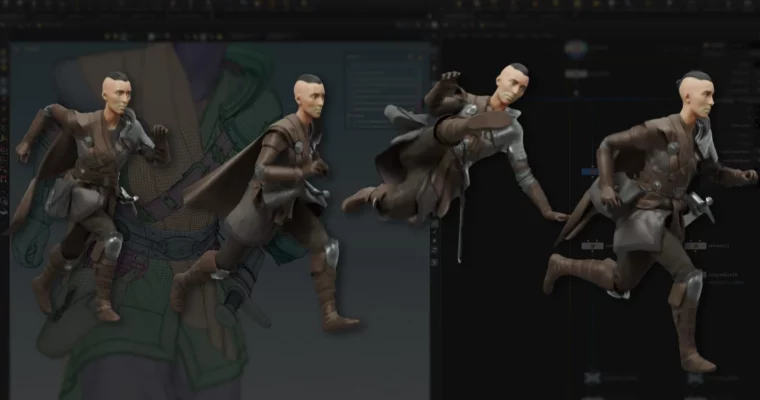
This workshop is all about getting reliable cloth simulations out the door without losing your mind. Salah Hussein, a senior FX and CFX artist with over 8 years in the trenches, walks you through his personal production workflow using the Houdini Vellum Solver. Over 4 hours, you’ll learn how to take character assets and animations, break them down into efficient proxy geometry, and build a constraints network that actually makes sense to debug.
The course covers the full CFX pipeline: preparing geometry, remeshing proxies, setting up collisions, and running multi-layer simulations. Salah also shows you how to handle post-simulation fixes so your final export keeps all the original point deforms and topology intact. No damaged attributes, no messy exports, just clean results that fit into a studio pipeline.
🎯 What you’ll learn
- Build efficient cloth proxy geometry from high-resolution character assets
- Set up a maintainable constraints network for multi-layer cloth simulations
- Use VDB-based collision methods to resolve geometry intersections
- Fine-tune Vellum Solver settings for realistic fabric behavior
- Integrate rigid body props like swords into cloth simulations
- Apply post-simulation fixes without manual frame-by-frame cleanup
- Export clean geometry with preserved point deforms and topology
✅ Requirements
- Skills: Basic understanding of Houdini UI and navigation, familiarity with 3D space and geometry concepts
- Tools: Houdini or Houdini Indie (Alembic and Houdini files provided as downloadable resources)
- Hardware: Computer capable of running Houdini simulations, dedicated GPU recommended
📝 Description
Salah’s approach is refreshingly practical. He doesn’t just show you the buttons to press — he explains why his workflow is structured the way it is. The horizontal constraint method he introduces lets you isolate and refine individual clothing elements instead of simulating everything at once. That means faster iteration and way less frustration when something goes wrong.
The course puts serious emphasis on geometry preparation. Salah walks through his remesh and poly reduce method that keeps important surface features while producing clean, uniform triangle topology. This matters because collision detection and cloth dynamics perform much better on consistent geometry. He also covers VDB-based collision methods for resolving intersections, which gives you that sweet spot between accuracy and performance.
One of the most valuable sections covers post-simulation fixes. Salah shows how to combine simulated proxy geometry with original high-resolution models while keeping everything intersection-free. He treats each clothing piece individually, maintains proper point order, and builds procedural, repeatable solutions. This is the kind of workflow knowledge that separates artists who can handle production deadlines from those who can’t.
The final export process is covered thoroughly too. Salah demonstrates how to keep all essential point deforms and the original geometry intact without changing or damaging attributes or topology. That’s a huge deal when you’re handing work off to lighting or lookdev teams.
🧑🎓 Who this course is for
- FX and CFX artists looking to level up their cloth simulation skills in Houdini
- Character artists who want to understand how their assets behave in dynamic simulations
- Technical directors and generalists needing a reliable, repeatable CFX pipeline
- Students and indie artists who want to learn industry-standard workflows from a working professional
🧑🏫 About the Author
Salah Hussein is a senior FX and CFX artist with over 8 years of production experience. He has worked on feature films and high-end commercial projects, developing specialized expertise in cloth simulation and character effects. His professional background spans multiple studios where he has tackled complex simulation challenges, from multi-layer clothing setups to integrating props and dynamic elements into character performances. Salah’s teaching style reflects his production mindset — he focuses on workflows that are maintainable, debuggable, and efficient enough to survive real studio deadlines.
🏁 Final Result
By the end of this workshop, you’ll have a complete CFX pipeline that takes character assets from import to final simulated output. You’ll be able to create multi-layer cloth simulations with realistic draping and natural movement, integrate props like swords using rigid body dynamics, and export clean geometry with all original attributes and topology preserved. The provided Houdini and Alembic files give you a solid starting point for building your own production-ready cloth simulation setups.
 Channel