Creating Cinematic Concept Art by Isaac Yeram Kim

Duration:2h 27s
Actual Duration:2h 2m
Release date:2024, November
Publisher:Gnomon
Skill level:Beginner
Language:English
Exercise files:Yes
Software:Blender, Photoshop
Course URL:https://www.thegnomonworkshop.com/workshops/creating-cinematic-concept-art
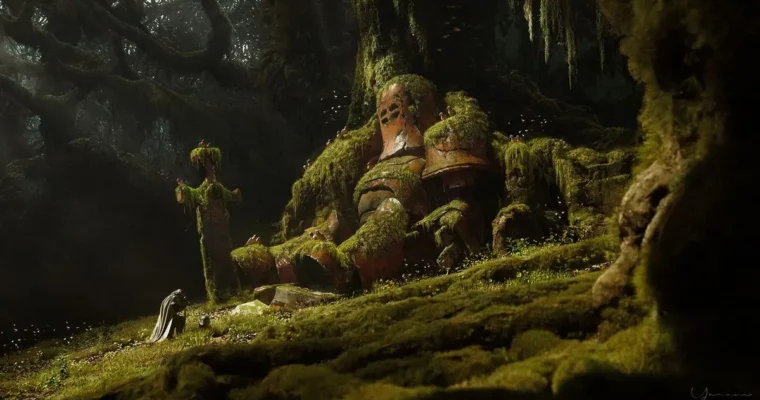
Isaac Yeram Kim, a Concept Artist at Sucker Punch Productions, shares his no-nonsense workflow for creating cinematic concept art. This 2-hour workshop focuses on the essential tools in Blender and Photoshop, cutting out the fluff to keep the process fast, experimental, and fun. You’ll learn how to block out ideas with Grease Pencil, build a stylized robot, and refine everything into a polished, production-ready image.
🎯 What you’ll learn
- Use Blender’s Grease Pencil for rapid image blocking and composition planning.
- Implement add-ons like Scatter and One Click Damage for quick asset creation.
- Maintain an experimental process without getting lost in complex menus.
- Photobash effectively in Photoshop while keeping image quality consistent.
- Apply professional color grading to bring your concept art to a finished state.
✅ Requirements
- Skills: Basic understanding of 3D space and familiarity with Blender and Photoshop UI.
- Tools: 3-button mouse, drawing tablet.
- Hardware: Minimum 16GB RAM, dedicated GPU.
📝 Description
This isn’t a course about mastering every button in Blender. Isaac has spent years stripping his workflow down to only what works. He starts with Grease Pencil for loose 2D sketching inside the 3D viewport, letting you nail down composition before committing to any geometry. From there, he introduces practical add-ons like Scatter and One Click Damage to speed up the hard-surface and environment detailing.
The second half of the workshop is all about Photoshop refinement. Isaac walks through his photobashing techniques, showing you how to blend 3D renders with photographic elements without breaking the image’s consistency. He covers digital painting, lighting adjustments, and color grading, turning a raw render into a finished, cinematic piece. The included project files let you reverse-engineer his entire process.
🧑🎓 Who this course is for
- Concept artists and digital artists of all skill levels looking to streamline their workflow.
- Game developers and entertainment industry professionals wanting production-ready methods.
- Freelance artists seeking to balance creativity with efficiency.
🧑🏫 About the Author
Isaac Yeram Kim is a Los Angeles–based concept artist who has worked in the entertainment industry since 2016. He has contributed to projects at AAA studios including Naughty Dog, Treyarch, The Initiative, and Sucker Punch Productions, as well as with clients like DreamWorks Animation and Flying Bark Productions. He specializes in environment concept art and cinematic illustration, with a strong focus on visual storytelling.
🏁 Final Result
- A complete cinematic concept art piece, from initial 3D blockout to final color-graded image in Photoshop.
- A practical understanding of a streamlined, production-ready workflow that can be applied to future projects.
 Channel