


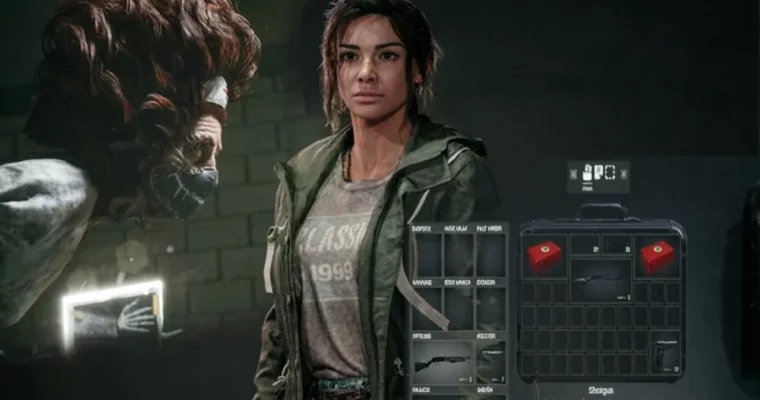
Complete Classic Resident Evil Game Development in UE5 by Jan Benkwtiz

Duration:32.5 hours on-demand video
Actual Duration:23h 58m
Release date:2026, March
Publisher:Udemy
Skill level:Beginner
Language:English
Exercise files:Yes
Software:Unreal Engine 5
Course URL:https://www.udemy.com/course/complete-classic-resident-evil-game-development-in-ue5
Ready to dive into creating your own classic survival horror game? This course walks you through building a complete horror shooter experience in Unreal Engine 5. You’ll go from basic project setup to implementing complex systems like inventory management, weapon mechanics, and enemy AI, all while capturing that nostalgic Resident Evil feel.
🎯 What you’ll learn
- Create a complete Animation Blueprint for your character.
- Implement fixed camera angles for a classic horror feel.
- Build a full Inventory System for picking up and using items.
- Develop a robust Storage System for managing game assets.
- Handle Level Transitions and save game progress.
- Implement custom Items and Weapons, including equipping and swapping.
- Create a complete UI System for inventory management.
- Develop a full Aiming and Shooting System with Line Trace.
- Implement Damage Systems for both players and enemies.
- Create Healing Mechanics and manage player health.
- Build a complete Reload System for various weapons.
- Implement Melee Weapons with attack Montages.
- Utilize Layered Blend per Bone Animation for realistic movement.
- Integrate Sound Effects like footsteps and shooting.
- Use Niagara for Visual Effects like muzzle flash.
- Implement Enemies and set up Enemy AI.
- Unlock Doors with Keys.
- Stack Items like ammunition.
- Create a full Inspection System for items.
- Model and texture game assets like floors, walls, lockers, and storage units in Blender.
- Integrate Typewriter save mechanics and Save Game functionality.
- Solve in-game Puzzles.
✅ Requirements
- Skills: You should have basic knowledge on how to use UE5. You should know how to import Textures and FBX models into your Project.
- Tools: Unreal Engine 5, Blender (for asset creation).
- Hardware: A computer capable of running Unreal Engine 5 smoothly.
📝 Description
This course is your ticket to becoming an intermediate UE5 artist by teaching you how to build a complete horror shooter game. You’ll get hands-on experience crafting intricate blueprints, dynamic animation blueprints, and smart enemy AI. We’ll cover essential gameplay systems like a fully functional inventory, precise weapon mechanics (equipping, swapping, aiming, shooting), and player survival through healing items. You’ll also learn to implement interactive elements like unlocking doors and managing items with a robust storage system. Using a game instance, you’ll master smooth level transitions. Plus, we’ll touch on advanced techniques to polish your game. This course is packed with practical knowledge to help you create professional-grade, engaging, and polished gaming experiences.
🧑🎓 Who this course is for:
- Beginners in Unreal Engine 5.
- Beginners in Game Development.
🧑🏫 About the Author
Jan Benkwtiz is an instructor with a passion for bridging the gap between 3D art in Blender and interactive game development in Unreal Engine 5. He actively shares free content and tutorials on YouTube, focusing on both Blender and UE5. With 11 courses and a solid student base, Jan aims to equip aspiring artists with the skills to bring their creations to life in interactive game environments.
🏁 Final Result
- A portfolio-ready, classic survival horror game project built in Unreal Engine 5, complete with character movement, inventory, weapon systems, enemy AI, environmental assets, and save/load functionality.
 Channel





Please add ~8.5 hours to the full course.
Create a Floor Texture for the Save Room37:28
Finishing the Floor and Create the Wall41:39
Modeling and Texturing a Locker for the Save Room1:38:01
Modeling and Texturing the Storage for the Save Room59:49
Level Building the Save Room from Blender to Unreal Engine 553:22
Interact with Typewriter and Setting Up Save Game52:33
Setting Up Save Game UI and Save Game with Typewriter1:02:48
Level Transition to the Save Room and Bug Fixing34:54
Solving a Puzzle – Open Lock with Code1:03:34
Thank you