Ad Clicks : Ad Views : Ad Clicks : Ad Views : Ad Clicks : Ad Views : Ad Clicks : Ad Views :
Oh Snap!

It looks like you're using an adblocker. Adblockers make us sad. We use ads to keep our content happy and free. If you like what we are doing please consider supporting us by whitelisting our website. You can report badly-behaved ads by clicking/tapping the nearby 'Advertisement' X text.

Blender Stylized Arabian Market Environment – Build 3D Scene by 3D Tudor & Marcus Rosefield

Blender Stylized Arabian Market Environment – Build 3D Scene by 3D Tudor & Marcus Rosefield

/

Author:3D Tudor & Marcus Rosefield

Duration:9.5 hours on-demand video

Actual Duration:9h 16m

Release date:2026, May

Publisher:Udemy

Skill level:Beginner

Language:English

Exercise files:Yes

Software:Blender

Course URL:https://www.udemy.com/course/blender-stylized-environments-build-3d-scene

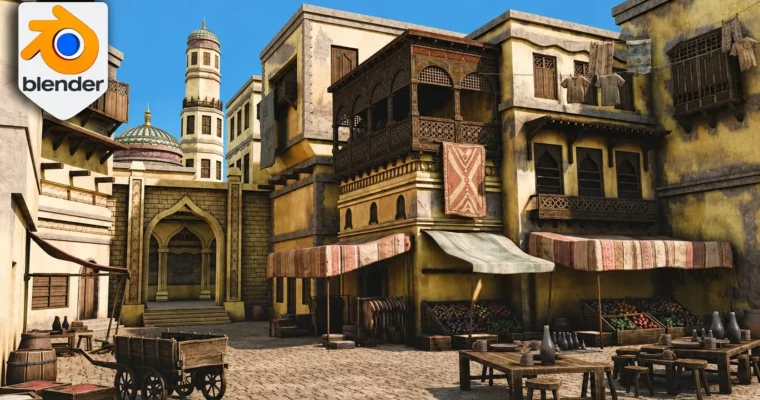
Build a complete stylized Arabian market in Blender, from blockout to final render, with architecture, props, materials, and lighting.

Build a complete stylized Arabian market in Blender, from blockout to final render. This course walks you through the full environment workflow: modeling architecture and props, applying materials and textures, dressing the scene, and setting up lighting for a polished final image.

🎯 What you’ll learn

  • Navigate Blender and use core modeling tools for environment creation.
  • Model Arabian-inspired architecture including arches, domes, towers, and decorative details.
  • Create market props like crates, barrels, rugs, and food displays.
  • Apply PBR materials, trim sheets, texture atlases, and vertex paint.
  • Dress a market environment with layered detail for a busy, lived-in feel.
  • Set up Cycles lighting, sky background, and final render settings.

✅ Requirements

  • Skills: Basic understanding of Blender’s interface and navigation.
  • Tools: A computer capable of running Blender and rendering with Cycles.
  • Hardware: Minimum 8GB RAM, dedicated GPU recommended.

📝 Description

This course is for anyone who’s built a few decent assets in Blender but ended up with an empty scene that feels flat. It’s a full walkthrough from blockout to final render, showing you how to build a complete stylized Arabian market environment.

You’ll start with the basics: navigation, transforms, edit mode tools, and essential modifiers like bevels, arrays, and booleans. From there, you’ll model Arabian-inspired architecture—arches, domes, towers, balconies, and decorative wooden details. Then you’ll bring the market to life with props: crates, barrels, pots, rugs, food displays, and a wheelbarrow. Finally, you’ll work with PBR materials, trim sheets, vertex paint, and Cycles lighting to create a warm, stylized render.

Every lesson builds toward the same finished scene. You’re not just learning isolated techniques—you’re seeing how a real environment workflow develops from start to finish.

🧑‍🎓 Who this course is for

  • Beginner Blender users who want a guided project that ends with a complete scene.
  • Intermediate artists looking for a stronger start-to-finish environment workflow.
  • Portfolio builders who need a finished project showing modeling, materials, and lighting.
  • Detail-oriented artists who love filling a scene with props and set dressing.

🧑‍🏫 About the Author

3D Tudor is a Blender and game art education studio founded by Neil Bettison in 2019. Neil is a professional 3D artist and environment artist who has taught over 250,000 students worldwide. His courses focus on practical, project-based training for artists who want to build real 3D skills. He is also co-author of a #1 Amazon Best Seller in Rendering & Ray Tracing.

Marcus Rosefield is a self-taught 3D Environment Artist with over 6 years of industry experience. He specializes in creating stylized environments in Blender for video games and animations, with a focus on visual storytelling and attention to detail.

🏁 Final Result

  • A complete, render-ready stylized Arabian market environment with architecture, props, materials, and lighting.
  • A portfolio piece demonstrating modeling, composition, set dressing, and final presentation skills.
Curriculum

📋 Course content

  1. Module 1: Foundations & Blockout
    • Lesson 1 – Master Blender Viewport Navigation & Camera Views6:54
    • Lesson 2 – Append Resources and Install Essential Add-ons3:33
    • Lesson 3 – Build Powerful Reference Boards with PureRef13:31

    • Lesson 4 – Essential Blender Modeling Tools and Edit Mode Mastery16:00
    • Lesson 5 – Accurate Building Blockout Using Cubes and Snapping7:47
    • Lesson 6 – Scene Blockout with Camera Setup and Tower Modeling8:06
    • Lesson 7 – Blocking Windows, Doors and Balcony Openings11:32
  2. Module 2: Architecture & Detailing
    • Lesson 8 – Architectural Trims with Edge Loops and Extrusions13:14
    • Lesson 9 – Bevel and Array Modifiers for Detailed Facades12:18
    • Lesson 10 – Boolean Window Cuts and Clean Quad Topology11:52
    • Lesson 11 – Boolean Windows and Doorways with Clean Topology6:18
    • Lesson 12 – Create Realistic Stairs with Bevel and Manual Modeling6:48
    • Lesson 13 – Model an Arched Window with Detailed Wooden Panels9:41
    • Lesson 14 – Build a Decorative Arched Window with Boolean Cut12:36
    • Lesson 15 – Modeling Detailed Windows and Doorway with Bevel10:51
    • Lesson 16 – Finishing the Lower Facade with Bevel and Array Modifier6:16
    • Lesson 17 – Building a Wooden Shelter with Array Modifier Beams9:37
    • Lesson 18 – Designing a Detailed Balcony with Custom Bevel12:21
    • Lesson 19 – Modeling a Detailed Balcony with Bevel and Custom Patterns14:52
    • Lesson 20 – Creating Brick Pillars with Array and Mirror Modifiers13:25
    • Lesson 21 – Cutting an Arched Doorway with Boolean9:53
    • Lesson 22 – Designing a Detailed Door with Bevel and Wall Trim6:43
    • Lesson 23 – Boolean Door Panels and Decorative Roof Details10:57
    • Lesson 24 – Sculpting a Detailed Dome with Bevel and Extrusions7:55
    • Lesson 25 – Building a Circular Tower with Boolean Windows11:04
  3. Module 3: Materials & Textures
    • Lesson 26 – Creating Realistic Materials with Normal Maps9:39
    • Lesson 27 – Stylized Sky Texture World Lighting in Cycles4:26
    • Lesson 28 – Procedural Stone Material with Ambient Occlusion16:37
    • Lesson 29 – Smart UV Project and Material Linking Workflow9:49
    • Lesson 30 – Scene Wide Material Assignment and UV Control12:24
    • Lesson 31 – Tower Materials with Smart UV Project and Vertex Paint9:38
    • Lesson 32 – Smart UV Project and Vertex Paint for Stone Walls4:53
  4. Module 4: Props & Set Dressing
    • Lesson 33 – Modeling an Ornate Matrabia with Bevel and Array Modifier9:51
    • Lesson 34 – Creating a Mashrabiya Part 211:17
    • Lesson 35 – Wooden Structure with Boolean and Solidify Modifier10:44
    • Lesson 36 – Modeling Detailed Wooden Fences and Trim17:54
    • Lesson 37 – Building Realistic Wooden Crates with Bevel7:17
    • Lesson 38 – Filling Crates with Geometry Nodes GeoStacker10:10
    • Lesson 39 – Customizing and Duplicating Food Crates11:13
    • Lesson 40 – Modeling a Stylized Wooden Barrel with Bevel5:40
    • Lesson 41 – Realistic Draped Carpets with Solidify and Subdivision Surface13:56
    • Lesson 42 – Cloth Shelters and Canopies with Subdivision Surface15:22
    • Lesson 43 – Creating Clay Pots and Plates with Bevel and Solidify12:13
    • Lesson 44 – Modeling a Clothes Rail with Bevel and Custom Hangers9:19
    • Lesson 45 – Create Cloth Piles and a Realistic Clothesline15:56
    • Lesson 46 – Modeling Detailed Tables, Chairs, and Props11:37
    • Lesson 47 – Building a Detailed Wooden Wheelbarrow13:56
  5. Module 5: Final Polish & Rendering
    • Lesson 48 – Boolean Doorways and Architectural Window Details10:54
    • Lesson 49 – Final Building Details with Array and Bevel Modifiers18:18
    • Lesson 50 – Skybox Control with Light Path and True Displacement7:27
    • Lesson 51 – Vertex Paint Damage and Sand Variation7:39
    • Lesson 52 – Final Render with Mist and BlendCraft Compositor14:12
Watch online or Download for Free
Blender Stylized Arabian Market Environment – Build 3D Scene by 3D Tudor & Marcus Rosefield
NAME
SIZEDURATION
11 – Damage Painting, Sand Variation, Mist, and Final Render Polish
57.3 MB21m

Download all Videos (52)
1.6 GB9h 16m


Download all

Join us on
  Channel    and      Group

Leave a Comment

Your email address will not be published. Required fields are marked *