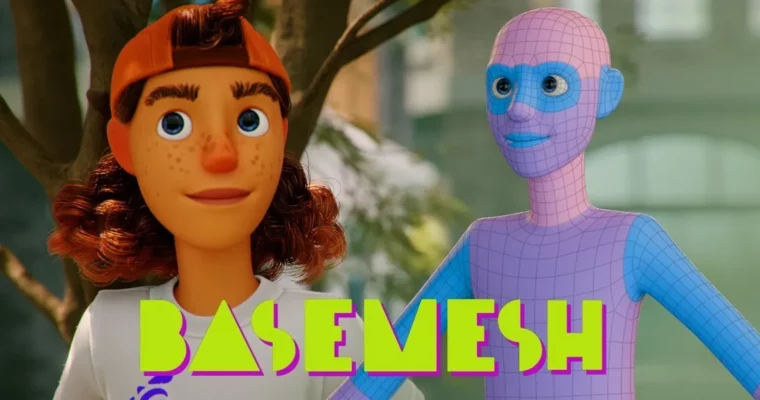
Basemesh – Create Stylized Charcters Quickly With Blender by Lucas Falcao

Actual Duration:5h 38m
Release date:2024, November
Publisher:CGCookie
Skill level:Intermediate
Language:English
Exercise files:Yes
Software:Blender
Course URL:https://www.cgcookie.com/courses/basemesh-create-stylized-characters-quickly-with-blender
Got a basemesh sitting on your drive doing nothing? This course turns it into a finished stylized skateboarder in Blender — no sculpting, no retopo. You model the clothes right off the body, shade everything with vertex paint masks and procedurals, then groom hair and render.
🎯 What you’ll learn
- Use a basemesh to block out a unique stylized character fast
- Model clothes and accessories directly from body topology
- Add seams, folds, pockets, and hard-surface details with bevels and knife cuts
- Build materials with vertex paint masks and procedural textures
- Shade skin, eyes, teeth, and fabric for a clean stylized look
- Groom scalp hair, eyebrows, and fabric fuzz with curves
✅ Requirements
- Skills: Basic familiarity with Blender interface, navigation, and polygon modeling basics
- Tools: Blender installed, 3-button mouse recommended
- Hardware: PC capable of running Blender, dedicated GPU recommended for Cycles rendering
📝 Description
Lucas starts where most people get stuck: a boring generic body mesh. Instead of sculpting anatomy, you grab loops right on the mesh and pull out a shirt, pants, socks, shoes, and a cap. Then you separate them and add the good stuff — polygon modeling with bevels, creases, and knife cuts for seams, pockets, and folds. Big shapes first, small details later. That is the whole mindset.
Shading is all done without hunting for image textures. You paint masks with vertex paint, then let nodes do the heavy lifting. Second tones, dirt, and scuffs come from masks. Fabric weave and iris patterns come from procedural textures like wave and Voronoi. Wear lands where it should thanks to layer weight and pointiness. It is practical, repeatable, and easy to tweak.
The final pass is skin, eyes, and hair. You get skin color and freckles, roughness control, teeth and gums, plus a cornea setup from the Blender manual that helps cut noise in Cycles. Hair is all curves — scalp hair, eyebrows, and even fuzz on the clothes using presets, clumping, and hand-combed guides. Add a simple studio lighting setup and you are rendering a clean result the whole way through.
🧑🎓 Who this course is for
- Blender users who want a finished character without sculpting or retopology first
- Anyone who has a base mesh sitting on their hard drive and no idea what to do with it
- Artists who want a full stylized shading workflow, from vertex paint masks to hair curves
🧑🏫 About the Author
Lucas Falcao is a VFX veteran with 25+ years in film and TV, with credits on Sin City, Life of Pi, Night at the Museum, Stranger Things, and Westworld. He teaches compositing at CG Cookie and brings a production-first approach — get the result fast, keep it clean, and only add detail where it reads on screen.
🏁 Final Result
- A finished stylized skateboarder character built from a basemesh, with modeled clothing and accessories, procedural materials, groomed curve hair, and studio lighting — ready for your portfolio.
 Channel