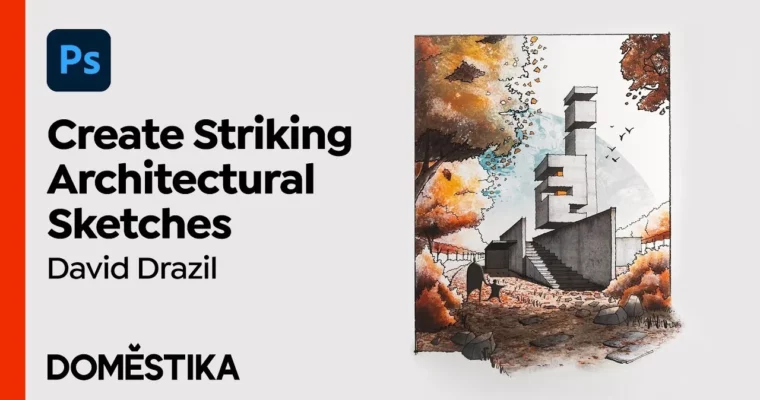
Architectural Drawing – From Paper to Photoshop by David Drazil

Duration:22 lessons (3h 54m)
Actual Duration:3h 57m
Release date:2023
Publisher:Domestika
Skill level:Beginner
Language:English
Exercise files:Yes
Software:Photoshop
Course URL:https://www.domestika.org/en/courses/4081-architectural-drawing-from-paper-to-photoshop
Learn to capture architecture on the go with a pencil and sketchbook, then bring those drawings to life in Photoshop. Architect David Drazil shows you how to combine hand-drawn sketches with digital color and texture to create polished, portfolio-ready illustrations.
🎯 What you’ll learn
- Create hand-drawn architectural sketches using perspective and shading techniques.
- Digitize and clean up your sketches in Photoshop.
- Apply color, texture, and lighting to your digital illustrations.
- Present your final artwork using Photoshop mock-ups.
✅ Requirements
- Skills: No prior knowledge required; basic Photoshop familiarity is helpful.
- Tools: Pens and pencils of your choice, an eraser, a sketchbook, a smartphone or scanner.
- Hardware: A computer with Photoshop (or similar software).
📝 Description
This course is built around a simple workflow: sketch first, then enhance digitally. David Drazil, founder of Sketch Like An Architect, walks you through the fundamentals of perspective drawing and shading, so you can capture buildings accurately and expressively by hand.
Once your sketch is done, you’ll move into Photoshop to digitize, clean up, and add color. The real magic happens when you layer in textures, adjust tonal values, and paint in elements like sky and vegetation. David’s approach is practical—he shows you exactly how to use reference images and build up your illustration step by step.
The course is structured around a single project, so you’ll follow along from start to finish. By the end, you’ll have a finished architectural illustration that blends the spontaneity of hand drawing with the polish of digital post-production.
🧑🎓 Who this course is for
- Architects and designers looking to improve their sketching and presentation skills.
- Illustrators and hobby sketchers interested in mixed media techniques.
- Anyone who wants to combine traditional drawing with digital tools.
🧑🏫 About the Author
David Drazil is an architect and the creator of Sketch Like An Architect, a project with over 233K followers dedicated to reviving hand-drawn architectural sketching. He holds a degree in architecture and building engineering from Czech Technical University in Prague and a master’s in architecture and design from Aalborg University in Denmark. David also collaborates as a featured artist with iPad sketching apps like Morpholio and ShadowDraw.
🏁 Final Result
- A complete architectural illustration, from a hand-drawn sketch to a digitally enhanced, colored, and textured final image.
 Channel