Stylized Rendering with Brushstrokes by Blender Studio

Duration:90 min
Actual Duration:1h 31m
Release date:2025
Publisher:Blender Studio
Skill level:Beginner
Language:English
Exercise files:Yes
Software:Blender
Course URL:https://studio.blender.org/training/stylized-rendering-with-brushstrokes/
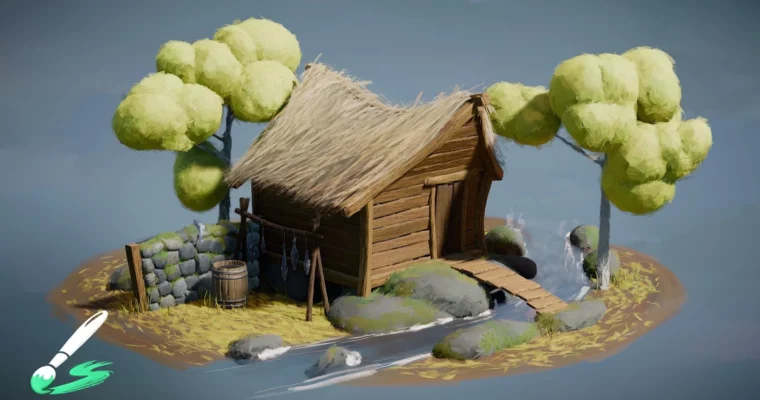
Want that hand-painted look without painting every frame by hand? This workshop shows you how to get it straight in Blender using the Brushstroke Tools extension, finishing with a full fishing hut scene.
🎯 What you’ll learn
- How to navigate the Brushstroke Tools extension and its core settings
- How to scatter and layer brushstrokes for a painterly surface look
- Simple to advanced brushstroke distribution methods for art direction
- How to build the fishing hut demo scene from blockout to final style
- How to keep your stylized workflow flexible and editable
✅ Requirements
- Skills: Basic familiarity with Blender UI and viewport navigation
- Tools: Blender with Brushstroke Tools extension installed, 3-button mouse
- Hardware: PC capable of running Blender 4.x, dedicated GPU recommended
📝 Description
This is a practical, follow-along workshop, not a theory lecture. You start with a quick tour of the Brushstroke Tools so you know what each brush, setting, and distribution option actually does. Then you jump straight into building.
The main project is the fishing hut demo scene. You start simple – placing strokes, getting coverage, finding the right scale and direction. Then you stack more complex distribution methods to break up repetition and push specific areas like wood, thatch, and water. It is all about control: you decide where it looks loose and painterly and where it stays readable.
What is nice here is how editable everything stays. Because you are working with real geometry strokes in Blender, you can move things, change density, tweak direction, and re-render without starting over. If you like stylized work and want a workflow that feels closer to painting than to node spaghetti, this one clicks fast.
🧑🎓 Who this course is for
- Blender users who want a painterly, stylized render style done in 3D
- Stylized environment artists looking for a faster way to handle surfaces
🧑🏫 About the Author
Blender Studio is the creative team behind the Blender open movies and the official Blender training content. They build production tools, add-ons, and assets while working on real short films like Sprite Fright and Project Gold. That means their workshops come from actual production needs, not just demo files.
🏁 Final Result
- A finished stylized fishing hut scene rendered with a full painterly brushstroke look, ready for your portfolio
 Channel