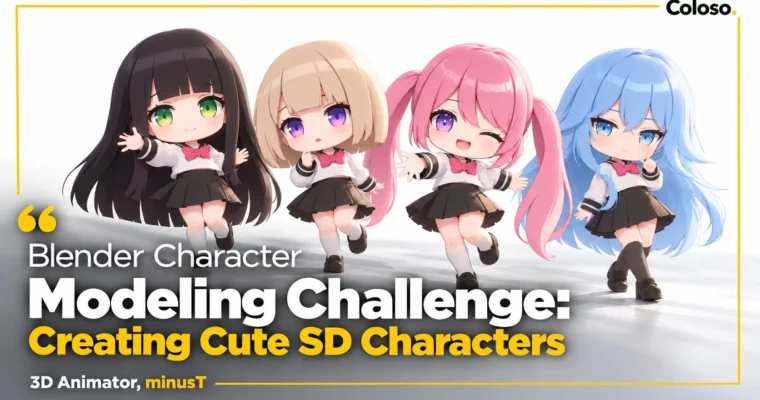
Blender Character Modeling Challenge – Creating Cute SD Characters by minusT2

Duration:16Hours 47Minutes
Actual Duration:33h 34m
Release date:2026, November
Publisher:Coloso
Skill level:Beginner
Language:Korean
Exercise files:Yes
Software:Blender
Course URL:https://coloso.global/en/products/signature-minust2-us
Stuck trying to turn your 2D doodles into 3D? This class with minusT walks you through cute SD characters in Blender from blocky base to posed, rendered final — hair, outfits, line art and all.
🎯 What you’ll learn
- SD proportions and what makes a chibi model look cute, not awkward
- Head, body, and hand modeling with simple, clean topology
- 4 hairstyles: bob, long hair, wavy hair, and twin-tails
- 4 outfits: sportswear, school uniform, casual hoodie look, and dress with frills
- Rigging basics — bones, weight painting, and IK for arms and legs
- Toon shading, 3D line art, UV unwrapping, and texture painting
- Posing with shape keys, lighting, camera setup, and final rendering
✅ Requirements
- Skills: Basic Blender navigation helpful, no character modeling experience needed
- Tools: Blender 4.2 (free), 3-button mouse recommended
- Hardware: PC or Mac capable of running Blender 4.2, dedicated GPU recommended for shading and rendering
📝 Description
If regular character modeling feels like too much, start small. Literally. SD characters use short proportions and simple shapes, so you can focus on the core ideas without getting buried in anatomy. minusT breaks down SD proportions, what to exaggerate, what to simplify, and how to keep the model clean for the next steps. You build a full base first — head, torso, arms, legs, hands — and get a feel for poly modeling in Blender 4.2.
Then it gets fun. You don’t just make one character and stop. You work through four different hair modeling challenges and four full outfit modeling sets. Bob, long, wavy, twin-tails. Sportswear, school uniform, hoodie + shorts, dress with frills. Each one has a slightly different structure, so you pick up practical tricks for frills, skirts, shoes, and hair clumps you can reuse on your own designs.
The last stretch is what gives it that anime look. You’ll set up a simple rigging with bones, weight painting, and IK so you can actually pose the character. Then you add toon shading, outlines, and UV unwrapping + texture painting for eyes, hair, and clothes. Final step: shape keys, lights, camera, render. What you get is a 3D model that reads like a 2D illustration, but you can still rotate and pose it.
🧑🎓 Who this course is for
- Blender hobbyists who want to turn their own 2D characters into 3D
- Beginners who want to make cute 3D / SD characters without getting overwhelmed
- Blender users curious about minusT’s character workflow and line art techniques
🧑🏫 About the Author
Hello, I’m minusT, a 3D animator and YouTuber focused on subculture characters in Blender. I’m self-taught with over 16 years in 3D, and my channel has passed 30 million total views. I also produced animation for The Grand Touhou Project Exhibition 2023. I made this second signature class because good tutorials for anime-style Blender work are still hard to find — so I packed in the hands-on SD workflow I wish I had when I started.
🏁 Final Result
- 4 complete SD characters with different hairstyles and outfits, fully textured, rigged, posed, and rendered — plus your own original 10th challenge character ready for portfolio or socials
📢 Guys, this is a Group Buy campaign, check the GBC forum thread to get access
You can find the course preview in the download section below.
 Channel