Ad Clicks : Ad Views : Ad Clicks : Ad Views : Ad Clicks : Ad Views : Ad Clicks : Ad Views :
Oh Snap!

It looks like you're using an adblocker. Adblockers make us sad. We use ads to keep our content happy and free. If you like what we are doing please consider supporting us by whitelisting our website. You can report badly-behaved ads by clicking/tapping the nearby 'Advertisement' X text.

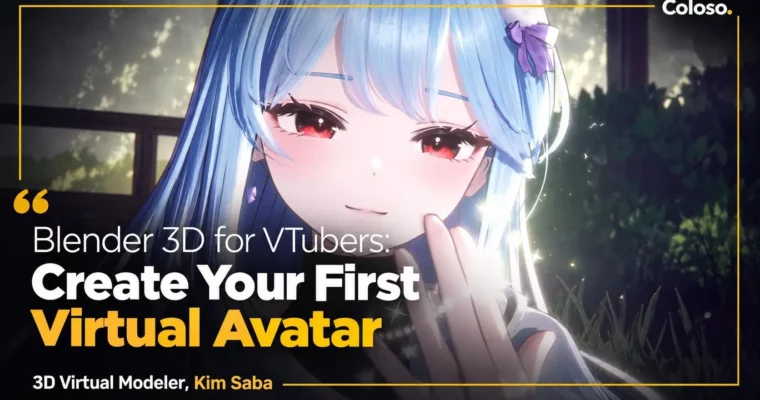
Blender 3D for VTubers – Create Your First Virtual Avatar by Kimsaba

Blender 3D for VTubers – Create Your First Virtual Avatar by Kimsaba

/

Author:Kimsaba

Duration:29μ‹œκ°„ 37λΆ„

Actual Duration:59h 13m

Release date:2025, February 20

Publisher:Coloso

Skill level:Beginner

Language:English

Exercise files:Yes

Software:Blender, Substance 3D Painter, Unity, Photoshop, Warudo, VRChat

Course URL:https://coloso.co.kr/products/dictionary-kimsaba

Build a cute, stream-ready 3D VTuber avatar from scratch using free tools and take it straight to broadcast.

Want to debut as a VTuber but have zero 3D experience? This class walks you through the full pipeline β€” from Blender modeling to live streaming in Warudo β€” so you end up with your own original avatar that actually moves, talks, and performs on stream.

🎯 What you’ll learn

  • Model a complete anime-style avatar in Blender β€” head, body, hair, and outfit β€” without needing original artwork
  • Build clean topology, UVs, and ID maps ready for texturing and rigging
  • Rig body, hair, and clothes with VRM-standard bones, weight painting, and spring bones
  • Texture in Substance 3D Painter and Photoshop for skin, hair, eyes, and clothing details
  • Set up anime-style toon shading with free Liltoon shader, outlines, and custom normals
  • Create Shape Keys for lip-sync, blinks, ARKit 52 facials, and MMD expressions
  • Export and convert avatars via Unity for Warudo and VRChat
  • Direct a live VTuber scene in Warudo β€” lighting, camera, props, particles, and facial tracking

βœ… Requirements

  • Skills: No prior 3D or drawing skills needed, basic PC file management and Blender UI curiosity
  • Tools: Blender 4.2.3 LTS (free), Unity 2021.3.18f1, Substance 3D Painter, Photoshop 2025, Warudo (free), iPhone with FaceApp for ARKit capture
  • Hardware: Windows PC that can run Blender and Unity, 16GB RAM and dedicated GPU recommended, iPhone for facial tracking, webcam or iPhone for VTuber motion

πŸ“ Description

This is not a theory-heavy modeling course. You follow one full avatar from a rough PNG reference to a live broadcast. Kimsaba shows her real freelance workflow: block the body with correct joint topology, connect head to body cleanly, build hair with Blender Curves, and make clothes that actually deform with cloth sim and sculpt brushes. No tablet required, no complex illustration skills β€” just reference-based building that beginners can copy.

Then comes the part that makes avatars look expensive: texture and shade. You will paint skin, hair gradients, angel rings, and fabric patterns in Substance 3D Painter, finish eyes in Photoshop, and set up the free Liltoon shader for that crisp anime look. That means custom normals, outlines, rim light, fake shadows, and MatCap tweaks per part, so your model looks good under stream lighting, not just in Blender.

Finally, you give it life. You will build Shape Keys for VRChat lip-sync and blinks, all 52 ARKit facials with an iPhone, plus fun MMD extras like star eyes, winking, tears, and jiggle eyes. Then you move to Unity, Warudo, and VRChat β€” spring bones, wardrobe animations, facial tracking, props, camera depth, and particle effects. By the end you know exactly which button to press when you go live.

πŸ§‘β€πŸŽ“ Who this course is for

  • Total beginners who want to make a 3D avatar but don’t know where to start
  • Hobbyists and aspiring VTubers who want to build their own original character and debut on stream
  • Newbie modelers who can do basic Blender but want higher-quality toon avatars and proper Warudo / VRChat setup

πŸ§‘β€πŸ« About the Author

Kimsaba is a freelance 3D virtual modeler based in Korea who has shipped 10+ original avatars and 300+ ARKit facial sets for active VTubers. Her credits include original avatars for Hincock, Baeksong, Mingyeolhui, Yukira, Nasom, and Kyang, plus facial and avatar edits for Pixel Network, Signal, and many indie livers.

She works in both pipelines β€” illustration-based avatars and original text-and-reference builds β€” and specializes in Liltoon shading and Warudo converting as an official collaborator with Orvit ENT. In this class she shares the exact output-focused tricks she uses to make avatars look cute on broadcast, not just in the viewport.

🏁 Final Result

  • A complete original anime-style VTuber avatar (.blend + Unity / Warudo files) β€” modeled, textured, rigged, toon-shaded, with lip-sync, blinks, ARKit 52 facials, and Warudo scene ready for streaming and VRChat upload.
Curriculum

πŸ“‹ Course content

  1. Module 1:  Introduction
      1. Course Introduction – Instructor intro and course goals
      1. Tools Overview – Blender, Substance 3D Painter, Warudo explained
  2. Module 2:  Avatar Modeling
      1. Getting Started with Blender – Installation, UI, navigation, useful addons
      1. Body Modeling 01 – Joints, topology basics, torso blocking with Mirror and Subdivision
      1. Body Modeling 02 – Hands and feet blocking with Crease
      1. Body Modeling 03 – Topology cleanup and UV Unwrap with Seams and Sharps
      1. Head Modeling 01 – Face shape blocking and ears
      1. Head Modeling 02 – Eyebrows, eyelashes, eyes, highlights, teeth, tongue, tears
      1. Head Modeling 03 – Head UVs and connecting head to body with Snap
      1. Hair Modeling 01 – Hair modeling approaches with Blender Curves
      1. Hair Modeling 02 – Hair structure planning and bangs
      1. Hair Modeling 03 – Side hair and back hair
      1. Hair Modeling 04 – Refining hair parts and UVs with Gridify
      1. Outfit Modeling 01 – Innerwear top and shorts with Sculpting tools
      1. Outfit Modeling 02 – Sculpting basics and shirt with Array
      1. Outfit Modeling 03 – Skirt tips and skirt modeling with Cloth Simulation
      1. Outfit Modeling 04 – Props: shoes, necktie, piercing
      1. Outfit Modeling 05 – Outfit cleanup, UVs, and ID map setup
  3. Module 3:  Avatar Rigging
      1. Body Rigging 01 – Rigging basics and VRM standard bones
      1. Body Rigging 02 – Parenting, weight painting, and testing with Bone Constraints
      1. Hair Rigging 01 – Creating hair bones
      1. Hair Rigging 02 – Hair weight painting with gradation brush
      1. Outfit Rigging 01 – Top bones and weight transfer with Data Transfer
      1. Outfit Rigging 02 – Skirt dummy mesh, bones, and rigging
      1. Outfit Rigging 03 – Top refinement and props rigging for piercing, shoes, necktie
      1. Head Rigging – Head weight assignment and facial contouring
  4. Module 4:  Avatar Texturing
      1. Unity Basics 01 – Install, Warudo project setup, plugins
      1. Unity Basics 02 – Transfer avatar to Unity and base shader setup
      1. Getting Started with Substance 3D Painter – Install, UI, and navigation
      1. Body Texturing 01 – Mesh prep, project setup, brushes, and baking mesh maps
      1. Body Texturing 02 – Base fill, paint brush details, AO, Cavity, and masks
      1. Hair Texturing 01 – Export, base color, gradient, hair strands, anisotropic noise
      1. Hair Texturing 02 – Angel ring, back/side masks, and transparency masks
      1. Outfit Texturing 01 – Export, base colors, pattern textures, and ID maps
      1. Outfit Texturing 02 – Detail pass and material masks
      1. Head Texturing 01 – Head mesh prep, base colors, ears, and foundation painting
      1. Head Texturing 02 – Eyes and detail texturing in Photoshop
  5. Module 5:  Avatar Setup – Shader and Shape Keys
      1. Shader Setup 01 – Free Liltoon shader and toon-style basics
      1. Shader Setup 02 – Custom normals, head and joint masks, Outline and Rim Light
      1. Shader Setup 03 – Fake shadow, Dissolve, MatCap, and per-part shader tuning
      1. Shape Keys 01: Body and Outfit – Shrink for extra outfits and shirt on/off keys
      1. Shape Keys 02: VRChat Lip Sync – JawOpen and VRC lip-sync keys
      1. Shape Keys 03: VRChat Blink – Closed, smiling, and straight-eye blinks
      1. Shape Keys 04: ARKit 52 Facials 01 – Eye-related keys with iPhone FaceApp
      1. Shape Keys 05: ARKit 52 Facials 02 – Mouth-related keys with iPhone FaceApp
      1. Shape Keys 06: MMD – MMD keys and special star and heart eyes
      1. Shape Keys 07: Extra Expressions – Eye jiggle and flowing tears
  6. Module 6:  Warudo and VRChat Setup
      1. Getting Started with Warudo – Install and interface tour
      1. Avatar Converting – FBX normalize, spring bones, wardrobe animation, Warudo export
      1. Warudo Setup 01 – Assets, scene setup, and blueprints
      1. Warudo Setup 02 – Facial test, eye jiggle, Live2D-style motion, particles, and effects
      1. VRChat Setup – Environment, components, physics bones, gestures, and in-game check
      1. Avatar Photoshoot – Capture hotkeys, posing, and final shoot

πŸ“’ Guys, this is a Group Buy campaign, check the GBC forum thread to get access

You can find the course preview in the download section below.

Watch online or Download for Free
Blender 3D for VTubers – Create Your First Virtual Avatar by Kimsaba
NAME
SIZEDURATION
Kimsaba Eng Dub
26.3 MB20m
SECTION 01 Course Introduction
11.1 MB10m
SECTION 02 Avatar Modeling
6.1 MB5m
SECTION 03 Avatar Rigging
0 B
SECTION 04 Avatar Texturing
0 B
SECTION 06 Warudo & VRChat Setup
0 B
Kimsaba Eng Sub
39.3 MB15m
SECTION 01 κ°•μ˜ μ†Œκ°œ
11.1 MB10m
SECTION 02 아바타 λͺ¨λΈλ§
0 B
SECTION 03 아바타 리깅
0 B
SECTION 04 아바타 ν…μŠ€μ²˜λ§
0 B
SECTION 05 아바타 μ„ΈνŒ…
0 B
SECTION 06 Warudo 및 VRChat μ„ΈνŒ…
28.2 MB5m

Download all

Join us on
  Channel    and      Group

Leave a Comment

Your email address will not be published. Required fields are marked *