It looks like you're using an adblocker.
Adblockers make us sad. We use ads to keep our content happy and free. If you like what we are doing please consider supporting us by whitelisting our website. You can report badly-behaved ads by clicking/tapping the nearby 'Advertisement' X text.
Blender Stylized Arabian Market Environment – Build 3D Scene by 3D Tudor & Marcus Rosefield
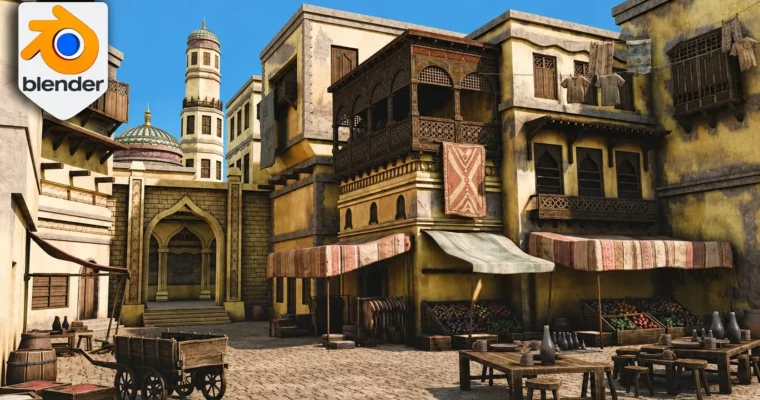
Build a complete stylized Arabian market in Blender, from blockout to final render, with architecture, props, materials, and lighting.
Build a complete stylized Arabian market in Blender, from blockout to final render. This course walks you through the full environment workflow: modeling architecture and props, applying materials and textures, dressing the scene, and setting up lighting for a polished final image.
🎯 What you’ll learn
Navigate Blender and use core modeling tools for environment creation.
Model Arabian-inspired architecture including arches, domes, towers, and decorative details.
Create market props like crates, barrels, rugs, and food displays.
Apply PBR materials, trim sheets, texture atlases, and vertex paint.
Dress a market environment with layered detail for a busy, lived-in feel.
Set up Cycles lighting, sky background, and final render settings.
✅ Requirements
Skills: Basic understanding of Blender’s interface and navigation.
Tools: A computer capable of running Blender and rendering with Cycles.
This course is for anyone who’s built a few decent assets in Blender but ended up with an empty scene that feels flat. It’s a full walkthrough from blockout to final render, showing you how to build a complete stylized Arabian market environment.
You’ll start with the basics: navigation, transforms, edit mode tools, and essential modifiers like bevels, arrays, and booleans. From there, you’ll model Arabian-inspired architecture—arches, domes, towers, balconies, and decorative wooden details. Then you’ll bring the market to life with props: crates, barrels, pots, rugs, food displays, and a wheelbarrow. Finally, you’ll work with PBR materials, trim sheets, vertex paint, and Cycles lighting to create a warm, stylized render.
Every lesson builds toward the same finished scene. You’re not just learning isolated techniques—you’re seeing how a real environment workflow develops from start to finish.
🧑🎓 Who this course is for
Beginner Blender users who want a guided project that ends with a complete scene.
Intermediate artists looking for a stronger start-to-finish environment workflow.
Portfolio builders who need a finished project showing modeling, materials, and lighting.
Detail-oriented artists who love filling a scene with props and set dressing.
🧑🏫 About the Author
3D Tudor is a Blender and game art education studio founded by Neil Bettison in 2019. Neil is a professional 3D artist and environment artist who has taught over 250,000 students worldwide. His courses focus on practical, project-based training for artists who want to build real 3D skills. He is also co-author of a #1 Amazon Best Seller in Rendering & Ray Tracing.
Marcus Rosefield is a self-taught 3D Environment Artist with over 6 years of industry experience. He specializes in creating stylized environments in Blender for video games and animations, with a focus on visual storytelling and attention to detail.
🏁 Final Result
A complete, render-ready stylized Arabian market environment with architecture, props, materials, and lighting.
A portfolio piece demonstrating modeling, composition, set dressing, and final presentation skills.
Curriculum
📋 Course content
Module 1: Foundations & Blockout
Lesson 1 – Master Blender Viewport Navigation & Camera Views6:54
Lesson 2 – Append Resources and Install Essential Add-ons3:33
Lesson 3 – Build Powerful Reference Boards with PureRef13:31




 Channel