Ad Clicks : Ad Views : Ad Clicks : Ad Views : Ad Clicks : Ad Views : Ad Clicks : Ad Views :
Oh Snap!

It looks like you're using an adblocker. Adblockers make us sad. We use ads to keep our content happy and free. If you like what we are doing please consider supporting us by whitelisting our website. You can report badly-behaved ads by clicking/tapping the nearby 'Advertisement' X text.

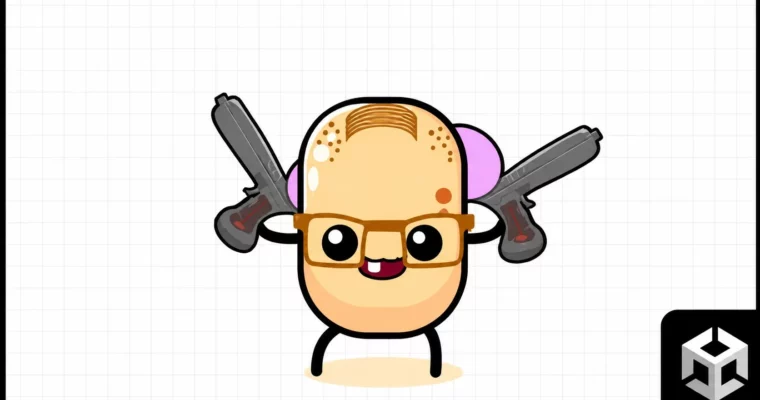
Unity 2D Game – Kawaii Survivor – The Coolest Roguelike Ever by Tabsil Makes Games

Unity 2D Game – Kawaii Survivor – The Coolest Roguelike Ever by Tabsil Makes Games

/

Author:Tabsil Makes Games

Duration:32.5 hours

Actual Duration:17h 3m

Release date:2025, September

Publisher:Udemy

Skill level:Intermediate

Language:English

Exercise files:Yes

Software:Unity

Course URL:https://www.udemy.com/course/unity-2d-game-kawaii-survivor-the-coolest-roguelike-ever

Build a complete 2D roguelike arena shooter in Unity, from core mechanics to polished UI and advanced code architecture.

Build a full 2D roguelike like Vampire Survivors or Brotato from scratch in Unity. This course walks you through everything: player movement, enemy AI, a modular inventory, wave systems, and a polished UI. You’ll also learn solid C# architecture with interfaces, scriptable objects, and clean code practices.

🎯 What you’ll learn

  • Create a complete 2D roguelike arena shooter in Unity
  • Implement a modular inventory and weapon merging system
  • Design complex user interfaces with sliding panels and scroll views
  • Apply SOLID principles and clean code architecture
  • Build a customizable wave system and enemy state machine
  • Polish the game with shaders, particles, camera shake, and haptics

✅ Requirements

  • Skills: Basic Unity and C# knowledge
  • Tools: Unity 2023.2 or higher, a code editor
  • Hardware: A computer capable of running Unity

📝 Description

This course is a full walkthrough for building a 2D roguelike arena shooter, similar to Vampire Survivors or Brotato. You’ll start by setting up source control with GitHub Desktop, then jump straight into creating the player character, Dave. From there, you’ll build enemies, weapons, and a loot system.

The real focus here is on clean code architecture. You’ll learn to use interfaces, scriptable objects, and SOLID principles to keep your project manageable. No more public variables everywhere. Instead, you’ll master private, protected, static, override, virtual, and abstract keywords. The course also covers a modular inventory system with weapon merging, a customizable wave system, and a complex UI with double sliding panels.

Polishing is a big part of the deal. You’ll add camera shake, haptic feedback, sound effects, particle systems, and even shader graphs for scrolling textures. There’s also a section on controller support and UI navigation, making the game playable on multiple platforms. By the end, you’ll have a complete, publishable game and a solid understanding of how to structure your next project.

🧑‍🎓 Who this course is for

  • Developers who want to build a complete roguelike game in Unity
  • Programmers looking to improve their C# architecture and coding practices
  • Anyone interested in creating complex user interfaces for games
  • Hobbyists who want to learn by building a real, polished project

🧑‍🏫 About the Author

Tabsil Makes Games is a game developer with over 8 years of experience in mobile game development. After earning a degree in Automotive Engineering and working at BMW, he switched to making games full-time. He has created over 25 courses on Udemy, teaching everything from Unity and C# to Blender and game optimization. His teaching style focuses on practical, hands-on projects with a strong emphasis on clean code and solid architecture.

🏁 Final Result

  • A fully playable 2D roguelike arena shooter with multiple weapons, enemies, and a boss
  • A modular inventory system with weapon merging and stat upgrades
  • A polished UI with menus, character selection, and settings
  • Source code and project files ready for reskinning and publishing
Curriculum

📋 Course content

  1. Module 1:  Getting Started & Player Setup
    • Course Presentation5:00
    • Starter Pack0:02
    • The Game Plan5:27
    • Setting Up Source Control4:28
    • Exploring The Starter Pack5:41
    • I present you, Dave (4:24 * Applying Physics to Dave10:13
    • Controlling Dave With a Joystick10:53
    • Appendix 01 – Mobile Joystick Setup5:28
    • Appendix 02 – Mobile Joystick Code7:58
    • Appendix 03 – Mobile Joystick Knob7:34
    • Appendix 04 – Mobile Joystick Polish6:50
    • Some Quick Explanations (2:)
    • Following Dave7:23
    • Clamping Camera Position8:39
    • Our First (Really Simple) Arena6:25
    • Sorting Layer & Order Explanations4:06
    • Using Unity’s Tilemap System5:41
    • Polishing our Arena4:04
    • Making the Arena More Interesting8:06
    • Advanced Sprite Sorting10:15
    • Built-in Sprite Sorting (Update)5:55
    • Appendix 05 – Fun 2D Colliders Experiment4:48
  2. Module 2:  Enemies & Combat
    • Refactoring the Player4:31
    • Building the Game Already5:18
    • Following the Player8:26
    • Getting Close Enough & Various Gizmos Tips8:00
    • Your First Particle System8:54
    • Playing the Enemy Pass Away Particles5:19
    • Adding a Spawn Indicator7:53
    • Using a Tweening Library7:44
    • Completing the Spawn Sequence3:48
    • We are under Attack !9:44
    • We All Love Refactoring ! (:43)
    • Basics of Player Health8:53
    • Adding a Health Bar7:54
    • Coding the Health Bar3:40
    • Adding a Text Overlay9:09
    • The First Weapon5:20
    • Aiming at Closest Enemy9:38
    • Using Physics to Detect Enemies5:54
    • Smoothing out Weapon Aiming8:17
    • Animating the Bad Way8:05
    • Animating the Good Way7:52
    • Destroying Enemies7:23
    • Dealing Damage To Enemies (how cute)8:13
    • A Better Attack10:55
    • Keeping Track of Attacked Enemies5:12
    • Auto Attack5:37
    • Quick Fixes4:49
  3. Module 3:  Particles & Bullets
    • The First Particle6:24
    • The First Particle Animation6:32
    • Spawning The Particles8:09
    • Linking Particles To Enemies7:59
    • Your First Pool8:46
    • Improvements10:31
    • Appendix 06 – Introduction to Actions6:07
    • Appendix 07 – Actions with Arguments3:01
    • Appendix 08 – Decoupling Scripts5:19
    • Appendix 09 – Additional Information on Actions0:07
    • The Process5:03
    • The Bad way to Implement it7:51
    • A Better Way to Implement it9:21
    • Shooting Bullets Logic12:34
    • Shooting Bullets8:09
    • Bullet / Player Interaction4:41
    • A Better Bullet Management5:14
    • Adding Pooling To Enemy Bullets13:07
    • Merging our Enemies8:16
    • Reshaping our Methods9:08
    • Enemy Wrap Up6:27
    • Attacking the Range Enemy2:00
    • The First Steps18:51
    • Range Weapon is Working !6:48
    • Pooling Range Weapon Bullets8:51
    • Attack Filtering for the Bullets2:58
    • Appendix 10 – LayerMask Explanation10:17
  4. Module 4:  Loot & Leveling
    • How to Add these ?6:33
    • Changing Particle Color6:45
    • Enemies Drop Candies7:41
    • An Intuitive Way to Collect Candies6:47
    • 2 Ways To Detect Candy4:51
    • Candy Follows Dave7:13
    • Adding Cash4:39
    • Interfaces for a Cleaner Codebase7:08
    • Who needs a Pool ?16:25
    • Fixing our Pool…1:51
    • Let’s Add Chests !11:18
    • Dave can now Level Up10:29
    • Building & Testing2:15
  5. Module 5:  Wave System & Core Loop
    • Introduction5:25
    • Adding Segments4:08
    • The First Wave12:41
    • Limiting the Spawn Area8:13
    • Adding More Segments3:41
    • Managing Multiple Waves5:42
    • The Wave Index1:41
    • Adding a bit of UI7:59
    • The GameManager Singleton4:28
    • What Panel To Show Next ?6:43
    • An Interface For Game States8:41
    • We Have a Menu !7:25
    • A Basic Core Loop7:13
    • Refactoring the UI Manager6:23
    • Finalizing the Core Loop10:24
  6. Module 6:  Player Stats & Upgrades
    • Some Explanations7:17
    • The Player Stats4:44
    • Formatting the Stat Name2:54
    • Why do we need Dynamic Button Callbacks ?3:53
    • The Upgrade Container9:40
    • We Configure the Dynamic Button Callback6:50
    • Setting Up the Stat Upgrades9:21
    • Completing the Loop3:49
    • Improving Player Stats7:14
    • Your Own Structure Operators7:17
    • IPlayerStatsDependency, another Interface4:09
    • The Max Health Stat6:26
    • Our First Scriptable Object6:29
    • Closing the Loop for the Max Health6:46
    • The Move Speed Stat12:31
    • Armor & Life Steal Stats11:02
    • The Dodge Stat6:45
    • Fixing Some Bugs6:28
    • Adding Health Recovery5:47
    • Adding a Basic Attack Stat11:36
    • Adding Weapon Levels8:19
    • Adding All Weapon Stats11:56
  7. Module 7:  Weapon Selection & Inventory UI
    • The Weapon Selection Manager6:54
    • The Weapon Selection Container6:43
    • Adding Visual Feedback7:11
    • Coloring Depending on Weapon Level5:15
    • Creating Color Palettes7:31
    • Passing Data to the Player7:56
    • The Weapon Position8:28
    • Giving Weapons to the Player8:19
    • The Weapon Selection UI8:53
    • Become a Layout Master6:56
    • The Stat Containers Layout7:16
    • Creating the Stat Containers11:20
    • The Resources Manager11:19
    • The Stat Container Manager6:41
    • Our Texts are so Clean8:26
    • The Weapon Stats Calculator7:19
    • Fixing some Biggy Buggy Bugz4:33
    • Refactor & Commit12:48
  8. Module 8:  Object System & Advanced UI
    • The ObjectData Scriptable Object8:29
    • Managing the new Objects11:32
    • Chest Collected Callback6:42
    • A Container for our Object9:14
    • Configuring the Container11:35
    • Giving the Object to the Player11:06
    • We Can now Recycle Objects6:57
    • The Base Elements14:10
    • Improving the UI8:37
    • Displaying our Player Stats6:22
    • Adding Logic to the Player Stats12:06
    • Coloring the Stat Texts7:22
    • Updating the Currency Texts6:22
    • Another UI, Again19:26
    • Spawning Weapon Containers4:21
    • Spawning Object Containers Too4:22
    • We Configure the Object Container10:43
    • Onto the Weapon Container Now4:19
    • The Lock Button4:36
    • We can now Lock Items6:13
    • Reroll !9:02
    • Adding Weapons to the Player13:36
    • The Logic Behind Purchasing5:23
    • Purchasing Objects3:13
    • Player Stats Setup16:03
    • Player Stats Panel Slides !9:36
    • The Inventory Also Slides7:56
    • Item Info Setup7:18
    • Double Sliding Panels, Finally11:35
  9. Module 9:  Inventory Management & Merging
    • Setting Up our User Interface6:40
    • Instantiate a Container11:34
    • Actions as Arguments ?5:52
    • Another Way to Detect Clicks6:29
    • We Configure the Item Info12:25
    • Recycling Objects13:27
    • Recycling Weapons16:40
    • Merge Button Interactability9:52
    • Finally Merging Weapons9:42
  10. Module 10:  Menus & Persistence
    • Pause Panel UI7:43
    • Displaying the Pause Panel9:50
    • Restart Confirmation Panel11:25
    • Pause Inventory5:47
    • Gameover Panel4:23
    • Menu Panel6:05
    • Adding our Premium Currency9:45
    • Saving with Player Prefs5:49
    • Saving with Sijil5:32
    • A bit of UI12:44
    • The Character Scroll View11:29
    • Controlling the Center Image8:09
    • The Info Panel9:00
    • Purchasing a Character6:53
    • Updating Visuals6:35
    • Saving Character States4:35
    • Saving the Last Selected Character7:43
    • Quick Fixes1:12
  11. Module 11:  Settings & Polish
    • Settings Panel UI7:58
    • SFX Button7:09
    • Music & Privacy Policy6:47
    • Help & Support4:33
    • Credits8:07
    • Bumpy Buttons13:28
    • Scale & Rotate4:53
    • Hop On Tap5:22
    • Camera Shake10:22
    • Haptic Feedback6:28
    • Weapon Attack Sound12:11
    • Muting Sounds6:05
    • Animating Dave11:25
    • Enemy Animation3:13
    • Adding More Weapons12:31
    • Animator Overrides8:06
    • Vegetation Shader 1/27:07
    • Vegetation Shader 2/210:17
    • Scrolling Texture Shader 1/29:26
    • Scrolling Texture Shader 2/27:31
  12. Module 12:  Boss & Advanced Features
    • Creating Zoomby7:23
    • Spawning Zoomby5:38
    • Zoomby Health Bar9:07
    • The State Machine11:55
    • Zoomby Attacks18:24
    • Dropping a Chest6:11
    • A Specific Bullet7:57
    • Constants2:30
    • Infinite Map23:29
    • Using Cinemachine10:46
    • The Old Method6:48
    • Hiding the Player Joystick4:57
    • The New Method5:43
    • Controlling Dave, Again3:58
    • Controller Support2:57
    • Quick Improvements2:38
  13. Module 13:  UI Navigation & Controller Support
    • UI Navigation – Theory4:57
    • A script for all our Buttons8:16
    • The UI Selector18:19
    • Managing Settings & Character Selection6:59
    • Pause panel11:21
    • Adding More Actions6:38
    • The Lock Button3:58
    • Reroll & After Purchasing an Item6:13
    • The Inventory9:32
    • The Player Stats8:41
    • The Inventory Item Info10:02
    • Scroll View & Wave Transition9:21
    • Virtual Mouse with the Joystick16:48
  14. Module 14:  Wrap Up
    • Project Files0:06
    • Bonus Lecture0:12
Watch online or Download for Free
Unity 2D Game – Kawaii Survivor – The Coolest Roguelike Ever by Tabsil Makes Games
NAME
SIZEDURATION
1. Introduction
23.8 MB5m
4. Camera Control
16.9 MB18m
6. Refactoring & Building The Game
9.8 MB9m
12. A Proper Refactoring Method
33.4 MB25m
14. Critical Hits
14.4 MB13m
16. Player XP
12.3 MB12m
21. The Weapon Stats
34.4 MB31m
25. Bonus Section
1.2 MB0m

Download all Videos (142)
1.1 GB17h 3m


Download all

Join us on
  Channel    and      Group

Leave a Comment

Your email address will not be published. Required fields are marked *