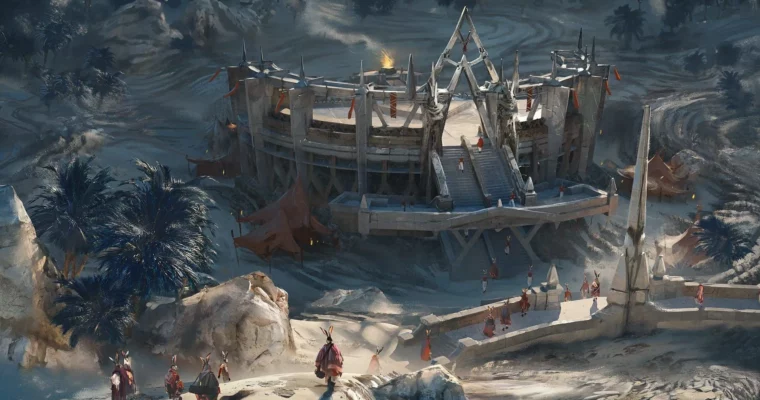
World Building using Blender & Photoshop Story Development & Creative Workflow by Tiago Sousa

Duration:2h 6m 46s
Actual Duration:2h 6m
Release date:2025
Publisher:Gnomon
Skill level:Beginner
Language:English
Exercise files:Yes
Software:Blender, Photoshop
Course URL:https://www.thegnomonworkshop.com/workshops/world-building-using-blender-photoshop
Learn how to create an entire world foundation using a straightforward creative process. In this two-hour workshop, Tiago Sousa presents his full workflow, from story conception to final environment. You’ll end up with not just one final scene, but a strong base you can keep developing. The world you create becomes a source of never-ending inspiration, even when you’re feeling less motivated.
🎯 What you’ll learn
- Develop story concepts and document essential narrative elements systematically.
- Research, gather, and organize visual references for consistent world development.
- Create initial sketches and test ideas using fundamental Blender tools.
- Utilize strategic camera angles and lighting to bring environments to life.
- Generate multiple renders that effectively showcase your created world.
- Enhance scenes in Photoshop using painting and photo-bashing techniques.
- Polish final compositions for professional portfolio presentation.
✅ Requirements
- Skills: Basic understanding of 3D space and familiarity with Blender and Photoshop UI.
- Tools: 3-button mouse, drawing tablet.
- Hardware: Minimum 16GB RAM, dedicated GPU.
📝 Description
This workshop is built around a simple idea: start with a story, not a render. Tiago Sousa walks you through his entire creative pipeline, showing how to turn a vague concept into a fully realized world.
First, you’ll learn how to write down the main elements of a story and organize essential references. Then, it’s into Blender for quick 3D sketching. Tiago shows how to test camera angles, lighting, and composition using basic geometry. The goal here is speed and exploration, not polish. You’ll generate several renders to see your world come to life from different angles.
The final stage happens in Photoshop. Tiago shares his techniques for painting, photo-bashing, and polishing a chosen scene. He focuses on removing the “3D look” by selectively adding crispness only to focal points, creating a painterly quality. The workshop includes his full Blender file with all assets and cameras, plus the layered Photoshop file so you can study every adjustment.
🧑🎓 Who this course is for
- Beginner and intermediate artists looking to strengthen their world-building and environment design skills.
- Digital artists, concept designers, and 3D generalists who want a systematic approach to creating cohesive fictional worlds.
- Portfolio developers and creative professionals who need to demonstrate storytelling abilities through visual work.
🧑🏫 About the Author
Tiago Sousa is a concept artist and illustrator based in Quebec City, Canada, with over two decades of experience. He began his professional career in Brazil in 2017, working at a VFX company in São Paulo before joining INSANE Game Studio on the MMORPG Profane. Since then, he has contributed to major titles including Spider-Man 2, Last Epoch, Dragon Age: Inquisition, and Diablo Immortal. He currently works as a concept artist at the visual development studio Volta.
🏁 Final Result
- A fully developed world foundation with enough material to produce several cohesive renders for your portfolio.
- A final polished concept art scene combining 3D blocking, digital painting, and photo-bashing techniques.
 Channel