Ad Clicks : Ad Views : Ad Clicks : Ad Views : Ad Clicks : Ad Views : Ad Clicks : Ad Views :
Oh Snap!

It looks like you're using an adblocker. Adblockers make us sad. We use ads to keep our content happy and free. If you like what we are doing please consider supporting us by whitelisting our website. You can report badly-behaved ads by clicking/tapping the nearby 'Advertisement' X text.

Make a Mario Kart style racing game in Unity 6 by Pete Jepson

Make a Mario Kart style racing game in Unity 6 by Pete Jepson

/

Author:Pete Jepson

Duration:7.5 hours on-demand video

Release date:2025, May

Publisher:Udemy

Skill level:Beginner

Language:English

Exercise files:Yes

Software:Unity 6

Course URL:https://www.udemy.com/course/make-a-mario-kart-style-racing-game-in-unity-6

Learn to build a complete, fun racing game in Unity 6, complete with custom controls, AI opponents, and multiplayer.

Ready to build your own arcade racer? This course walks you through creating a complete Mario Kart-style game using Unity 6. You’ll go from zero to a portfolio-ready project, learning game design principles and coding along the way.

🎯 What you’ll learn

  • Master Unity 6
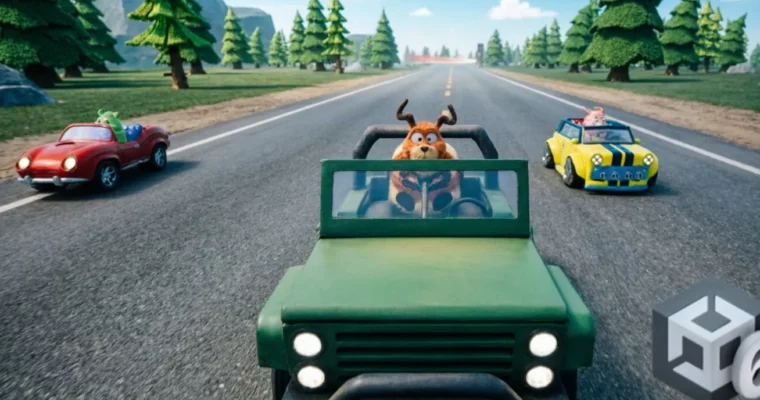
  • Create a Mario Kart style racing game
  • Write your own car controller scripts
  • Create a complete game
  • Learn level design

✅ Requirements

  • Hardware: You will need a computer capable of running Unity 6
  • Skills: No game design or coding experience needed as I take you through it step by step

📝 Description

Welcome to my new course where we will be Making a Mario Kart style racing game in Unity 6. I will take you step by step through the process of creating a complete game from start to finish.

This course is aimed at a Beginner to Intermediate level of coding. We write our own code throughout the game and look in detail at writing code specifically for racing cars and karts. This also covers computer-controlled AI karts that challenge you to a competitive race.

The course features three cartoony race tracks. The first track we create ourselves from scratch, covering track design using Unity splines. Asset layout and animated obstacles. The karts have special items such as boxing gloves so you can punch the opponents out of the way when they are too close. Missiles so you can blow up karts that are up ahead of you. Cartoon bombs that can blow up karts behind you and oil splats that will cause opponents to spin out and lose control.

We use the Unity Input System, so you can control the kart using keyboard and mouse, or gamepad. We create a local multiplayer mode for 2, 3 or 4 local players. Note that this isn’t online multiplayer, but local multiplayer where up to 4 players can use the same computer to race against each other.

By the end of this course you will have developed skills and knowledge to make your own awesome driving games and have a completed game for your portfolio of work. The end product is yours and you can share it with friends or even upload online. You don’t need any previous game design experience as I take you through it step by step. You can of course continue to add your own ideas, tracks, cars and assets to this project. If you get stuck just drop me a message in the Q & A section and I’ll help you get everything sorted. Why not enrol today and I look forward to seeing you in the course.

🧑‍🎓 Who this course is for:

  • People wanting to make their own games in Unity 6
  • Those with a passion for game design
  • Individuals interested in level design and coding

🧑‍🏫 About the Author

Pete Jepson is a qualified teacher with over 12 years of experience teaching game design. He has been using Unity since 2013 and has created numerous courses on game development and animation. With a large student base from around the world, Pete is dedicated to helping learners succeed and is always available for questions.

🏁 Final Result

  • A complete, playable Mario Kart-style racing game with custom controls, special items, AI opponents, and local multiplayer, ready for your portfolio.
Curriculum

📋 Course content

  1. Introduction
    • Introduction1:42
    • Course structure1:50
    • Create a project2:03
    • Download project assets0:15
  2. Input Actions
    • Input actions5:03
  3. Kart Controller
    • Kart structure3:11
    • Input Script4:00
    • Drive forward8:06
    • Steering2:00
    • Suspension and brake assist6:07
    • Flying in the air4:20
    • Reverse2:50
    • Kart reset1:47
    • Kart sounds7:51
    • Brake to a stop6:53
    • Brake lights1:29
    • Drifting8:43
    • Setting gears9:42
  4. Race Track
    • Create a race track5:49
    • Export the track2:01
    • Create track material3:47
    • Creating blocker colliders4:57
    • Add fences7:01
    • Blockers physics4:36
    • Adding obstacles7:08
    • Log stomper6:32
    • Add stumps3:16
    • Adding trees8:00
    • Add rocks3:57
    • Bake a lightmap9:35
  5. Environment and Effects
    • Add a character4:18
    • Player light2:45
    • Post Processing2:40
    • Obstacle sound4:12
    • Stomper smoke3:55
    • Animation and sound4:01
    • Kart splat4:08
    • Animate totem poles6:24
    • Totem pole explosion6:12
  6. AI Opponents
    • AI NavMesh7:13
    • AI waypoints2:18
    • AI control script5:13
    • AI kart audio4:19
    • AI obstacle sounds2:47
    • Kart spin out4:49
  7. Race Progression
    • Create progress points3:38
    • Progress points AI speed6:59
    • Stop the kart when hit2:01
  8. Special Items
    • Special items inputs1:49
    • Boxing gloves5:49
    • Missiles6:43
    • Missile sounds3:12
    • Cartoon bomb5:52
    • Spawn cartoon bomb2:54
    • Reverse camera3:36
    • Oil splat5:39
    • AI special items6:22
    • AI items spawn points2:50
  9. AI Navigation and Karts
    • Modify the NavMesh2:46
    • Multiple AI karts3:29
  10. User Interface (UI)
    • UI map6:00
    • Player marker3:50
    • AI marker1:38
    • Speed UI2:57
    • Start banner1:16
    • Progress amounts4:27
    • Display position2:40
    • Prevent going the wrong way3:00
    • Stop the kart when hitting obstacles1:01
    • Lap display4:39
    • AI random spawn1:17
    • Special items display2:10
    • Special items amounts6:55
    • Race start text4:13
  11. Game Flow and Menus
    • Timeline sequence5:13
    • Start countdown6:50
    • Finish line1:56
    • Display the winner6:51
    • Small adjustments2:35
    • Create a main menu4:33
    • Kart choose menu5:57
    • Menu script8:42
    • Kart display4:16
    • Player choose button1:53
    • Other player prefabs4:38
    • Track select menu10:25
    • Load scene buttons5:45
    • Raw image3:06
    • Loading text2:18
    • Race start script1:38
    • Setup AI karts4:39
    • AI tags4:37
    • AI tags script3:31
    • Add a pause menu6:27
    • Back to menu2:19
    • Setup track 26:03
    • Multiplayer menu2:08
    • Multiplayer script5:49
    • Multiplayer spawn2:25
    • Player input manager1:58
    • Camera override5:10
    • Changing player tags4:05
    • Fixing the 3 player issue3:45
    • Multiplayer position display1:42
    • Reset public statics2:46
    • Export the game2:21
    • Course Completion0:33
Watch online or Download for Free
Make a Mario Kart style racing game in Unity 6 by Pete Jepson
NAME
SIZEDURATION
3 – Post Processing
231 MB


Join us on
  Channel    and      Group

Leave a Comment

Your email address will not be published. Required fields are marked *